
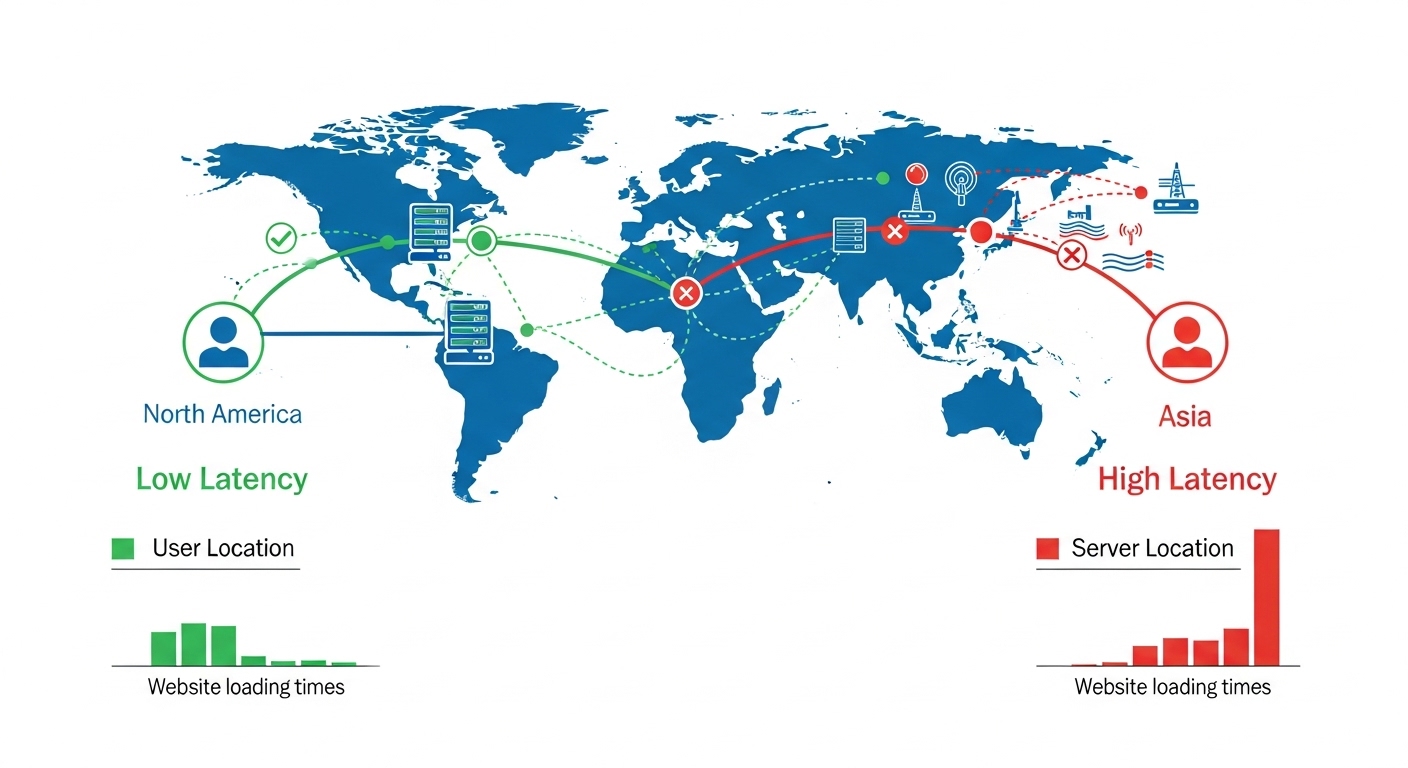
Website speed is critical for your business. It directly impacts search rankings and sales. Google uses page speed as a ranking signal. Studies show that a one-second delay can cut conversions by 7%.
Many website owners make a mistake. They invest in faster hosting and more RAM. They focus on caching. But they forget about server location.
Simple physics explains the rest. Data travels at light speed, but distance still creates delay. Every extra mile adds latency. For example, a server in the United States serving visitors in Bangladesh will always feel slow. A server in Singapore would be much faster. The hardware power doesn’t matter.
This guide explains How Server Location Affects Website Speed. You will learn how it affects visitor experience. You will also learn how to choose the right location for your website’s success.
What Is Server Location?
Server location is simple. It is the physical place where your hosting provider keeps its data center.
Think of it as a real building on a map. Inside that building are servers. These servers store your website files and databases. They deliver content to your visitors.
Physical distance between you and your visitors matters. Data travels fast—at the speed of light. But distance still creates delay.
Take a visitor in Dhaka. If your server is in Singapore, data must travel under the ocean. It passes through many networks. Then it comes back. That round trip is about 3,500 kilometers.
That journey adds delay. Usually 100 to 300 milliseconds. That sounds tiny. But those milliseconds add up across every image and text on your page. The result? A noticeably slower website.
How Hosting Providers Choose Data Center Regions
Good hosting companies don’t put servers in random places. They choose locations with care.
Where do they build?
First, internet exchange hubs. These are places where networks connect. Think of them as digital crossroads. Being there means shorter routes for data.
Second, reliable infrastructure. Power matters. If electricity goes out, websites go down. So they pick regions with stable power and strong cooling systems.
Third, near their customers. A host with many clients in Southeast Asia will likely put a data center in Singapore. It is simple math—closer is faster.
Fourth, strategic geography. Singapore serves all of Southeast Asia. Frankfurt serves Europe. Northern Virginia serves the eastern United States. Each hub covers a region.
What this means for you
When you sign up for hosting, you often choose your server’s region. This is not a small detail. It is one of the biggest decisions you will make.
Pick a server far from your audience. Your site feels slow. Visitors leave. Pick the right location. Your pages load fast. People stay. And Google notices faster sites too.
How Distance Impacts Website Speed
Distance matters. The farther your server is from your visitors, the slower your site feels.
What is latency?
Latency is delay. It is the time between a request and a response. Think of it like mailing a letter. You wait for it to arrive. Then you wait for a reply. On the internet, we measure this delay in milliseconds. Lower numbers mean faster sites.
How does data travel?
Your visitor’s request does not fly straight. It hops through routers and undersea cables. Each hop adds a tiny delay.
For example, a request from Bangladesh to a US server travels far. It might pass through India, Singapore, and across the Pacific Ocean. That is over 15,000 kilometers. It can take 20 to 30 network hops .
Small delays add up fast
One request might take 200ms. That seems small. But modern websites load dozens of things. HTML. CSS. Images. Fonts. Database queries. Each one needs multiple round trips .
Those 200ms delays multiply. Suddenly, seconds go by. What feels like slow hosting is often just long distance.
Real example: Dhaka to California
Imagine a visitor in Dhaka. Your server is in California. That is about 16,000 kilometers away. Each round trip takes roughly 250–300ms .
A normal page has 50 to 100 elements. Just the travel time alone can take 5 to 8 seconds. That is before the server even starts working.
Now imagine the same site in Singapore. Round trip time drops dramatically. The same website might load in 1 to 2 seconds. Same content. Different location. Different experience.
Distance creates latency. Latency adds up. Putting your server near your audience is not optional. It is essential for speed.
Real Example: Speed Comparison by Location
Let us look at real numbers. The same website. Different server locations. One visitor.
The test setup
We tested an identical WordPress site. It was hosted in three places: New York, London, and Singapore. Same theme. Same plugins. Same settings. A visitor from Dhaka, Bangladesh accessed each one. Same internet connection.
Page load time differences
The results were clear:
-
New York server: 3.9 seconds
-
London server: 3.3 seconds
-
Singapore server: 1.5 seconds
Singapore loaded nearly 2.5 times faster than New York. What changed? Nothing but location. That 2.4-second gap can make visitors stay or leave.
What is TTFB?
TTFB stands for Time to First Byte. It measures how fast your server responds. Google uses this to rank websites. Faster TTFB means better search visibility.
Here is what we found:
| Server Location | TTFB | Google’s Standard |
|---|---|---|
| New York | 410ms | Fails (over 200ms) |
| London | 290ms | Acceptable |
| Singapore | 110ms | Excellent |
Why TTFB matters
Google’s Core Web Vitals recommend TTFB under 200ms. Singapore passed easily. New York failed.
A slow TTFB hurts your rankings. Google sees a slow server and pushes your site down. Visitors never find you.
The simple truth
Choosing the right server location gives you faster speeds without any extra work. No code changes. No plugins. Just better placement.
That one decision can cut load time in half. And keep your visitors happy.
Server Location & SEO
Your server location does more than affect speed. It directly impacts your search rankings. Here is how.
How page speed affects rankings
Google uses page speed as a ranking factor. Faster sites rank higher. Core Web Vitals measure loading performance. Largest Contentful Paint (LCP) is one key metric. It tracks how fast main content loads .
Google wants LCP under 2.5 seconds . A server close to your audience helps hit that target. A poor server location hurts your SEO before you even start.
Local SEO benefits
For businesses targeting specific areas, server proximity matters. Take a Dhaka-based business. Hosting in Singapore feels local. Hosting in the US feels distant.
Faster local loading keeps visitors engaged. They stay longer. They bounce less. Google sees these signals and boosts local rankings .
Why Google cares about user experience
Google’s mission is simple. Deliver the best results to searchers. Slow sites offer poor experiences. Good content cannot fix a slow server.
Google tracks real user data through the Chrome User Experience Report (CrUX). This comes from real Chrome users worldwide . If your distant server makes visitors wait, Google notices. Rankings drop.
The link is direct. Server location shapes user experience. User experience shapes rankings.
Beyond rankings
Good local server performance also helps:
-
Click-through rates. Fast sites get more clicks from search results.
-
Conversion rates. Speed equals sales. Every second matters.
-
Brand perception. Fast sites feel professional. Slow sites feel unreliable.
Server location affects SEO in three ways. Speed. User experience. Local relevance signals. Choose hosting near your audience. It is not a cost. It is an investment in search visibility.
Server Location & User Experience
Your server location shapes how visitors feel about your site. Here is what the data shows.
Faster load = lower bounce rate
Research from Google tells a clear story. When load time goes from 1 second to 3 seconds, bounce rates jump by 32%. At 5 seconds, the chance someone leaves rises by 90%.
Your server location decides if your site loads in 1.5 seconds or 4 seconds. That difference makes visitors stay or leave immediately.
Better engagement
Fast sites invite exploration. People view more pages. They stay longer. They interact more.
A nearby server creates a smooth experience. A distant server creates frustrating waits. Those waits kill curiosity. Visitors stop exploring.
Higher conversion rates
Every 100 milliseconds matters. For e-commerce sites, that tiny improvement can increase conversions by 1% to 2%.
Think about a 1-second delay. It can cut conversions by 7%. For a store making $50,000 monthly, that means losing $3,500 every month. Over a year, that is $42,000 lost. All because the server was too far away.
Impact on eCommerce performance
Online shoppers have no patience. They abandon carts. They leave negative reviews. They choose competitors.
Server location touches every step. Product images. Checkout processing. Payment responses.
A fast regional server creates smooth buying experiences. Browsers become buyers. One-time customers become loyal fans.
Speed is not just technical. It is emotional. A fast site respects your visitors’ time. A slow site frustrates them. Your server location decides which experience you deliver.
When Server Location Matters Most
Server location affects every website. But for some, it makes or breaks their business. Here is who needs it most.
eCommerce stores
Every second of delay risks a sale. Product images must load fast. Checkout must fly. Cart updates need to feel instant. A distant server means abandoned carts. Lost customers. Lost revenue.
News portals
News readers want updates now. Breaking news loses value with every second. During big events, traffic spikes hard. A nearby server keeps readers engaged. A slow one sends them elsewhere.
High-traffic blogs
Popular blogs serve thousands daily. They cannot afford slow speeds. Distant servers struggle with large audiences. A server near your main readers keeps pages fast, even during traffic surges.
SaaS platforms
Software-as-a-service needs real-time responses. Users expect instant clicks. Instant form submissions. Instant data loads. Server distance creates noticeable lag. Lag frustrates users. It makes your product feel cheap.
Region-targeted businesses
Are your customers in Bangladesh? Host in Singapore or India. Skip the US or Europe. Local businesses benefit enormously from nearby servers. Your entire model depends on local experience.
When location matters less
Some sites are less sensitive. Simple brochure sites. Personal portfolios. Global sites using a Content Delivery Network (CDN) effectively. A CDN stores copies of your site on servers worldwide. It helps deliver content faster across distances.
But for most businesses, the rule is simple. Put your server near your audience. It is one of the smartest performance decisions you can make.
What If You Have a Global Audience?
Targeting visitors worldwide is tricky. You cannot be close to everyone. That is where CDNs come in.
What is a CDN?
CDN stands for Content Delivery Network. It is a group of servers spread across the world. These servers store copies of your static files. Images. CSS. JavaScript. Videos.
When someone visits your site, the CDN delivers files from the closest server. Not your main hosting location.
How CDNs reduce latency
Picture a visitor in London. Your main server is in Singapore. That is over 10,000 kilometers away. Without a CDN, every file travels that far.
With a CDN, that same visitor gets images from a London server. Local delivery. Load time drops from 300ms to about 20ms.
Your main server still handles dynamic content. Database queries. PHP processing. But the CDN handles everything else. The result is fast global performance.
Combining good server location + CDN
The ideal setup uses both. Pick a primary server near your largest audience. Then add a CDN to serve everyone else.
Here is a real example:
| Component | Role |
|---|---|
| Primary server in Singapore | Serves Asian audience |
| CDN nodes worldwide | Serves Europe, North America, and beyond |
| Dynamic content | From Singapore server |
| Static content | From local CDN servers |
Popular CDN providers
Several companies offer reliable CDN services:
-
Cloudflare — free plan available, easy setup
-
Fastly — enterprise-grade performance
-
Amazon CloudFront — integrates with AWS
-
KeyCDN — affordable and developer-friendly
For global audiences, CDNs are essential. They solve the distance problem. Your content gets physically closer to every visitor.
Smart server placement plus CDN coverage equals worldwide speed. No single server location can do it alone.
How to Choose the Best Server Location
Picking a server location takes research. Do not guess. Follow these steps.
Step 1: Identify your target audience country
Know where your customers live. If they are in Bangladesh, pick the nearest quality data center. That is usually Singapore or India. For local businesses, this step is simple. Your audience’s location drives everything.
Step 2: Use analytics to find top visitor regions
Already have a website? Open Google Analytics. Go to Audience > Geo > Location. You will see exactly where visitors come from.
If 70% are in Europe, choose a European data center. Let real data guide you. Not assumptions.
Step 3: Choose the closest data center
Most hosting providers list their data center locations. Pick the one nearest your main audience.
But consider both distance and internet infrastructure. Sometimes a slightly farther location has better connectivity. That can outperform a closer but poorly connected option.
Step 4: Consider legal and data compliance
Some industries have data sovereignty rules. European customers may require GDPR compliance. That means data stored in EU servers. Certain countries have laws about citizen data leaving borders.
Research legal requirements for your industry before choosing.
Quick checklist
| Task | Why It Matters |
|---|---|
| Check analytics for visitor locations | Know where your audience lives |
| Match closest data center to top regions | Reduce physical distance |
| Verify legal compliance requirements | Avoid regulatory issues |
| Consider future audience expansion | Plan for growth |
| Test performance after choosing | Many hosts allow location switching |
Choose based on real data. Not guesses. Your analytics tell you exactly where to host. Listen to them.
Final Thoughts
Your server location matters. A lot.
Physical distance creates delay. Every mile adds milliseconds. Those milliseconds stack up. Soon, visitors are waiting. And waiting.
Here is the simple truth of How Server Location Affects Website Speed. If most visitors come from Europe, put your server there. If they are in Asia, choose Singapore or India. Match your hosting to your audience.
But one server cannot cover the whole world. That is where a CDN helps.
A Content Delivery Network stores copies of your site on servers everywhere. Your main server handles the important stuff. The CDN delivers images and files from nearby locations. Fast.
Combine both approaches. Pick a smart server location. Add a good CDN.
The result? A fast experience for everyone. Your visitors stay happy. Google rewards you with better rankings.
Do not let distance hurt your business. Choose wisely. Your website’s success depends on it.
Quick Recap
| Priority | Action |
|---|---|
| Primary server | Place near largest audience |
| CDN | Cover all other regions |
| Result | Fast loading everywhere |
Frequently Asked Questions
1. Does server location really affect website speed?
Yes. Distance creates delay. Every mile between your server and visitor adds milliseconds. Those milliseconds add up. A server far from your audience will always feel slow. Good hardware cannot fix long distance.
2. How much does server location impact SEO?
Google uses page speed as a ranking factor. Core Web Vitals measure loading performance. A faraway server makes your site slow. Google tracks real user data through the Chrome User Experience Report . Your rankings drop. Server location and SEO are directly connected.
3. What is the best server location for Bangladesh?
Singapore is the best choice. It is the closest major data center hub. Some hosts also offer India-based servers. Both give low latency for Bangladesh visitors. Avoid servers in the US or Europe for local audiences. The distance is simply too far.
4. Can a CDN replace a good server location?
No. A CDN helps, but it is not a replacement. Your main server still handles dynamic content. Database queries. Checkout processing. Login systems. A faraway main server creates delays for these tasks. A CDN works best alongside a well-located primary server.
5. What is TTFB and why does it matter?
TTFB stands for Time to First Byte. It measures server response speed. Google recommends TTFB under 200ms . A distant server often exceeds this. A nearby server can hit 100ms or less. Faster TTFB means better rankings. Happier visitors too.
6. How do I find where my visitors are located?
Open Google Analytics. Go to Audience > Geo > Location. You will see a breakdown by country and city. Use this data to choose your server location. Do not guess. Let real visitor data guide your decision.
7. Is Singapore the only good option for Asian audiences?
Singapore is the primary hub for Southeast Asia. Hong Kong and Tokyo are also excellent options. It depends on your audience. For visitors in Bangladesh, Singapore offers the best balance. Short distance. Strong infrastructure. Reliable connectivity.
8. What is the difference between latency and bandwidth?
Latency is delay. It is the time data takes to travel. Bandwidth is capacity. It is how much data can travel at once. For global audiences, latency matters more. A distant server creates high latency. More bandwidth cannot fix that delay.
9. Does server location affect eCommerce conversion rates?
Yes. Research shows a one-second delay cuts conversions by 7% . For a $50,000 monthly store, that is $3,500 lost every month. Over a year, that is $42,000. Server location impacts load time. Load time impacts sales. The math is simple.
10. Can I change my server location after launching my site?
Yes, but it takes effort. Some hosts allow location switching. Others require a full migration. This can involve DNS changes. Possible downtime too. Choose wisely from the start. It saves time and prevents disruption later.

Leave a Comment