When you pick a host, performance is everything. A slow host ruins your business. But what should you actually look for? Three things matter most. Speed. Uptime. And load times.
Speed is how fast your host sends data to a visitor. Uptime is how often your server stays online. Load time is how quickly your full web page appears on screen. Google says the best load time is one to two seconds. Anything slower, and visitors leave. Research shows a one second delay can cut conversions by 20 percent.
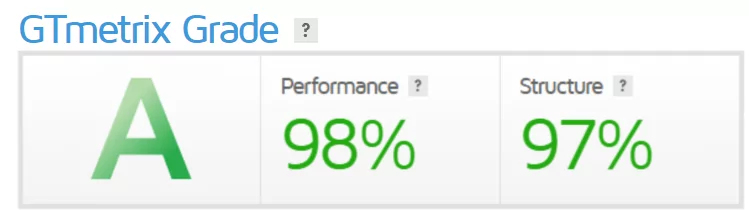
So how does Ultahost perform? I tested them on GTmetrix, a trusted speed tool. Running Ultahost.com through the test gave me a 98 percent performance score. That is well above average. Most hosts score between 70 and 85 percent. Their response time was also excellent.
To be fair, testing the main domain is not perfect. A real website hosted on Ultahost would give better results. I asked their support agents for a test site. They could not provide one. Still, a 98 percent score is strong. It shows their servers are fast and reliable.
If speed and uptime matter to you, Ultahost passes the test.
Uptime is not the same as overall performance. They are two different things. Also, fully loaded time depends heavily on your website design and structure. A clean, simple site loads faster. A heavy, image packed site loads slower. The provider promises a 99.9 percent uptime. That has become the standard across the hosting industry. Most top hosts offer the same guarantee.
UltaHost Data Center
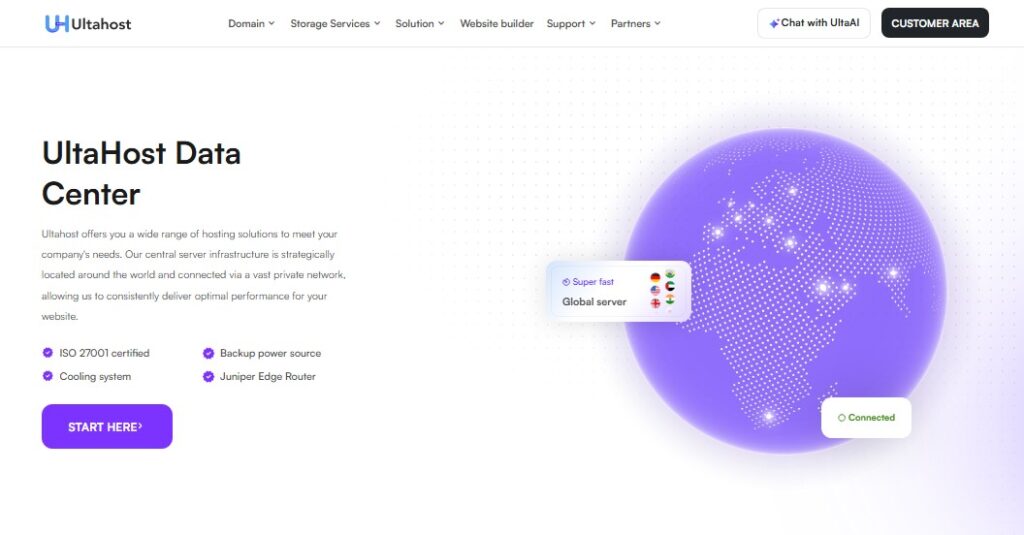
UltaHost gives you many hosting solutions for your business needs. Their server network is spread across the globe. All data centers connect through a private high speed network. This helps your website load fast no matter where your visitors live.
Every UltaHost data center meets strict security standards. They are ISO 27001 certified. Each location has backup power sources to prevent outages. Advanced cooling systems keep servers running smoothly. They use Juniper Edge Routers for fast and reliable network traffic.
UltaHost also uses NVMe SSD storage. These drives are up to twenty times faster than traditional hard drives. Your website loads quickly. Pages appear in seconds. Visitors stay happy.
UltaHost operates data centers across six continents and twenty countries. You can choose server locations in Europe, North America, South America, Asia, the Middle East and Africa, and Australia. European locations include London, Frankfurt, Amsterdam, Paris, Milan, Madrid, Zurich, Oslo, Stockholm, Warsaw, and Istanbul. North American locations include Seattle, Los Angeles, Dallas, Chicago, New York, Toronto, and Mexico City. South America has Sao Paulo, with Bogota coming soon. Asian locations include New Delhi, Singapore, Kuala Lumpur, Hong Kong, Tokyo, and Seoul. The Middle East and Africa have Dubai, Riyadh, Johannesburg, and Lagos coming soon. Australia has Sydney. Picking a server close to your audience makes your site faster. Google will rank you better too.
UltaHost earns excellent reviews from customers. They have a 4.9 out of 5 star rating from nearly two thousand reviews. Users love the speed, support, and reliability.
Level Of Support
Now for the good part. Ultahost has a very helpful support hub. They offer help 24/7 through live chat.

A real human on live chat is a relief these days. Most companies use bots and automated replies. But Ultahost uses real people. The agent joined in less than 30 seconds. That is very impressive. They answered most of my questions. They were polite and courteous too.
I did have one small issue. The chat window closed when I minimized my browser. That was frustrating. I had to start over. But overall, the support experience was strong. Fast response. Real humans. Good answers.
Phone
Ultahost also offers phone support. They have helplines in the USA and Turkey. Those are the countries where their support teams are based. I tried calling their US line. But I could not reach them from Nigeria, where I am writing this review. International calls can be tricky. Your experience may be different if you are in or near those countries.

Video Guides
Here is another rare support feature. Video guides. Most hosting companies do not offer them. Maybe because they take real effort to create. But Ultahost does it anyway.

As a visual learner, I really appreciate detailed video tutorials. They explain complex ideas in plain English. No technical jargon. No confusing terms. You can watch, pause, and rewind as needed. This makes learning much easier than reading long help articles. Ultahost understands that people learn in different ways. Video guides prove that.
Email

Ultahost also offers email support. That is becoming rare these days. Many hosting providers have dropped email support completely. They rely only on chat or tickets. But Ultahost keeps it as an option. This is helpful for complex issues. You can write a detailed message. You do not have to wait in a chat queue. And you get a written record of the conversation.
Ticket
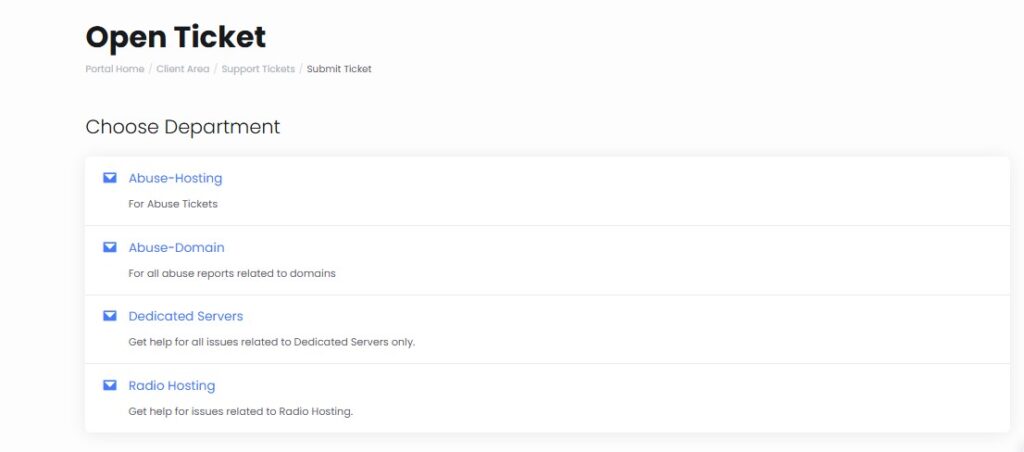
You can also open support tickets with Ultahost. This works as an extension of their email support. A real agent gets assigned to your case. That same agent stays with you until you find a solution. No repeating yourself to different people. To open a ticket, you just need your name, email, and phone number. Then add any details about your issue. That is it. The ticket system is great for complicated problems that take time to fix.
Knowledgebase

Finally, there is the good old knowledgebase. It comes with a built in search engine. You can quickly sift through hundreds of FAQs and getting started guides. No need to wait for a support agent. Just type your question and find answers instantly. This is perfect for common issues like setting up email or connecting a domain. Many hosts have a knowledgebase. But Ultahost keeps theirs organized and easy to use. Articles are written in plain English. Beginners will feel right at home.
Registration
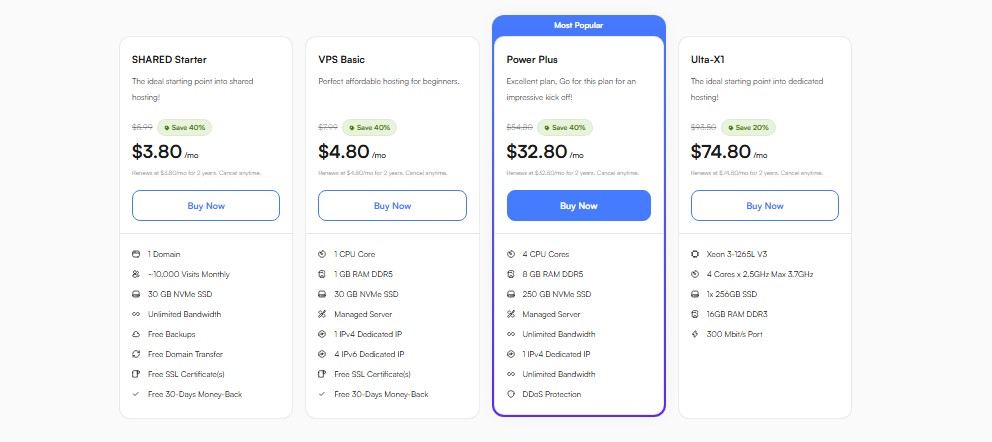
Want to get started on Ultahost? The process is simple. Just pick a plan that fits your needs. Pay for it. Fill in your details. That is it. You are good to go. Let us use their shared plans as an example.
Find the plan you want. Click the buy button. Then follow the on screen instructions. Most users finish registration in under five minutes. No technical skills required.
Now you have a choice. You can register a brand new domain. Or use a domain you already own. Just type your domain name. Then pick an extension like .com or .net. After that, move to the next step.
Ultahost gives you many billing options. You can pay every month. Every three months. Every six months. Once a year. Every two years. Or every three years. Pick what works for you. Then choose where your server is located. Select which SSL certificate you want. Decide if you need their free website builder. And add any extra features you like.
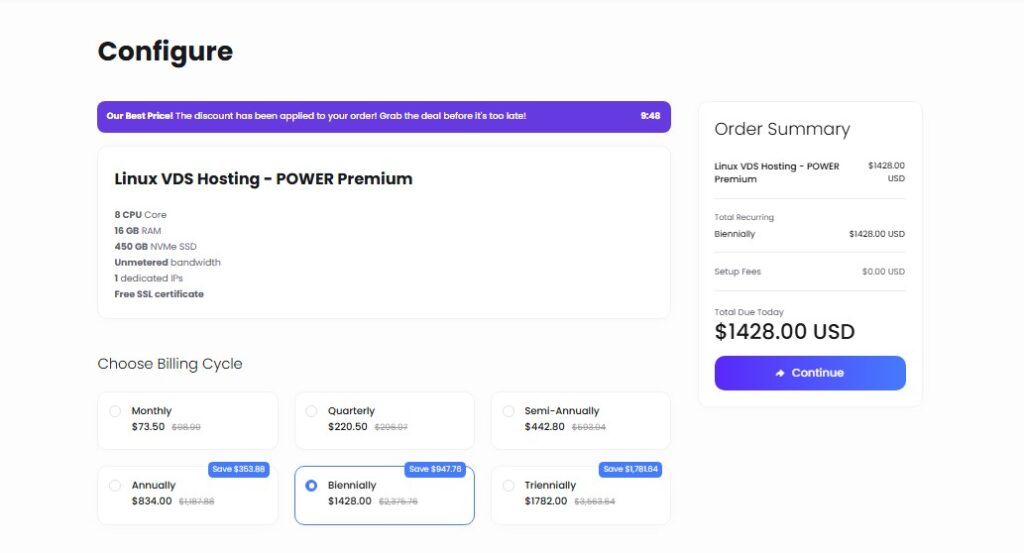
Click the Continue button. That will take you to the checkout page.
Now fill in your payment information. Add your account details. Pick any extra add ons you want. Then finish your order.
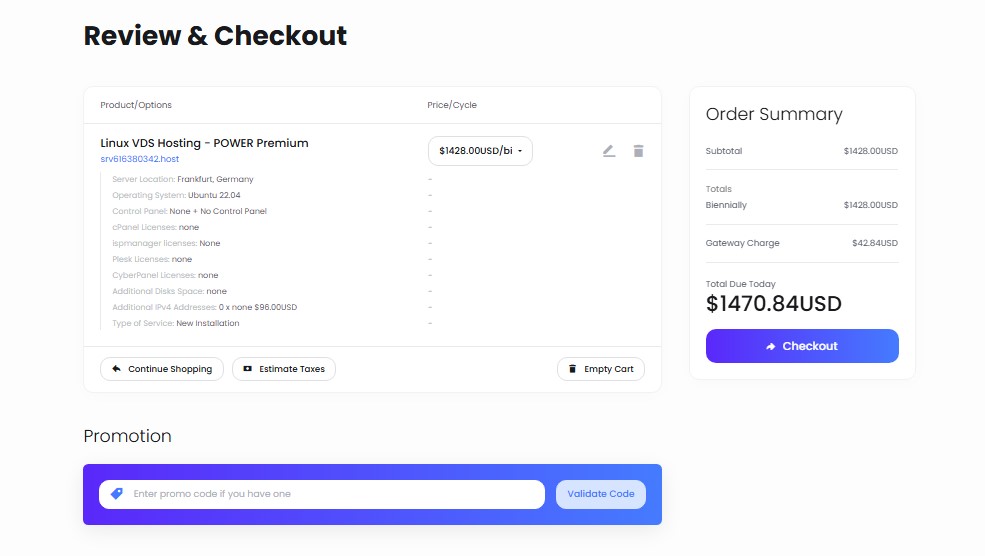
That is it. You now have an account with the hosting site. They will send you an email. Just check your inbox. All your account details will be there.
Ultahost Control Panel
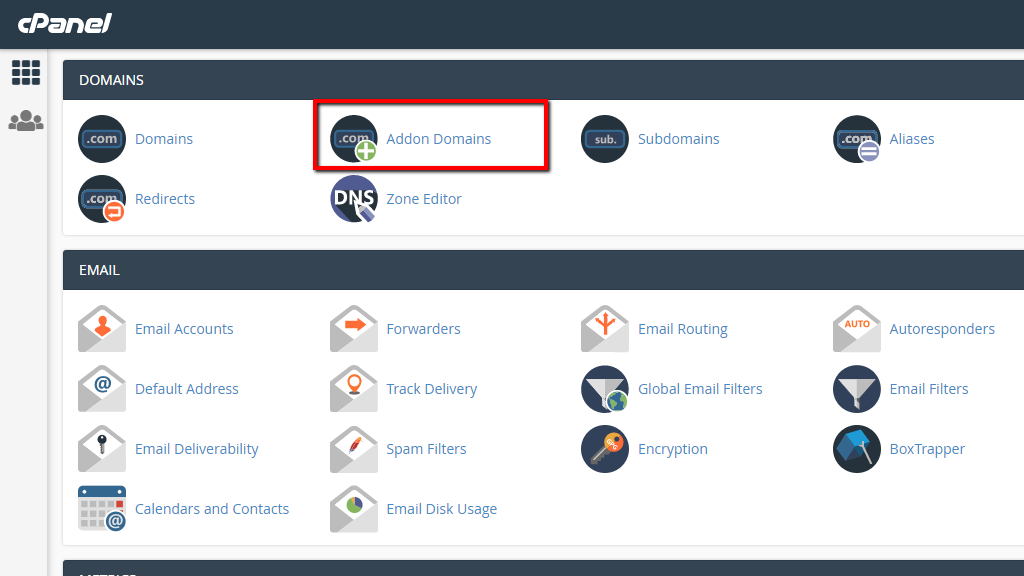
Once you join the platform, you can access your client dashboard. From there, you get one click access to the host’s modern cPanel. Ultahost uses cPanel for all backend changes. This makes managing your site simple and familiar.
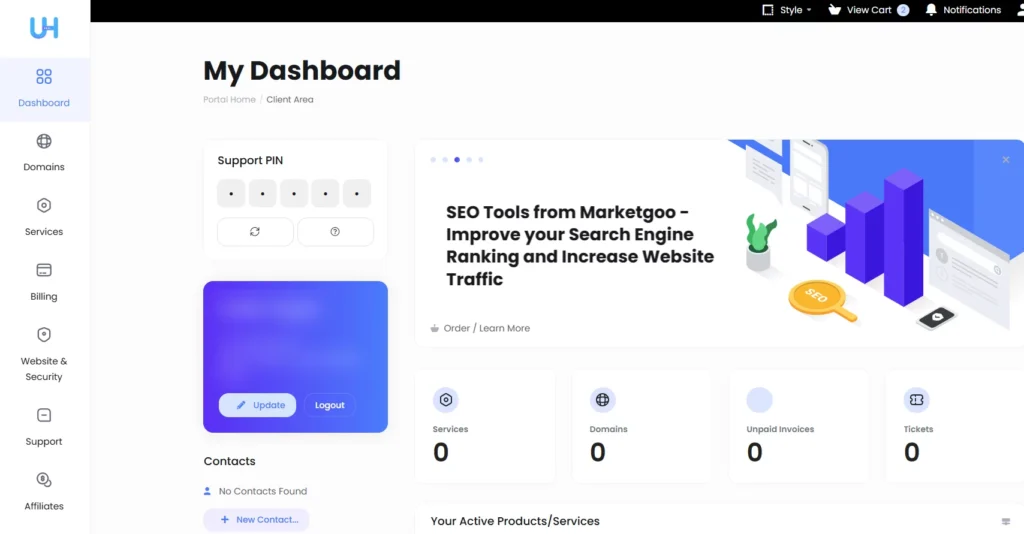
This gives you full control. You can manage your domains. Set up email accounts. Handle your databases. And control other important functions for your site.
Installing WordPress on Ultahost
The fastest and easiest way to install WordPress is simple. Just sign up for one of Ultahost’s WordPress plans. Every WordPress plan comes with automatic installs. You also get a WordPress staging tool to test changes safely. Plus WordPress plugins and backup tools. Everything you need is ready from the start.
Adding an Email on Ultahost
You can create a professional email address for your domain. Just log into your cPanel account on Ultahost.
Once inside, go to Email Accounts. You will find this under the Email section. Click the Create button. Then fill in your email details. Choose your email address. Pick which domain it will be tied to. Set a password. Decide the mailbox size. Then select Do not automatically create folders.
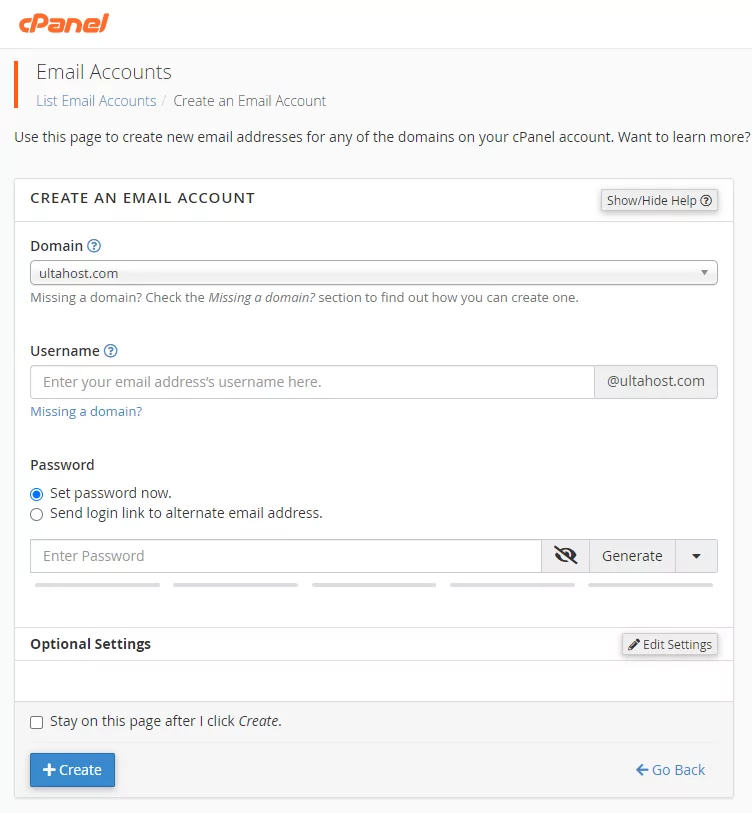
Click Create again. That is it. Your new email is ready to use.
Conclusion: Do We Recommend Ultahost?
Ultahost is not the biggest hosting company out there. But they are starting to get noticed. People like them for their affordable plans.
After testing, I have mixed feelings. Their speed could be better. I ran several performance tests. Their Time To First Byte, or TTFB, was around 900 milliseconds. That is not great. For comparison, data from real user tests shows Ultahost’s average TTFB is actually 1.4 seconds . Anything above 800 milliseconds needs improvement.
But here is the good news. They are a young company founded in 2018 . They do not have a huge global presence yet. So slower speeds are somewhat understandable.
What I really like is their honest pricing. No hidden fees. And their support team is awesome. Fast replies. Real humans.
So who is Ultahost for? Small to mid sized businesses. People who want low prices. And folks who want help just seconds away. If speed is your top priority, look elsewhere. But for value and support, Ultahost delivers.