
How Does Web Hosting Work? A Simple Guide for Beginners 

Author: Tanvir |24 min read|May 13, 2026

A website is like a store filled with content, but without web hosting, no one can access it online. Website files—HTML pages, images, videos, and styles—must be stored on a server, a powerful computer connected to the internet 24/7. Web hosting is the service that provides space on these servers so your website remains accessible anytime.

Every website on the internet relies on hosting to stay online. Without it, your site would only exist on your personal computer and disappear whenever it shuts down or loses connection.

This guide explains web hosting in simple terms, including how servers work, how websites are delivered to visitors, and what happens behind the scenes when someone enters a domain name into a browser.

What Is Web Hosting?

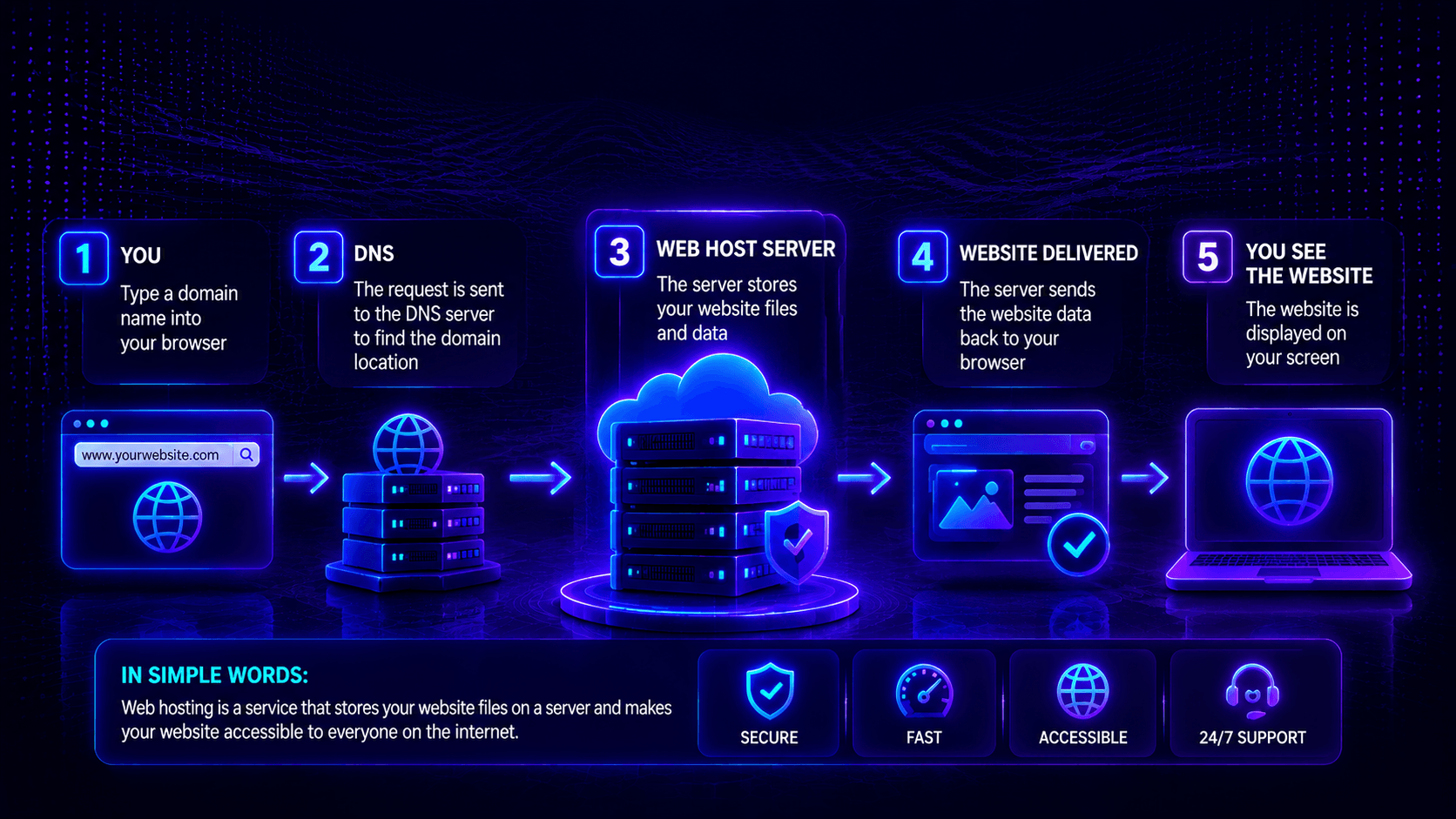
Web hosting is a service that stores your website’s files on a special computer called a server. When someone types your domain name into their browser, their computer connects to that server. The server sends your website files back to their browser. Their browser displays your website. Without web hosting, your files would sit on your personal computer, invisible to the world.

How websites are stored online

Your website files—HTML pages, images, CSS styles, videos, and databases—need a permanent home. That home is a web server. Servers are not like your personal computer. They run specialized software, have redundant power supplies, multiple internet connections, and backup systems. They are designed to stay on 24 hours a day, 7 days a week, 365 days a year. Hosting companies own thousands of these servers in data centers across the world. You rent space on one of their servers.

Difference between a domain and hosting

People often confuse domain names with web hosting. They are two different things that work together.

Your domain name is your website’s address. It is what people type into their browser to find you. Example: google.com or facebook.com. You rent a domain name from a domain registrar like Namecheap or GoDaddy for about $10-15 per year. The domain name tells browsers where to find your website’s server.

Your web hosting is the actual space where your website files live. It is like the land and building for your online store. You rent hosting from a provider like Hostinger, Bluehost, or SiteGround for $3-30 per month. The hosting provider stores your files and delivers them to visitors.

Simple example: Your domain name is like your street address (123 Main Street). Your web hosting is like the actual house at that address. You need both. Without the address, no one knows how to find your house. Without the house, there is nothing at the address to visit.

How Web Hosting Works

When you enter a website address, your browser connects to a hosting server that stores the website’s files. The server processes the request and sends the website content back to your device within seconds, allowing the page to load and display online.

Step-by-Step Process

Step 1: User types a website name into a browser. You type example.com into Chrome, Safari, or Firefox and press Enter. Your browser needs to find where that website lives. The browser does not know the location yet—it only knows the name.

Step 2: Domain connects to the hosting server. Your browser asks the Domain Name System (DNS): “Where is example.com?” Think of DNS as the phonebook of the internet. The DNS looks up the domain name and returns an IP address (like 192.0.2.45). That IP address is the unique identifier for the server where the website files are stored.

Step 3: Server sends website files to the visitor’s browser. Your browser connects to that server using the IP address and requests the website files. The request travels across the internet, hopping through multiple routers and networks. When the request arrives, the server locates the requested files—HTML pages, images, CSS styles, JavaScript files—and sends them back the same way they came.

Step 4: Website appears on screen. Your browser receives the files, interprets the code, and displays the website as a visual page. The HTML provides the structure. The CSS adds colors, fonts, and layout. JavaScript makes interactive elements work. All of this happens in milliseconds.

Simple Explanation of Servers

A server is just a computer. But it is a special kind of computer. Unlike your laptop or desktop, a server has no monitor, keyboard, or mouse. Its only job is to store files and send them to people who request them. Servers run 24/7, have redundant power supplies, and are connected to high-speed internet backbones. Hosting companies keep thousands of servers in climate-controlled data centers with backup generators and multiple internet connections.

What Happens Behind the Scenes

While you see a beautiful website, the server is doing hard work. It reads your request, finds the correct files, handles any database queries (for dynamic sites like WordPress), executes scripts (PHP, Python, Node.js), and packages everything for delivery. The server also logs the request, checks security rules, and may cache the response for future visitors. All of this happens in milliseconds, often without you ever thinking about it.

Main Components of Web Hosting

Web hosting involves several key components working together. Understanding each piece helps you see the full picture of how websites function online. This section explains the four main components: the domain name, the web server, the Domain Name System (DNS), and your website files.

Domain Name

  • Your domain name is what people type into their browser to find you. Examples include google.com, wikipedia.org, or yourbusiness.ca. Domain names are human-readable because remembering google.com is much easier than remembering 142.250.190.46 (Google’s actual IP address). You rent a domain name from a domain registrar like Namecheap, GoDaddy, or Cloudflare for about $10-15 per year. The domain name itself is not the website. It is simply the address that points to where your website lives.

Web Server

  • A web server is the computer that stores your website files. When someone requests your domain, the server sends those files to the visitor’s browser. Web servers run specialized software like Apache, Nginx, or IIS that understands how to handle incoming requests. Unlike your personal computer, servers are designed to run 24/7 without interruption. They are housed in data centers with redundant power, cooling, and internet connections.

DNS (Domain Name System)

  • DNS is the phonebook of the internet. When you type example.com into your browser, DNS translates that human-readable name into a machine-readable IP address (like 192.0.2.45). That IP address tells your browser exactly which server to connect to. Without DNS, you would need to remember the numeric IP address of every website you wanted to visit.

Website Files

  • Your website files are the actual content that visitors see. They include HTML pages (structure), CSS files (colors, fonts, layout), JavaScript (interactive elements), images, videos, and databases (for dynamic sites like WordPress). These files are stored on your web server. When a visitor requests your site, the server sends these files to their browser, which then assembles them into the visual page they see.

Types of Web Hosting

Not all web hosting is the same. Different websites have different needs, and hosting providers offer several options to match those needs. Choosing the right type affects your website’s speed, reliability, security, and cost. This section explains the five main types of web hosting: shared, VPS, dedicated, cloud, and WordPress hosting.

Shared Hosting

Shared hosting is the most common and affordable option. Your website lives on a server with dozens or even hundreds of other websites. Everyone shares the same CPU, RAM, and storage. This keeps costs low—typically $3-15 monthly. Shared hosting is beginner-friendly because the hosting provider manages the server. However, performance can be inconsistent because a traffic spike on another site can slow down your site. Security isolation is also less robust than other options.

Best for: Personal blogs, small business websites, portfolio sites, and anyone just starting their first website.


VPS Hosting

More control and performance. VPS stands for Virtual Private Server. Like shared hosting, multiple websites live on the same physical server. But virtualization technology carves that server into isolated compartments. Each VPS has dedicated CPU, RAM, and storage that neighbors cannot touch. Your performance remains consistent even if another site on the same physical server gets a traffic spike.

VPS hosting costs $20-100 monthly. You get root access for custom software installations, better security isolation than shared hosting, and the ability to scale resources (upgrade RAM or CPU without migrating to a new server). VPS requires more technical knowledge than shared hosting, but many providers offer managed VPS plans where they handle server maintenance.

Best for: Growing businesses, eCommerce stores, and websites that have outgrown shared hosting.

Dedicated Hosting

Entire server for one website. A dedicated server gives you an entire physical machine. No sharing. No neighbors. Every CPU core, every gigabyte of RAM, and every megabyte of storage belongs to your website alone. This delivers maximum performance, highest security isolation, and complete control over server configuration.

Dedicated servers cost $100-500+ monthly. They require significant technical expertise to manage—or you pay extra for managed dedicated hosting. Dedicated hosting is overkill for most websites but essential for large eCommerce stores, high-traffic news sites, and businesses with strict compliance requirements.

Best for: Large eCommerce stores, high-traffic websites, businesses with strict security or compliance requirements.

Cloud Hosting

Flexible and scalable. Cloud hosting spreads your website across a network of interconnected servers (sometimes hundreds or thousands). If one server fails, another takes over instantly—no downtime. Resources scale automatically: up during traffic spikes (Black Friday, product launches), down during quiet periods. You pay for what you use, like a utility bill. Cloud hosting costs $10-150+ monthly depending on usage.

Unlike traditional hosting, where you are capped by a single server’s resources, cloud hosting can scale virtually infinitely. This makes it ideal for businesses with unpredictable traffic or global audiences.

Best for: Websites with unpredictable traffic, seasonal businesses (eCommerce during holidays), and global audiences needing fast loading from multiple regions.

WordPress Hosting

Optimized for WordPress websites. WordPress hosting is not a different type of infrastructure. It is shared, VPS, or cloud hosting specifically optimized for WordPress websites. The provider configures servers for WordPress’s unique needs: server-level caching for faster page loads, CDN integration for global speed, automatic WordPress core and security updates, and support staff trained specifically in WordPress.

WordPress hosting costs $10-100+ monthly. The trade-off is higher cost than generic shared hosting, but you gain significantly better performance, security, and convenience. For anyone running a WordPress site, managed WordPress hosting is often worth the premium.

Best for: Anyone running a WordPress website who wants better performance and security without managing technical details.

What Happens When Someone Visits Your Website?

When a visitor opens your website, their browser sends a request to your hosting server. The server responds by delivering the website’s files—HTML, images, CSS, and scripts—which the browser assembles into a complete webpage. Fast hosting and reliable uptime ensure this process happens quickly and consistently for every visitor.

Browser Request

When someone types your domain name into their browser or clicks a link to your site, the browser sends a request. That request travels across the internet, hopping through multiple routers and networks, until it reaches the server where your website files are stored. The request asks the server: “Please send me the files for example.com.”

What is in the request? The browser asks for specific files (HTML page, images, CSS, JavaScript). It also sends information about itself (browser type, device type, screen size). The server uses this information to optimize the response.

Server Response

The server receives the request and immediately goes to work. It locates the requested files, executes any necessary scripts (for dynamic sites like WordPress), queries databases to pull content, and checks security rules. The server then packages the files into a response and sends them back across the internet to the visitor’s browser. This entire process typically takes 50-500 milliseconds.

Page Loading Process

The visitor’s browser receives the server’s response and begins assembling the page. First, it reads the HTML to understand the page structure. Then it requests additional files referenced in the HTML: CSS files for styling, JavaScript for interactivity, and images or videos for visual content. Each additional file requires another request-response cycle. The browser paints the page on the screen progressively—showing content as it arrives rather than waiting for everything.

Importance of Speed and Uptime

Speed directly affects user experience, search rankings, and conversion rates. A one-second delay reduces conversions by up to 7%. Forty percent of visitors abandon sites that take more than three seconds to load. Fast hosting gives you a competitive advantage.

Uptime is the percentage of time your website is available. Industry standard is 99.9% uptime (about 8.76 hours of downtime annually). For an eCommerce store generating 1,000 hours, one hour of down time costs $ 1,000 in lost revenue. Reliable hosting protects your income.

Features You Get With Web Hosting

Web hosting includes more than server space. Most plans provide essential features like storage, bandwidth, email accounts, SSL certificates, backups, security tools, and a control panel to help you manage and protect your website. Understanding these features helps you choose the right hosting plan for your needs. 

Storage Space

Storage space is where your website files live. Every image, HTML page, CSS file, JavaScript file, PDF download, and database entry takes up storage space. Think of it as the hard drive space on your hosting account.

How much do you need? A simple blog with mostly text might use 1-5 GB. A business website with 50-100 product images might use 10-20 GB. A media-heavy site with video files or a large image gallery could use 50 GB or more. Hosting plans typically offer 10-100 GB for shared hosting and significantly more for VPS or dedicated plans. Always leave a 20-30% buffer for growth.

Bandwidth

Bandwidth is the amount of data your website can transfer to visitors. Each time someone visits a page, their browser downloads your HTML, CSS, JavaScript, and images. That download consumes bandwidth.

How to estimate your needs: Average page size × monthly visitors × average pages per visit. A 2 MB page with 10,000 monthly visitors viewing 2 pages each consumes 40 GB of bandwidth (2 MB × 10,000 × 2 = 40,000 MB = 40 GB). Many shared hosting plans advertise “unlimited” bandwidth, but read the fair use policy carefully. VPS and dedicated plans specify bandwidth allowances (typically 1-10 TB monthly).

Email Accounts

Most hosting plans include email accounts using your domain name. Instead of a Gmail or Outlook address, you can have yourname@yourbusiness.com. Professional email addresses build trust, reinforce your brand, and look more credible than free email providers.

What to look for: The number of accounts included (5-100 depending on plan), storage per mailbox (often 1-10 GB), webmail access for checking email from any browser, and support for connecting to email clients like Outlook, Thunderbird, or Apple Mail.

SSL Certificates

SSL (Secure Sockets Layer) encrypts data between your website and your visitors. Without SSL, sensitive information like login credentials, form submissions, and payment details travel as plain text that hackers can intercept.

Why SSL is essential in 2026: Browsers label sites without SSL as “Not Secure,” scaring away visitors. Google uses SSL as a ranking factor. Payment gateways require SSL for eCommerce. Leading hosting providers include free SSL certificates (usually via Let’s Encrypt). If a host charges extra for SSL, consider another provider—free SSL is standard.

Backups

Backups protect you from data loss. If your site is hacked, a software update breaks functionality, or you accidentally delete important files, you can restore from a recent backup. Without backups, data loss is often permanent.

What to look for: Automated backups (daily is best, weekly is acceptable), off-site storage (not on the same server as your live site), retention period (how many days of backups are kept), and one-click restore from your control panel. If a host offers backups only as a paid add-on, factor that cost into your decision.

Security Tools

Hosting providers include various security features to protect your website and its visitors. The quality and completeness of security tools vary significantly between budget and premium hosts.

Common security features: Web application firewall (WAF) to block malicious traffic before it reaches your site. DDoS protection to prevent attack-related downtime. Malware scanning to detect infections automatically. Automatic security updates for server software. Account isolation to prevent other customers on shared servers from affecting your site.

Control Panel (cPanel)

The control panel is your dashboard for managing everything about your hosting account. You use it to upload files via File Manager, create email accounts, manage MySQL databases, add addon domains or subdomains, access error logs, set up cron jobs, and install applications via one-click installers (WordPress, Joomla, etc.).

What to look for: cPanel is the industry standard—most tutorials and documentation assume cPanel. Some hosts use Plesk (similar functionality, popular on Windows servers) or custom dashboards (may be simpler but less flexible). A good control panel makes complex tasks simple, even for beginners.

How to Choose the Right Web Hosting

Choosing the right web hosting depends on your website type, budget, expected traffic, performance needs, customer support quality, and future scalability. A small blog may only need affordable shared hosting, while growing businesses and eCommerce sites often require faster, more reliable VPS or dedicated hosting solutions.

Consider Website Type

Different websites have different hosting requirements. A personal blog or portfolio site with mostly static content runs perfectly on shared hosting. A business website with moderate traffic and a contact form also does well on shared or managed WordPress hosting. An eCommerce store with product images, inventory management, and checkout processing needs better performance, stronger security (PCI compliance), and the ability to handle traffic spikes. A custom web application or SaaS platform may require VPS or cloud hosting for specific software configurations. A high-traffic news site or large online store may need dedicated hosting or enterprise cloud solutions.

Match your hosting type to your website type. Do not buy dedicated hosting for a personal blog. Do not try to run a high-volume eCommerce store on budget shared hosting.

Consider Budget

Hosting costs range from about $3/month for basic shared hosting to $500+ per month for high-end dedicated servers. Your budget should match your website’s purpose and revenue potential.

Low budgets ($3–$10/month) suit personal blogs, hobby sites, and very small businesses. Medium budgets ($15–$30/month) fit growing business websites and small eCommerce stores. Higher budgets ($50–$150+ monthly) are best for high-traffic stores, VPS hosting, or cloud-based applications.

Annual plans often save 20–40%, but watch renewal prices—introductory discounts can rise significantly after the first term.

Consider Traffic Expectations

Be realistic about how many visitors your site will receive. A new blog might attract 100-500 monthly visitors. A successful small business site might attract 5,000-20,000 monthly visitors. A popular eCommerce store might attract 50,000-200,000+ monthly visitors.

Shared hosting comfortably handles up to 10,000 monthly visitors. VPS or cloud hosting handles 10,000-100,000 monthly visitors. Dedicated hosting handles 100,000+ monthly visitors. Overestimating wastes money on idle resources. Underestimating leads to slow performance and downtime. Start with a plan that matches your current traffic with room to grow.

Consider Speed and Uptime

Speed and uptime are non-negotiable features. A slow site frustrates visitors, hurts search rankings, and reduces conversions. Downtime directly costs you revenue and damages credibility.

Look for hosts with SSD or NVMe storage (5-10x faster than HDDs), built-in caching (server-level and object caching), CDN integration for global speed, and uptime guarantees of 99.9% or higher. Read independent reviews—do not rely solely on provider claims. Real customer experiences reveal whether a host delivers on its promises.

Consider Customer Support

When your website breaks, you need help immediately, not after 24 hours of waiting for a ticket response. Hosting problems do not follow business hours. Servers crash at 2 AM on Saturday.

Look for 24/7/365 support across multiple channels: live chat for quick issues, ticket systems for complex problems, and phone support for emergencies. Test support before buying—send a pre-sales question via live chat at an odd hour and measure response time and quality.

Consider Scalability

Your website today will not be your website next year. Choose a host that grows with you. Look for clear upgrade paths from shared to VPS to cloud to dedicated. Easy resource increase without migrating to a new server. Cloud hosting with auto-scaling for unpredictable traffic. Many successful businesses start with shared hosting and upgrade as they grow. Ensure your chosen host makes that upgrade easy.

Common Web Hosting Terms Beginners Should Know

Web hosting includes terms like bandwidth, uptime, SSL, CDN, nameservers, databases, and cPanel. Understanding these basics helps beginners compare hosting plans, manage websites effectively, and communicate clearly with support teams when issues arise.

Bandwidth

Bandwidth is the amount of data your website can transfer to visitors over a given period (usually monthly). Each time someone visits your site, their browser downloads files—HTML pages, images, CSS, JavaScript. Each download consumes bandwidth. Larger files (videos, high-resolution images) consume more bandwidth. More visitors consume more bandwidth. Hosting plans specify bandwidth limits or advertise “unmetered/unlimited” (subject to fair use policies). Estimate your needs: average page size × monthly visitors × average pages per visit.

Uptime

Uptime is the percentage of time your website is available and functioning. Whenuptime fails, visitors cannot access your site. Industry standard is 99.9% uptime, which allows about 8.76 hours of downtime annually. Premium hosts guarantee 99.99% (52 minutes annual downtime) or 99.999% (5 minutes annual downtime). Higher uptime guarantees indicate more reliable infrastructure, but verify through independent monitoring services—do not rely solely on provider claims.

SSL (Secure Sockets Layer)

SSL is a security protocol that encrypts data between your website and your visitors. When SSL is active, you see “https://” and a padlock icon in the browser address bar. Without SSL, browsers label your site “Not Secure.” SSL is essential for protecting login credentials, form submissions, and payment information. Search engines rank SSL-secured sites higher. Most hosts include free SSL certificates (Let’s Encrypt).

CDN (Content Delivery Network)

A CDN is a network of servers distributed around the world. Each server stores copies of your static files (images, CSS, JavaScript). When someone visits your site, the CDN serves files from the server closest to them. This dramatically reduces loading times, especially for international visitors. Many hosting plans include basic CDN integration or offer it as an add-on.

Nameservers

Nameservers are the DNS servers that connect your domain name to your hosting provider. When you register a domain (or buy hosting), you receive nameserver addresses (e.g., ns1.hostingcompany.com). You configure your domain to point to those nameservers. This tells the internet: “When someone types example.com, send them to the hosting company’s servers where this website lives.”

Database

A database is an organized collection of data that your website can query, update, and retrieve dynamically. Dynamic websites (WordPress, eCommerce stores, forums) use databases to store posts, pages, user accounts, product inventory, orders, and settings. Without a database, your website would be static—every page would need to be manually created as a separate HTML file. MySQL and MariaDB are the most common database systems in web hosting.

cPanel

cPanel is the control panel software that most hosting providers use to let you manage your account. Through cPanel, you can upload files (File Manager), create email accounts, manage databases (phpMyAdmin), add domains or subdomains, access error logs, set up cron jobs, install applications via one-click installers (WordPress, Joomla), and check bandwidth usage. If you use shared or VPS hosting, you will likely use cPanel. Some hosts use Plesk or custom dashboards.

Common Mistakes Beginners Make

Beginners often choose hosting based only on price, ignore support quality, overlook uptime guarantees, forget to enable backups, or pay for unnecessary features. These mistakes can lead to slow performance, downtime, data loss, and wasted money.

Choosing the Cheapest Hosting Only

A $3/month hosting plan may look attractive, but ultra-low prices usually come with trade-offs. Servers are often overcrowded, so your website can slow down when others use more resources. Strict limits may throttle or suspend your site if it uses too much CPU or memory, and customer support can be very slow.

Many essential features like backups, CDN, and malware protection are often paid extras, increasing the real cost. A $3 plan plus add-ons can end up costing $10–$15/month anyway.

Instead of choosing the cheapest option, focus on value, reliability, and total cost of ownership.

Ignoring Support Quality

When your website goes down at 11 PM on a Saturday, waiting 24 hours for a ticket response is unacceptable. Yet many budget hosts offer only email support with delayed responses. Support quality matters because hosting problems happen at all hours. Slow or incompetent support means extended downtime, lost sales, and frustrated customers. Test support before buying—send a pre-sales question via live chat at an odd hour (like 10 PM on a Sunday). Measure response time and answer quality. Look for 24/7/365 availability across multiple channels: live chat for quick issues, tickets for complex problems, phone for emergencies. Read recent reviews specifically about support responsiveness.

Not Checking Uptime Guarantee

Uptime is the percentage of time your website is available. A 99.9% uptime guarantee sounds impressive, but it allows about 8.76 hours of downtime annually. For an eCommerce store, that is potentially thousands in lost revenue. Many budget hosts do not publish uptime guarantees or have vague language like “reliable hosting.” Premium hosts publish clear guarantees with SLA credits (money back or account credit when they miss the guarantee). Before purchasing, verify the actual uptime through independent monitoring services or read recent customer reviews that mention uptime. Do not rely solely on provider claims.

Forgetting Backups

“Backups are included” means nothing until you need to restore one and discover they are corrupted, missing, or never run. Many budget hosts claim weekly backups, but data centers fail. Ransomware attacks increasingly target backup systems. Some hosts charge extra for daily backups, leaving you vulnerable if you decline. Before purchasing, verify backup details: Are backups automated daily (not weekly)? How many days of retention (7, 30, 90)? Are backups stored off-site? Can you restore with one click? If a host charges extra for backups, factor that cost into your decision. After setup, test your backups—request a restore of a test file to confirm the process works.

Buying Unnecessary Features

Hosting providers love to upsell. You do not need a dedicated IP address for most websites. You do not need “premium SSL” when Let’s Encrypt provides free certificates trusted by all browsers. You do not need advanced server management if you are running a simple WordPress site. The smart approach is to start with basic shared hosting. Most small to medium websites never need VPS or dedicated servers. Add features only when your site genuinely outgrows its current resources. Scale as you grow, not before.

Benefits of Good Web Hosting

Good web hosting improves website speed, security, SEO rankings, user experience, and reliability. A well-optimized hosting environment keeps your site fast, stable, and always accessible, helping you retain visitors and grow your online presence effectively.

Faster Website Speed

Good hosting dramatically improves page load times. Premium hosts use NVMe SSD storage (5-10x faster than traditional SSDs), modern CPUs, LiteSpeed or Nginx web servers, built-in caching (server-level and object caching), and CDN integration for global speed. Faster pages directly improve user experience, reduce bounce rates, and increase conversions. A one-second delay reduces conversions by up to 7%. Good hosting eliminates hosting-related slowdowns, ensuring your site performs at its best.

Better SEO Rankings

Google uses page speed as a ranking factor for both desktop and mobile searches. Faster sites rank higher. Slower sites rank lower. Google’s Core Web Vitals (Largest Contentful Paint, First Input Delay, Cumulative Layout Shift) depend heavily on server performance. Good hosting ensures your server responds quickly, helping you pass Core Web Vitals assessments. Additionally, high uptime ensures Google’s crawlers can index your content consistently. Sites with frequent downtime may be crawled less often, delaying new content from appearing in search results.

Improved Security

Good hosting providers include robust security features as standard, not as paid add-ons. Free SSL certificates encrypt data between your site and visitors, essential for trust and SEO. Web application firewalls (WAF) block malicious traffic before it reaches your site. DDoS protection prevents attack-related downtime. Malware scanning detects infections automatically. Automatic security updates patch vulnerabilities before attackers exploit them. Account isolation prevents other customers on shared servers from affecting your site. Budget hosts often charge extra for these features or omit them entirely.

Better User Experience

Website visitors are impatient. A slow site frustrates them. A site that crashes or shows errors erodes trust. A site that loads inconsistently confuses them. Good hosting delivers consistent, fast performance. Pages load quickly. Forms submit reliably. Checkout processes complete without errors. This positive user experience keeps visitors engaged, encourages return visits, and builds brand trust. Visitors who enjoy using your site are more likely to become customers and recommend you to others.

Higher Website Reliability

Good hosting providers offer uptime guarantees of 99.9% or higher. Some premium hosts guarantee 99.99% or 99.999% uptime. This reliability means your website is available when customers need it. No lost sales from unexpected downtime. No frustrated visitors finding error messages. No damage to your brand reputation from being “offline.” Reliable hosting also includes redundant systems: multiple power supplies, multiple internet connections, backup generators, and RAID storage. If one component fails, another takes over seamlessly.

FAQs

What is the difference between domain and hosting?

A domain name is your website’s address (like example.com). It is what people type into their browser to find you. You rent a domain name from a registrar for about $10-15 per year.

Web hosting is the space where your website files live. It is the building at that address. You rent hosting from a provider for $3-30 per month.

You need both. Without a domain, no one can find your website. Without hosting, there is no website to find. Many providers offer both services, but they are technically separate products.

Can I host a website without buying hosting?

Technically yes, but practically no for real websites. Free hosting services exist (GitHub Pages for static sites, InfinityFree, 000webhost). However, free hosting comes with significant limitations: your site displays ads you cannot remove, resource limits are extremely restrictive (low CPU, RAM, database connections), storage is minimal (typically 100MB-1GB), bandwidth is capped, you cannot use a custom domain (your URL includes the provider’s name), and there is no customer support.

Free hosting is fine for learning or testing. For any real website that matters to you or your business, paid hosting is essential.

Which hosting is best for beginners?

Shared hosting is the best starting point for beginners. It is affordable ($3-15 monthly), requires no technical expertise, and includes easy-to-use control panels (cPanel). The hosting provider manages server maintenance, security updates, and hardware. You focus on building your website.

Recommended beginner-friendly providers: Bluehost (easiest setup, free domain for first year, officially recommended by WordPress), Hostinger (excellent value, very fast performance, custom control panel), and SiteGround (best support, ideal if you anticipate needing help often).

How much does web hosting cost?

Web hosting costs vary by type and provider:

  • Shared hosting: $3-15 monthly
  • Shared hosting (mid-range): $10-15 monthly
  • Managed WordPress hosting: $15-30 monthly
  • VPS hosting: $20-100 monthly
  • Cloud hosting: $10-150+ monthly
  • Dedicated server: $100-500+ monthly

Most beginners start with shared hosting at $5-15 monthly. Pay annually rather than monthly to save 20-40%. Watch for renewal pricing—many hosts discount first-term pricing heavily.

Is shared hosting good for small websites?

Yes. Shared hosting is perfect for small websites. Personal blogs, portfolio sites, small business brochure sites, and hobby projects all run well on shared hosting. Shared hosting comfortably handles up to 10,000 monthly visitors with good performance.

Move to VPS or cloud hosting when you consistently exceed 10,000-20,000 monthly visitors, experience slow performance despite optimization, run resource-heavy applications (eCommerce with complex inventory), or need custom software or server configurations. For most beginners and small sites, shared hosting is the right choice.

Conclusion

Web hosting is the foundation of every website. It stores your files on always-on servers and delivers them to users when they visit your domain. Without it, your website cannot be accessed online.

When someone visits your site, DNS finds your server, the browser requests your files, and the server sends them back in milliseconds. The browser then displays the page. This is why hosting, domain names, and server performance all matter.

For beginners, shared hosting is the best starting point due to its low cost, simplicity, and managed support. Focus on value, not just price, and choose a provider with good uptime, security, and customer support. As your website grows, you can upgrade to VPS or cloud hosting.

Share this article: Facebook X (Twitter) LinkedIn
Tanvir
✓ Author

Tanvir

Experienced Hosting Expert specializing in high-performance server management, cloud architecture, and 24/7 technical support. Passionate about optimizing uptime and delivering seamless digital experiences.

Leave a Comment

Leave a Reply

Your email address will not be published.Required fields are marked *

🔗 Link copied!