
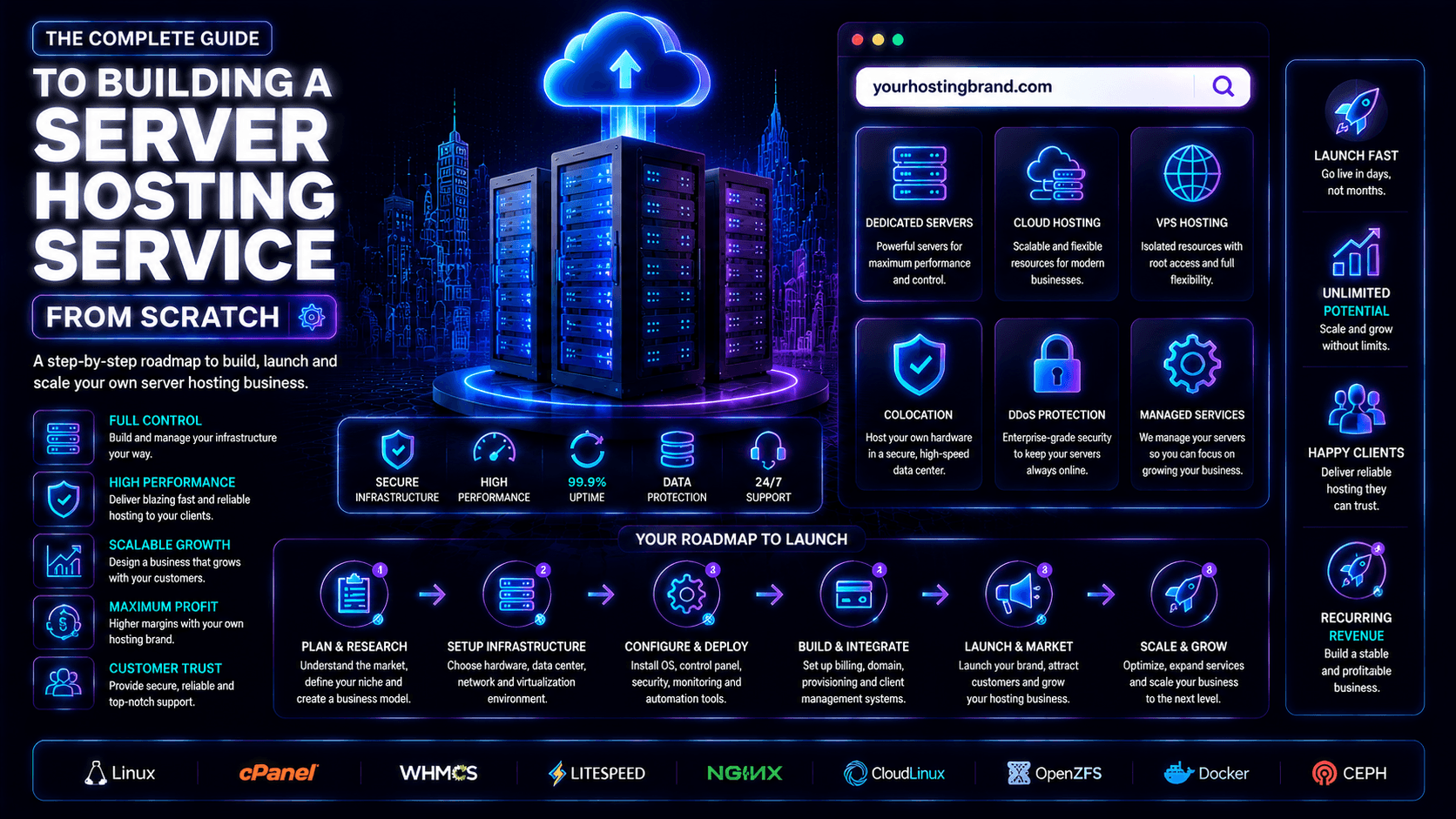
Building a Server Hosting Service from Scratch lets you offer reliable storage and computing power. You also provide network resources to businesses. Your clients avoid managing physical infrastructure.
In 2026, demand for websites, apps, and online stores keeps growing. This creates opportunities for hosting providers. Success depends on strong uptime and fast performance. You also need security and responsive customer support.
You can offer shared, VPS, dedicated, or cloud hosting. Each type fits different customer needs. Choose the right infrastructure, pricing, and features. This helps you build a competitive hosting business.
Understanding the Hosting Industry
Before you start a hosting business, you need to know the market. Study your competitors. Learn what customers want. In 2026, demand for websites, apps, and online stores keeps growing. This creates chances for new providers. Customers look for reliable performance. They want strong security. They also need responsive support.
How the Hosting Market Works
Hosting companies make money through recurring payments. They offer server resources, storage, security, and technical help. Customers pay every month or every year. This creates steady income.
- Shared hosting: Affordable option for small websites and beginners.
- VPS hosting: Provides more resources and control for growing businesses.
- Cloud hosting: Offers flexibility and easy scalability.
- Dedicated hosting: Designed for high-traffic and resource-intensive websites.
- Recurring revenue: Customers typically pay monthly or annually.
Key Players in Hosting Infrastructure
Many hosting businesses rent infrastructure instead of building their own data centers.
- AWS: Large-scale cloud infrastructure and flexible services.
- Microsoft Azure: Popular with businesses and enterprise customers.
- Google Cloud: Strong cloud, data, and AI infrastructure.
- DigitalOcean: Simple and developer-friendly hosting solutions.
- cPanel/WHM and Plesk: Popular control panels for managing hosting accounts.
Target Audience for Hosting Services
Different customers have different hosting requirements:
- Individuals: Affordable hosting for blogs and portfolios.
- Small businesses: Reliable hosting with security and email features.
- Enterprises: Dedicated or private infrastructure with strong uptime.
- Developers and agencies: Flexible servers, APIs, staging, and reseller options.
- eCommerce businesses: Fast hosting, CDN support, backups, and scalability.
Understanding these groups helps you choose the right services. You can set better prices. You can offer the right features for your hosting business.
Choosing Your Hosting Business Model
Hosting businesses vary from simple reseller setups to full infrastructure providers. Some sell shared hosting, others specialize in niches like WordPress or gaming. Your model shapes costs, complexity, customers, and profit potential.
Reseller hosting vs owning infrastructure
Reseller hosting
Reseller hosting is the easiest way to enter the market. You rent server resources from a larger provider. Then you sell hosting plans under your own brand. The provider manages the infrastructure. You focus on customers, billing, marketing, and support.
Pros of reseller hosting:
- Low startup costs (as little as $20-50 per month)
- No hardware to buy or maintain
- No data center expertise required
- You can focus entirely on marketing and customer support
- Easy to scale as you grow
Cons of reseller hosting:
- Lower profit margins (you pay the upstream provider)
- Limited control over server configurations
- If the upstream provider has an outage, your customers also have an outage
- Your brand depends on someone else’s infrastructure quality
Reseller hosting works best for beginners. It suits agencies well. It is great for anyone who wants to test the hosting market. You avoid significant upfront investment.
Owning infrastructure
Owning infrastructure gives you greater control over servers, software, security, and performance. However, it requires more capital, technical knowledge, and ongoing maintenance.
Pros of owning infrastructure:
- Higher profit margins once you reach scale
- Complete control over hardware and software configurations
- Ability to offer unique features competitors do not have
- Direct customer relationship with no middle provider
Cons of owning infrastructure:
- High startup costs (10,000to100,000+ depending on scale)
- Technical expertise required for server management
- Responsibility for hardware failures and replacements
- More complex scaling
Owning infrastructure makes sense for established hosting providers. It works for large agencies. It suits anyone building hosting as a primary business with significant scale.
Niche Hosting
The general hosting market is very competitive. It is hard to compete on price alone. Big providers have huge resources. Niche hosting solves this problem. You focus on a specific audience. Then you tailor your services to their needs.
Here are some examples. WordPress and WooCommerce hosting is optimized for performance. It includes eCommerce features. Gaming hosting provides low-latency multiplayer servers. SaaS hosting works for scalable applications. Agency or reseller hosting helps manage multiple client sites. Geographic hosting targets local businesses. These businesses need nearby support.
Specializing gives you clear benefits. You face less competition. You can offer higher value. You can charge premium prices. You build stronger customer trust. Retention also improves.
Pricing Strategies and Positioning
Your pricing reflects your brand. Too cheap suggests low quality, while overpriced plans without value lose customers.
Value-based pricing charges based on the benefit you deliver, not cost. A $50,000/month WooCommerce store values uptime and speed far more than a $50 hosting bill.
Tiered pricing (Basic, Pro, Enterprise) lets customers upgrade as they grow.
Freemium or trials reduce entry barriers and encourage upgrades later.
Introductory pricing attracts new users. You offer low first-term costs. But renewal pricing must be transparent. Customers should know what comes next.
Always compare your competitors. Check their prices and features. Ensure your pricing covers your costs. Include servers, support, and marketing. Remain profitable and sustainable over time.
Planning Your Infrastructure
Reliable infrastructure is the foundation of your hosting business. You need to choose hardware, servers, data centers, and network resources. Base your choices on expected traffic. Also plan for future growth.
Hardware Requirements
Your server hardware directly affects performance and reliability.
- CPU: Multi-core Intel Xeon or AMD EPYC processors handle multiple workloads efficiently.
- RAM: 1–2GB may work for small sites, while eCommerce and business websites often need 4–16GB+.
- Storage: SSD or NVMe storage provides faster website loading and better server performance.
- Backup storage: Use separate storage for regular backups and disaster recovery.
Data Center vs. Cloud Setup
You can choose from several infrastructure options:
- Colocation: Own the servers and place them in a professional data center.
- Dedicated servers: Rent physical servers while the provider handles hardware maintenance.
- Cloud hosting: Use platforms like AWS, Google Cloud, or DigitalOcean. These offer flexible virtual infrastructure.
- Best for beginners: Cloud or dedicated servers work well. They require less upfront investment. They are easier to scale.
Bandwidth and Network Considerations
Fast and reliable networking helps prevent slowdowns and downtime.
- Start with 1Gbps connectivity for smaller operations.
- Consider 10Gbps networks as traffic increases.
- Use CDNs to improve global website performance.
- Choose providers with reliable network redundancy.
- Add DDoS protection to reduce traffic-related disruptions.
- Monitor bandwidth usage and create suitable limits for hosting plans.
Setting Up Servers
Setting up servers involves several key choices. You need the right operating system. You must choose a web server. Virtualization technology also matters. These components affect performance, security, compatibility, and scalability.
Choosing an Operating System
Linux is the most common choice for hosting. It is efficient and stable. It is also cost-effective.
- Linux: Supports PHP, Python, MySQL, WordPress, and most web applications.
- Ubuntu/Debian: Popular options for flexible server management.
- AlmaLinux: A strong choice for hosting environments and cPanel.
- Windows Server: Best for ASP.NET, Microsoft SQL Server, and other Microsoft technologies.
- Cost: Linux generally avoids operating-system licensing costs, while Windows requires paid licensing.
Installing Web Servers
Web server software delivers websites and applications to visitors.
- Apache: Flexible, widely supported, and useful for shared hosting.
- Nginx: Lightweight and efficient for high-traffic websites and static content.
- Apache advantage: Supports .htaccess for easier directory-level configuration.
- Nginx advantage: Handles many simultaneous connections efficiently.
- Reverse proxy: Nginx can sit in front of application servers. This improves performance and security.
Virtualization Technologies
Virtualization creates multiple isolated environments. These run on one physical server. This makes VPS hosting possible.
- KVM: Open-source virtualization with strong performance and isolation.
- VMware: Enterprise-focused virtualization with advanced management features.
- Docker/LXC: Lightweight containers suitable for applications and development environments.
- VPS hosting: Virtualization allows providers to divide server resources into separate customer environments.
- Recommended for beginners: KVM offers a strong balance of performance, flexibility, and cost.
Building Your Hosting Platform
A professional hosting platform needs more than servers. You also need a control panel. Billing systems are essential. Automation tools help too. These tools manage customers, payments, and hosting accounts efficiently.
Control Panels
Control panels give customers an easy way to manage their hosting. They can handle websites, domains, email, databases, and files.
- cPanel & WHM: Popular for Linux-based shared and reseller hosting.
- Plesk: Supports Linux and Windows and offers developer-friendly features.
- DirectAdmin: Lightweight and affordable for budget-focused providers.
- hPanel: Hostinger’s proprietary panel and generally not available for independent hosting businesses.
Automation and Billing Tools
Automation reduces manual work and helps your business scale.
- WHMCS: Handles billing, recurring payments, provisioning, domains, and support tickets.
- HostBill: Suitable for larger providers with advanced VPS and cloud billing needs.
- Blesta: Flexible and developer-friendly with strong customization options.
- Payment automation: Automatically tracks successful and failed payments.
- Account provisioning: Creates, suspends, and terminates hosting accounts automatically.
How Automation Works
Your billing platform connects with the control panel through APIs. It also connects with server infrastructure. When a customer places an order, the system springs into action. After payment completes, it creates their hosting account automatically. It sends login details right away. It activates all services instantly.
This automation saves you time. It reduces human errors. You can manage more customers without extra work. You avoid constant manual server tasks.
Security & Backup Systems
Strong security protects customer websites and data. Reliable backups save you from disasters. Together, they build your hosting reputation. A good platform needs multiple security layers. It also needs tested disaster recovery procedures.
Firewalls and DDoS Protection
Firewalls control network traffic. They block unauthorized access. DDoS protection keeps servers online. It stops traffic-based attacks.
- Host firewall: Blocks unnecessary ports and connections.
- WAF: Helps protect websites from common web attacks.
- DDoS protection: Filters malicious traffic before it overwhelms servers.
- Traffic monitoring: Detects unusual activity and potential threats.
- Cloud protection: Services such as Cloudflare can add another security layer.
SSL Certificates and Encryption
SSL certificates enable HTTPS and encrypt data exchanged between visitors and websites.
- Use SSL/HTTPS for every hosted website.
- Offer free certificates through Let’s Encrypt.
- Enable automatic certificate renewal.
- Protect login, payment, and customer information.
- Use HTTPS to improve customer trust and website security.
Backup and Disaster Recovery
Backups provide protection against hacking, hardware failure, accidental deletion, and data corruption. A reliable strategy should include:
- Daily or hourly backups for important websites.
- Offsite storage to protect against server failures.
- Multiple backup copies using the 3-2-1 approach.
- Immutable backups to help prevent ransomware deletion.
- Retention policies to manage storage efficiently.
- Regular restore testing to ensure backups actually work.
A well-designed backup system allows quick recovery. You can restore customer websites fast. This minimizes downtime after unexpected problems.
Creating Hosting Packages
Hosting packages should offer clear resources and features. They need upgrade options for different customers. Start with simple shared hosting plans. Add VPS and dedicated options as your business grows.
Shared Hosting Plans
Shared hosting is ideal for beginners, blogs, portfolios, and small businesses.
- Basic: 1 website, 10–50GB SSD/NVMe storage, email, SSL, and databases.
- Professional: Multiple websites, 50–100GB storage, backups, and higher resources.
- Business: More websites, larger storage, improved performance, and priority support.
- Essential features: Include free SSL, control panel, and file manager. Add FTP/SFTP, backups, and databases. Basic DDoS protection is a must.
- Add-ons: Domain registration, malware scanning, premium backups, CDN, and SEO tools.
VPS and Dedicated Hosting
VPS plans suit growing websites and developers. They work for eCommerce stores and applications needing more resources.
- Entry VPS: 1–2 CPU cores, 1–2GB RAM, and 20–50GB SSD storage.
- Mid-range VPS: 2–4 cores, 4–8GB RAM, and 100–200GB storage.
- High-end VPS: 4–8 cores, 8–16GB RAM, and 200–500GB+ storage.
- Features: Offer root access and Linux choices. Include snapshots and scalable resources. Add DDoS protection and optional control panels.
Dedicated hosting This provides an entire physical server. It suits customers needing maximum performance. It offers strong isolation.
- Clearly list CPU, RAM, storage, and network specifications.
- Offer 1Gbps or faster network connections.
- Provide remote management tools such as IPMI, iDRAC, or iLO.
- Offer optional managed services, monitoring, and security updates.
Resource Allocation and Limitations
Clear resource limits keep server performance stable. They prevent one customer from affecting others.
- Storage limits: Control disk usage.
- Bandwidth limits: Prevent excessive traffic consumption.
- CPU and RAM limits: Maintain predictable performance.
- Inode limits: Control the number of files stored.
- Email limits: Reduce spam and abuse.
- Database limits: Prevent excessive resource consumption.
- Fair-use policies: Define acceptable usage for “unlimited” plans.
Set transparent limits and provide easy upgrade options when customers need additional resources.
Building Your Website & Brand
A professional website builds trust. A strong brand helps convert visitors into customers. Keep your branding clear and consistent. Focus on reliability, performance, and support.
Domain and Branding
Choose a short, memorable domain that is easy to spell and relevant to hosting.
- Prefer a .com domain when available.
- Consider .host or .cloud as alternatives.
- Avoid complicated spellings, numbers, and hyphens.
- Create a clear unique selling proposition (USP).
- Keep your logo, colors, messaging, and tone consistent.
- Position your brand around price, performance, security, or a specific niche.
Designing a High-Converting Website
Your website should make it easy for visitors to understand your services and place an order.
- Create a clear homepage with a strong headline and CTA.
- Display hosting plans with simple pricing tables.
- Highlight your most popular package.
- Create separate pages for shared, VPS, and dedicated hosting.
- Explain technical features through customer benefits.
- Add clear CTAs such as “Get Started” or “Launch Your Website.”
- Make the website fast, mobile-friendly, and easy to navigate.
Building Trust Signals
Customers want proof that your hosting service is reliable and secure.
- Display genuine customer reviews and testimonials.
- Add case studies and customer success stories.
- Offer a clear 99.9% uptime guarantee where appropriate.
- Explain your money-back and service-credit policies.
- Highlight SSL, backups, DDoS protection, and security features.
- Show accurate business statistics and contact information.
- Keep all trust claims transparent and verifiable.
A fast, professional, and trustworthy website can make a major difference in turning visitors into long-term hosting customers.
Payment Integration
Payment integration lets your hosting business accept payments. It manages subscriptions and automates recurring billing. A reliable system makes checkout easier. It also reduces manual work.
Payment Gateways
Use trusted gateways to support local and international customers.
- Stripe: Supports subscriptions, multiple currencies, fraud protection, and hosting billing integrations.
- PayPal: Adds a familiar payment option and can improve checkout convenience.
- Airwallex: Useful for international payments and multi-currency management.
- Adyen: Suitable for larger businesses with global payment needs.
- Multiple gateways: Offering more than one option improves flexibility. It can increase conversion rates.
Subscription Billing Setup
Hosting businesses depend on recurring payments, so billing should be automated.
- Automated monthly or annual invoices
- Recurring payment processing
- Failed-payment retries
- Automatic account suspension for non-payment
- Prorated upgrades and downgrades
- Renewal and payment notifications
- Automatic account provisioning after payment
Platforms like WHMCS connect payment gateways with control panels. This automates billing and account management.
Handling Global Payments
If you serve international customers, support multiple currencies. Include regional payment methods where possible.
- Offer customers suitable local payment options.
- Display prices in commonly used currencies.
- Monitor currency conversion and international transaction fees.
- Use multi-currency billing when appropriate.
- Plan for sales tax, VAT, and other applicable requirements.
A well-configured payment system collects recurring revenue efficiently. It provides a smooth checkout experience. Customers will trust your billing process.
Customer Support System
Reliable customer support helps build trust, reduce cancellations, and improve customer retention. Use a combination of live chat, support tickets, and self-service resources.
Live Chat and Ticket Systems
Use different support channels for different customer needs.
- Support tickets: Best for technical and ongoing issues.
- Live chat: Ideal for quick questions and pre-sales assistance.
- WHMCS: Can connect customer accounts with ticket-based support.
- Chatwoot: Useful for managing conversations across multiple channels.
- Tawk.to: Provides live chat functionality for customer websites.
- Support team: Start small and add specialized support levels as your customer base grows.
Set clear response targets so customers know when to expect assistance.
Knowledge Base and Tutorials
A detailed knowledge base allows customers to solve common problems without contacting support.
Include guides covering:
- Getting started: Account setup, domains, and email.
- WordPress: Installation, migration, and optimization.
- Email: Gmail, Outlook, iPhone, and Android setup.
- Security: SSL, backups, and malware protection.
- Billing: Invoices, upgrades, cancellations, and renewals.
- Troubleshooting: Downtime, slow websites, and common errors.
Keep articles simple, use screenshots where helpful, and create short video tutorials for complex tasks. A well-organized knowledge base reduces support tickets while helping customers get faster solutions.
SLA (Service Level Agreement)
An SLA is a formal commitment to your customers about the service you will provide. For hosting, SLAs cover uptime guarantees and support response times. Publishing an SLA builds trust. Violating it damages your reputation
Uptime SLA guarantees your servers will be available a certain percentage of the time. Industry standards vary by hosting type:
| Hosting Type | Standard Uptime SLA | Annual Downtime Allowed |
| Shared hosting | 99.9% | 8.76 hours |
| VPS hosting | 99.95% | 4.38 hours |
| Dedicated servers | 99.99% | 52.6 minutes |
| Enterprise cloud | 99.999% | 5.26 minutes |
SLAs define uptime, support response times, and compensation. 99.9% uptime allows ~9 hours yearly downtime—significant for eCommerce.
Clearly define downtime (exclude scheduled maintenance and external outages). Offer service credits for failures.
Set response targets: emergencies (15–30 min), high (1–2 hrs), normal (4–8 hrs), low (24 hrs).
Include exclusions (customer errors, third-party failures, force majeure).
Publish uptime stats and use a status page. Transparency and clear communication build long-term customer trust.
Marketing Your Hosting Business
Marketing drives growth for your hosting business. Focus on SEO and content for long-term traffic. Use paid ads and affiliates for faster acquisition. Social media builds trust and engages users. It also creates a loyal community.
SEO and Content Marketing
SEO can generate consistent organic traffic from people actively searching for hosting solutions.
- Target relevant short- and long-tail keywords.
- Publish hosting guides, tutorials, comparisons, and case studies.
- Improve website speed and mobile performance.
- Use clear headings and internal links.
- Build quality backlinks through useful content.
- Use local SEO when targeting specific regions.
- Track rankings and traffic with SEO tools.
Paid ads and affiliate programs
SEO takes time to show results. Paid ads provide immediate traffic. They work while SEO builds long-term growth.
Google Ads targets high-intent users searching “buy web hosting.” It’s expensive but converts well because users are ready to purchase. You only pay per click, so test keywords with a $500–$2,000 monthly budget.
Social media ads (Facebook, Instagram, LinkedIn) target interests and demographics. They are cheaper but convert lower. They work best for awareness and retargeting visitors who didn’t buy.
Retargeting shows ads to past visitors, improving conversions.
Affiliate programs turn partners into sellers using unique links. Commissions range from $50–$100 per sale or 10–30% recurring. Influencer reviews also drive trusted traffic.
Social media and community building
Social media and community building is about trust accumulation. Most customers don’t buy immediately. They remember who helped them. They come back when they need hosting.
Platform focus (what works in practice):
- Twitter (X): Real-time support and transparency. Fast public responses to outages or issues build credibility.
- LinkedIn: This is the strongest B2B platform for hosting. It works best for VPS, dedicated servers, and agencies. Use it for lead generation and thought leadership.
- Reddit: High-risk, high-trust environment. Works only when you provide genuine technical help without self-promotion.
- Facebook Groups: Useful for small business and beginner audiences. Reputation is built through answers, not ads.
- YouTube: This is one of the most powerful tools for hosting marketing. Buyers rely on tutorials and comparisons before choosing a provider.
Community building (where retention happens):
- Discord or Slack communities for customers
- Knowledge sharing channels (WordPress, server help, showcases)
- Customer support embedded into community spaces
This reduces support load and increases loyalty. Users help each other instead of waiting for tickets.
Scaling Your Hosting Service
Scaling your hosting business means increasing resources before performance problems affect customers. Monitor server usage regularly and upgrade capacity as demand grows.
Scaling Strategies
- Monitor resources: Track CPU, RAM, storage, bandwidth, and server load.
- Vertical scaling: Upgrade CPU, RAM, or storage on existing servers.
- Horizontal scaling: Add multiple servers and distribute traffic with load balancers.
- Redundancy: Use backup servers to reduce the impact of hardware failures.
- Multiple data centers: Improve availability, disaster recovery, and global performance.
- Replication: Keep data synchronized across servers where appropriate.
- Geographic load balancing: Route users to suitable locations for better performance.
- Test failover: Regularly verify that backup systems work when primary infrastructure fails.
Scale proactively rather than waiting for customers to experience slow websites or downtime.
Legal & Compliance
You must publish clear Terms of Service and a Privacy Policy. Comply with data protection laws like GDPR where applicable. Handle abuse reports and copyright complaints through formal takedown procedures.
Terms of Service (ToS)
The ToS defines the legal contract between you and the customer. It typically includes:
- Acceptable Use Policy (AUP) This prohibits illegal content, spam, hacking tools, malware distribution, and copyright infringement.
- Payment and billing rules (renewals, suspensions, refunds)
- Service suspension/termination rights for violations
- SLA uptime commitments and limitations
- Liability limitations and indemnification clauses protecting the provider
- Governing law and dispute resolution terms
This prohibits illegal content, spam, hacking tools, malware distribution, and copyright infringement.
Privacy Policy
The Privacy Policy explains how you collect, store, and process personal data such as:
- Customer account information
- Billing details
- Server logs and IP addresses
- Support tickets and communications
If you serve EU users, GDPR requires clear explanations. You must state the lawful basis for processing. Explain data retention periods. Describe user rights like access, deletion, and portability. Hosting providers also need data processing agreements (DPAs) with customers when acting as data processors.
Data Protection Laws
If you serve EU users, GDPR requires clear explanations. You must state the lawful basis for processing. Explain data retention periods. Describe user rights like access, deletion, and portability. Hosting providers also need data processing agreements (DPAs) with customers when acting as data processors.
- GDPR: Applies when handling personal data of individuals in the EU/EEA.
- Lawful processing: Have a valid legal basis for collecting and processing personal data.
- Data processing agreements: Use appropriate agreements with relevant third-party providers.
- User rights: Support requests such as data access, correction, deletion, and portability.
- Breach response: Follow applicable data-breach notification requirements.
- Data security: Protect customer information with appropriate technical and organizational safeguards.
- Data retention: Keep personal information only for as long as necessary.
- Transparency: Maintain clear privacy policies and explain how customer data is handled.
Also consider local privacy, consumer-protection, and data-localization requirements when serving customers in different countries.
Handling abuse and DMCA complaints
Handling abuse and DMCA complaints is critical. It maintains legal protection and platform trust.
If you operate in or serve the U.S., comply with the DMCA safe harbor framework. This protects hosting providers from liability for user content if they respond properly.
Core DMCA requirements
- Designate a registered copyright agent with the U.S. Copyright Office
- Publish a clear takedown policy with required notice elements (work identification, infringing URLs, contact info, sworn statement).
- Act quickly to remove or disable infringing content after valid notice
- Provide a counter-notice system so users can dispute removals
- Restore content after 10–14 business days if no legal action is filed
- Maintain a repeat infringer policy for terminating abusive accounts
Abuse handling in practice
- Monitor abuse emails continuously and respond quickly
- Separate workflows for copyright, malware, phishing, spam, and illegal content
- Escalate serious cases (especially illegal material) immediately to authorities
- Log every action taken for legal protection and audit trails
- Train support staff to verify and process complaints correctly
A structured abuse system ensures compliance. It reduces legal risk. It maintains your safe-harbor protection as a hosting provider.
Common Mistakes to Avoid
Avoiding common mistakes protects your hosting business. It prevents unnecessary costs. It reduces customer complaints. It stops revenue loss. Focus on accurate budgeting, reliable support, and strong security from the beginning.
Underestimating Costs
Server rental is only one part of your operating expenses. Remember to budget for:
- Server and infrastructure costs
- Control panel and billing software
- Backups and monitoring
- Bandwidth and DDoS protection
- Marketing and advertising
- Payment processing fees
- Customer support
- A 20–30% emergency budget for unexpected expenses
Calculate your total monthly operating costs before setting prices. Do not price plans based only on server rental.
Poor Customer Support
Slow or ineffective support leads to cancellations. This happens even when your servers perform well.
- Set clear first-response targets.
- Provide 24/7 support or clearly communicate your support hours.
- Use a knowledge base to reduce repetitive tickets.
- Train staff to provide accurate technical solutions.
- Monitor ticket backlogs and customer satisfaction.
- Increase support capacity as your customer base grows.
Reliable support, clear communication, and fast problem resolution build long-term customer trust.
Ignoring Security
Ignoring security can lead to data breaches, downtime, and serious damage to your hosting business. Make security a core part of your infrastructure from day one.
- Keep software updated: Regularly patch cPanel, WHMCS, PHP, WordPress, and server software.
- Use strong authentication: Enable 2FA and avoid shared or unused accounts.
- Isolate customers: Use proper account and resource isolation to prevent attacks from spreading.
- Protect backups: Store backups off-site and use secure, tested recovery systems.
- Monitor threats: Track suspicious activity, malware, and unusual server behavior.
- Follow security policies: Establish clear procedures for patching, access control, and incident response
Conclusion
Building a Server Hosting Service from Scratch takes work. You need reliable infrastructure. Strong security is a must. Automation saves time and reduces errors. Customer-focused support keeps clients happy. AI, edge computing, and green infrastructure are shaping the future of hosting.
Cloud, VPS, serverless, hybrid, and multi-cloud solutions offer more flexibility. They provide better scalability. These technologies help providers improve performance. They reduce downtime. They meet changing customer needs.
Overall, hosting businesses can succeed by focusing on key areas. Reliability matters most. Security is critical. Scalability allows growth. Fast support keeps customers satisfied. Sustainability is becoming more important. Always adapt to new technologies. Stay ahead of the competition.
Ready to build your hosting business? Start with the right infrastructure, choose a profitable hosting model, and launch your Server Hosting Service from Scratch today.

Leave a Comment