
Yes, the Semrush Free Trial is still very much alive in 2026. If you’ve been waiting for the right moment to test out one of the most powerful SEO and digital marketing tools on the market, this is it.
The standard Semrush Free Trial gives you 7 full days of access — plenty of time to explore keyword research, site audits, backlink analysis, competitor tracking, and more. But here’s the best part: Hosting Rated readers don’t just get the standard trial. You get an extended 14-day Semrush Free Trial, giving you double the time to dig into everything Semrush has to offer.
Whether you’re a blogger, SEO specialist, content marketer, or agency owner, this is your chance to see firsthand why millions of marketers rely on Semrush every single day. No commitment, no risk — just full access to premium features.
Claim your free trial below!👇

Adobe officially completed its acquisition of Semrush on April 28, 2026. If you’re wondering what that means for you — the answer is: not much, at least for now. According to Semrush, current customers and trial users will see no immediate changes to product access, features, interface, support, billing, or existing agreements. So the Semrush Free Trial process stays essentially the same for the time being.
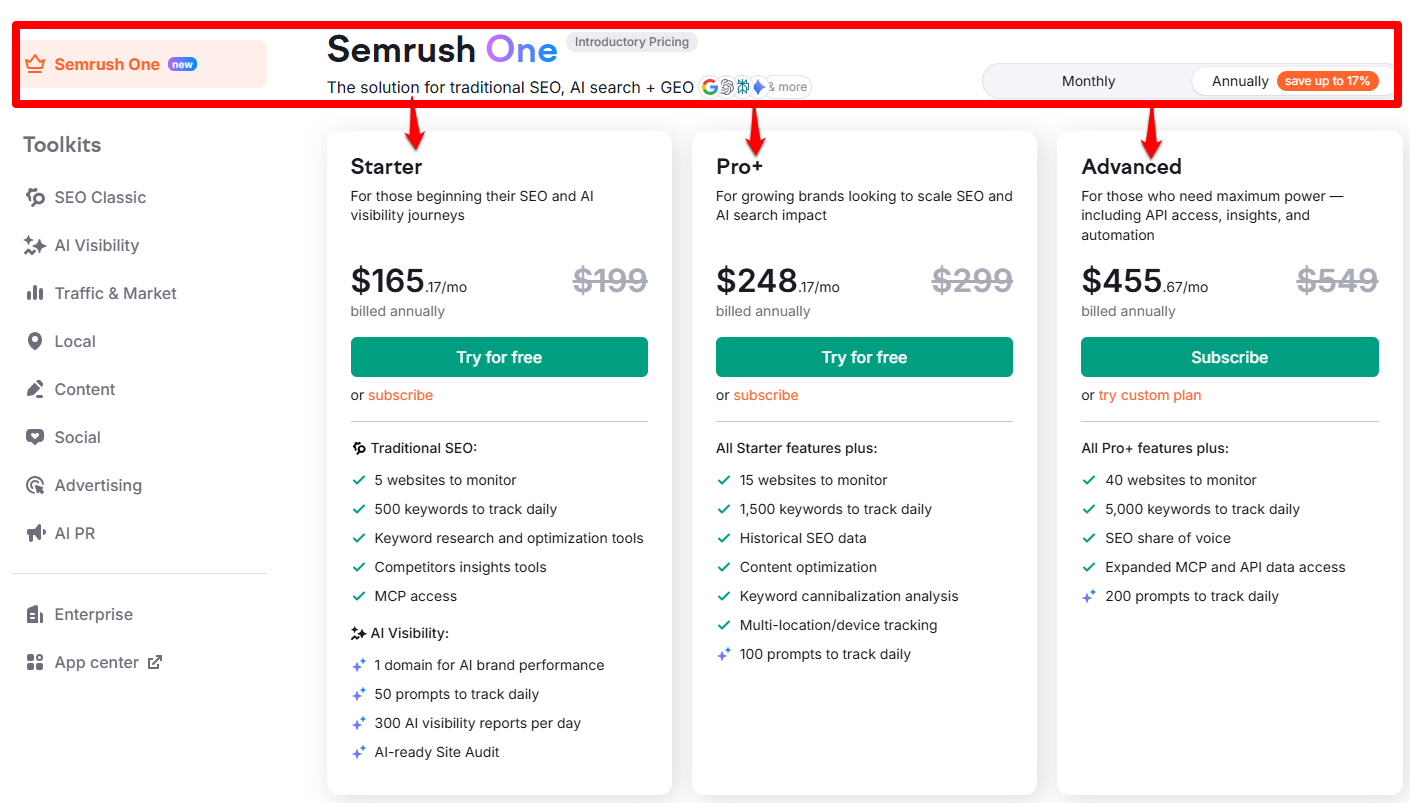
The SEO Classic plan now offers three tiers: Pro, Guru, and Business. These are the same plans long-time Semrush users already know — Pro for freelancers and solo marketers, Guru for growing teams that need content and historical data tools, and Business for agencies and larger operations that require API access, share of voice tracking, and multi-user seats.
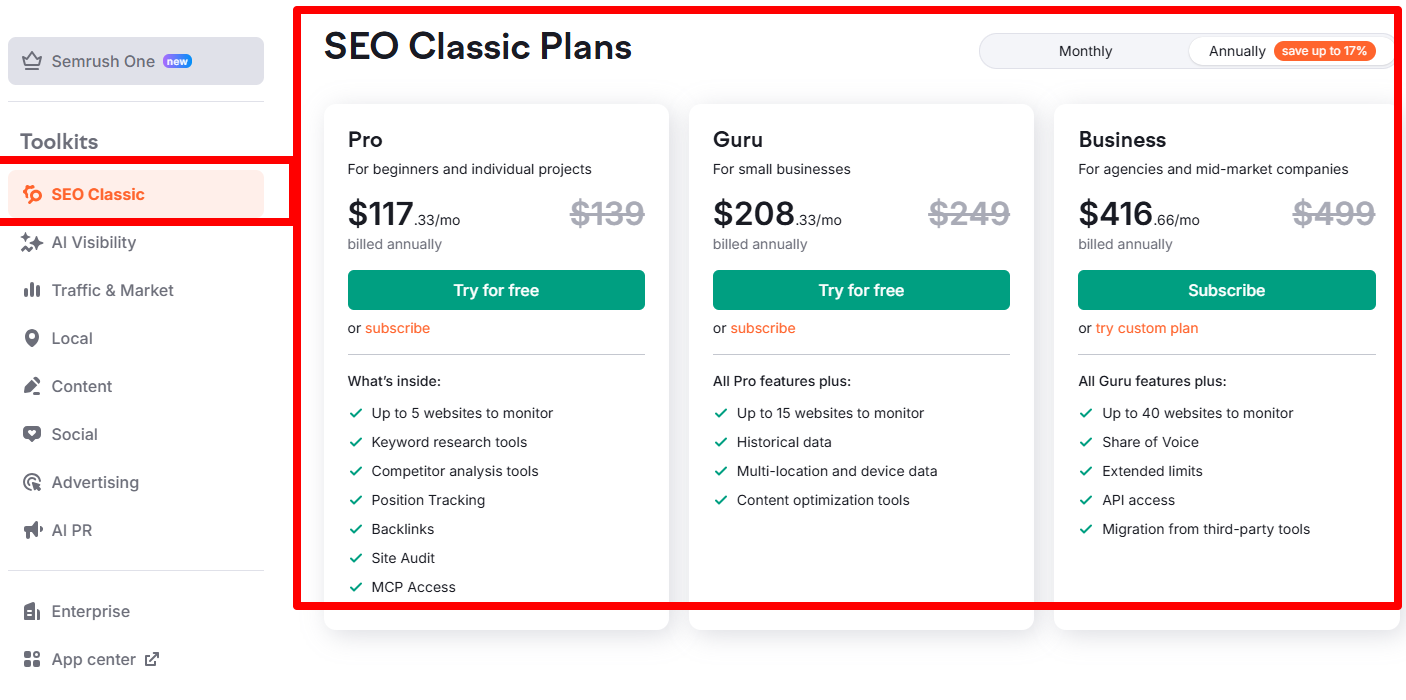
SEO Classic Plans: Pro, Guru, and Business
The image above shows the legacy side of Semrush’s pricing — the SEO Classic Plans. While Semrush One gets all the attention for bundling AI visibility, SEO Classic remains the go-to path for marketers who live and breathe traditional search. It comes in three tiers: Pro, Guru, and Business.
Pro — $117.33/mo (billed annually, down from $139)
For beginners and individual projects. Pro gives you up to 5 websites to monitor, keyword research tools, competitor analysis, position tracking, backlinks, Site Audit, and MCP access. This is the entry point for solo bloggers, freelancers, and anyone testing the waters. The “Try for free” button means the Semrush Free Trial is fully available on this tier — perfect if you want to sample the core SEO toolkit before paying a cent.
Guru — $208.33/mo (billed annually, down from $249)
For small businesses. Guru includes everything in Pro, plus up to 15 websites to monitor, historical data, multi-location and device tracking, and content optimization tools. If you’re managing a handful of client sites or running a content-heavy blog, Guru is where the value kicks in. Historical data alone is worth the jump — it lets you track ranking trends over time instead of just seeing a snapshot. The “Try for free” button here means the 14-day Semrush Free Trial also covers this tier.
Business — $416.66/mo (billed annually, down from $499)
For agencies and mid-market companies. Business adds up to 40 websites to monitor, Share of Voice, extended limits, API access, and migration from third-party tools. Note the button says “Subscribe” rather than “Try for free” — so the Semrush Free Trial isn’t directly available on Business. It’s built for agencies managing large portfolios and teams that need programmatic access.
Key takeaways from this pricing page:
-
Every plan shows annual billing by default, with “save up to 17%” baked into the displayed prices
-
The monthly prices ($139, $249, $499) are crossed out to emphasize the discount
-
Pro and Guru both offer “Try for free” — so the Semrush Free Trial is accessible on two of the three SEO Classic tiers
-
Business is subscribe-only — no trial button, just a “try custom plan” link
Which SEO Classic trial should you pick?
-
Pro trial → if you’re a solo blogger or freelancer who only needs the SEO essentials
-
Guru trial → if you manage multiple sites and want historical data + content tools
-
Business → no free trial, but worth a custom demo if you’re an agency or mid-market company
The smart play: start the Semrush Free Trial on Pro, explore the core toolkit, then upgrade to Guru mid-trial if you need historical data or more websites. That way you see exactly what each tier offers before locking into an annual commitment.
To help you choose the right plan to test, here’s a side-by-side comparison of the Semrush One plans available with a free trial:
| Plan | Best For | What You Can Test Free | Why Choose |
|---|---|---|---|
| Semrush One Starter | Bloggers, freelancers & solopreneurs | SEO + AI visibility tools, keyword research, competitor analysis, audits, rank tracking | Future-ready for both SEO & AI search visibility |
| Semrush One Pro+ | Marketers & small teams | Keyword, domain & competitor research, audits, backlinks, rank tracking | Simplest, most affordable core SEO tools |
| Semrush One Advanced | Content teams & agencies | Everything in Pro+, plus higher limits, historical data, content tools, multi-location tracking | More data, higher limits, content tools & reporting power |
| Classic SEO | Traditional SEO users | Keyword & competitor research, backlinks, audits, rank tracking, reporting | Traditional SEO workflows only, no AI visibility |
Why Semrush?
Semrush is one of the most complete digital marketing tools you can find today. I’ve been using it for years — mostly for checking what competitors rank for, finding good keywords, and planning content. And if you truly want to grow your organic traffic, it’s hard to ignore how much data Semrush gives you in one place.
The Largest Keyword Database in the Industry
Semrush offers the world’s largest keyword database compared to alternatives like Ahrefs, Moz, and SurferSEO. We’re talking 28.4+ billion keywords indexed across 142 GEO databases. And from my own experience, the data tends to be remarkably accurate — you can see my detailed accuracy test here.
Trusted by Millions Worldwide
As of May 2026, Semrush has surpassed 10 million users and serves over 117,000 paying customers. That scale matters: more users means more data flowing back into the platform, a stronger global support network, and a deeper pool of community tips, hacks, and workflows.
Built for the AI Search Era
Semrush is also shipping new tools weekly to help users keep pace with AI visibility growth. That’s a big reason the Semrush Free Trial is worth testing right now — you get hands-on access to both the traditional SEO toolkit and the newer AI visibility features, without paying a cent upfront.
How to Start Your Semrush Free Trial (3 Easy Steps)
Semrush has quite a few pricing plans now — and that can get confusing quickly. So here’s a simple, step-by-step guide to activating your Semrush Free Trial without any hassle.
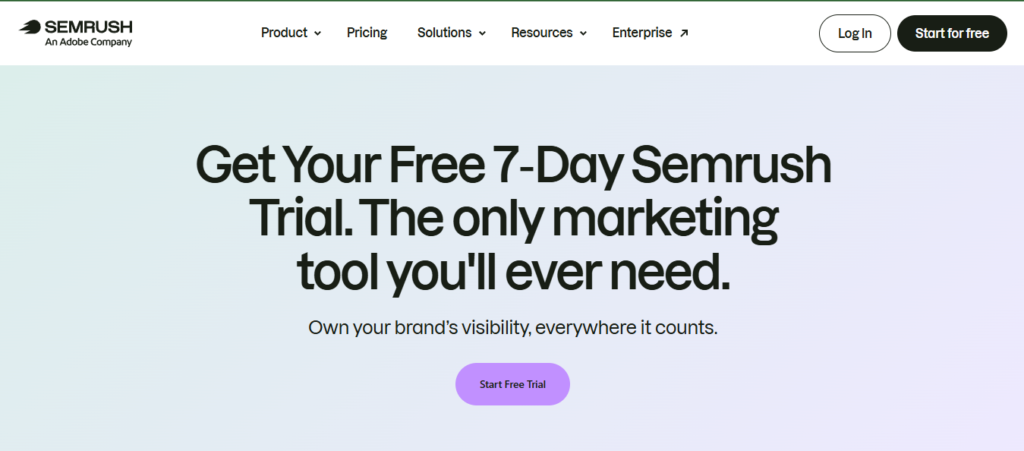
Step 1: Visit the Trial Page
As a Hosting Rated reader, you get access to a special 14-day Semrush Free Trial. Just head over to this page, and you’ll see a screen like this:
Step 2: Create Your Free Semrush Account
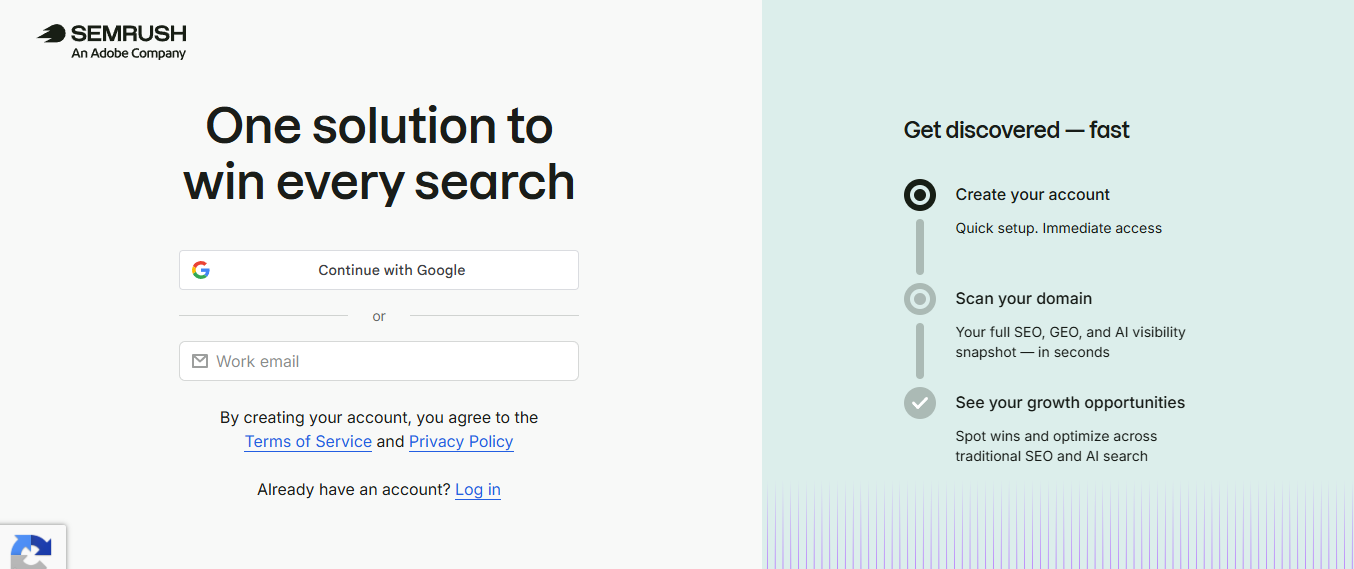
Once you land on the signup page, you’ll see the headline “One solution to win every search” — a clear sign you’re in the right place.
You have two quick ways to register:
-
Continue with Google — the fastest option, one click and you’re in.
-
Sign up with your work email — just enter your email address and hit continue.
On the right side of the screen, Semrush shows you exactly what happens next:
Create your account — Quick setup, immediate access
Scan your domain — Get a full SEO, GEO, and AI visibility snapshot in seconds
See your growth opportunities — Spot wins and optimize across traditional SEO and AI search
By creating your account, you agree to Semrush’s Terms of Service and Privacy Policy. And if you already have an account, just click Log in instead.
Step 3: Choose Your Plan & Start Your Free Trial
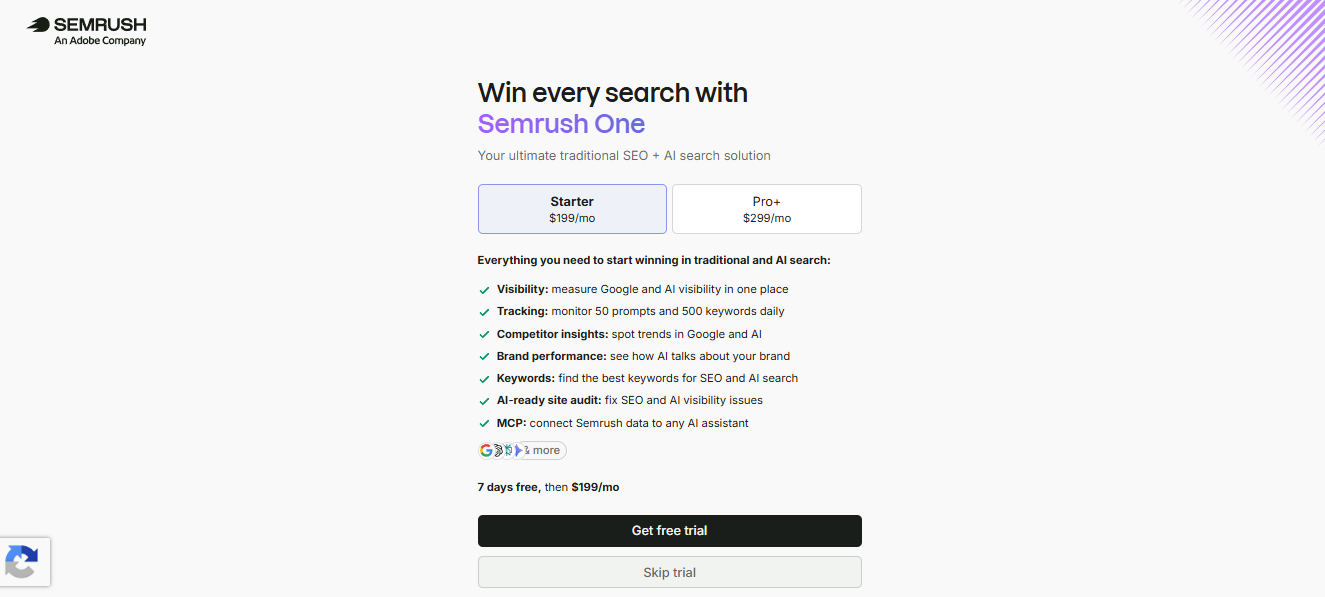
Once your account is created, Semrush will ask you to pick a plan. You’ll see two options on this screen:
-
Starter — $199/mo
-
Pro+ — $299/mo
For most users, Starter is the best place to begin. It includes everything you need to start winning in traditional and AI search:
✅ Visibility — measure Google and AI visibility in one place
✅ Tracking — monitor 50 prompts and 500 keywords daily
✅ Competitor insights — spot trends in Google and AI
✅ Brand performance — see how AI talks about your brand
✅ Keywords — find the best keywords for SEO and AI search
✅ AI-ready site audit — fix SEO and AI visibility issues
✅ MCP — connect Semrush data to any AI assistant
Below the feature list, you’ll see the trial terms clearly stated: “7 days free, then $199/mo.”
Click the black “Get free trial” button to continue. If you’d rather not start the trial right now, you can click “Skip trial” instead.
Step 4: Enter Payment Details & Activate Your Trial
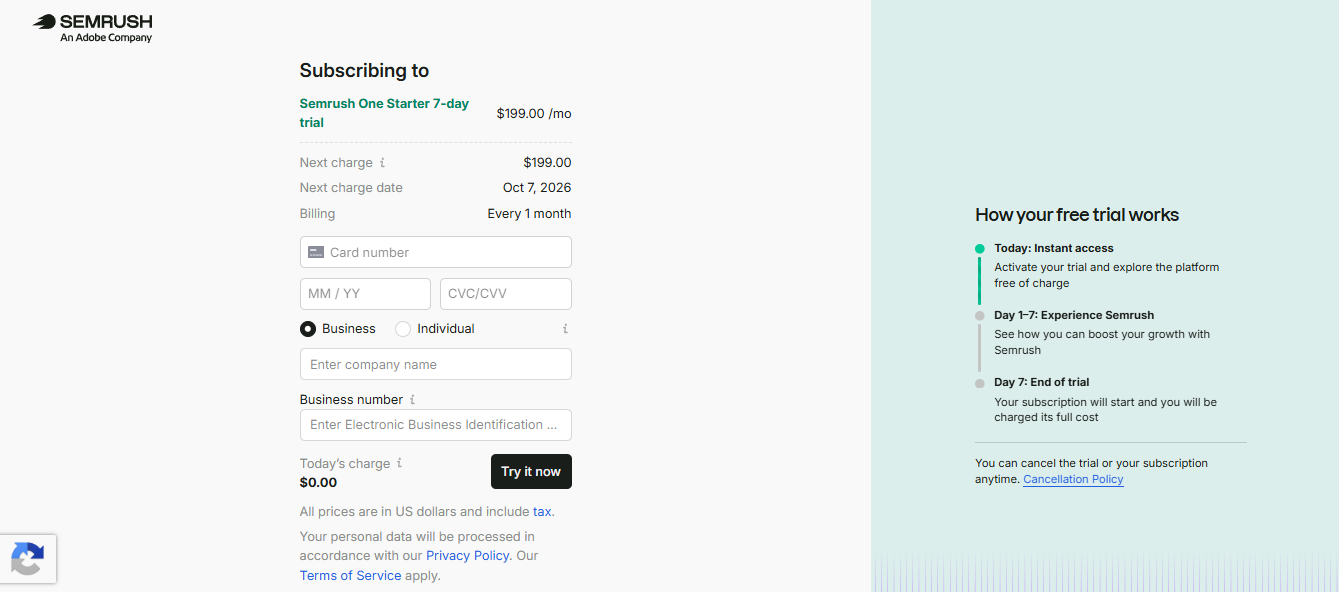
This is the final step. You’ll land on a checkout page titled “Subscribing to Semrush One Starter 7-day trial” — confirming you’re about to start the 7-day trial at $199.00/mo.
Here’s what you need to fill in:
-
Card number — your credit or debit card details
-
Expiry date (MM/YY) and CVC/CVV — standard card verification fields
-
Business or Individual — select which applies to you
-
Company name and Business number — only required if you select “Business”
Once everything is filled in, you’ll see “Today’s charge: $0.00” — confirming the trial is completely free to start. Click the black “Try it now” button to activate your trial.
On the right side of the screen, Semrush clearly explains how the trial works:
🔹 Today: Instant access — Activate your trial and explore the platform free of charge
🔹 Day 1–7: Experience Semrush — See how you can boost your growth with Semrush
🔹 Day 7: End of trial — Your subscription will start and you’ll be charged the full cost
Important: You can cancel the trial or your subscription anytime — just check the Cancellation Policy link shown on the page.
That’s it — you’re in.
Once you click “Try it now,” your Semrush Free Trial is live. You’ll have full access to the platform immediately, with $0.00 charged today.
Take the next few days to explore keyword research, competitor analysis, site audits, and the AI visibility tools. And remember — you can cancel anytime before the trial ends, so there’s zero risk in testing everything out.
Ready to start? Claim your Semrush Free Trial below!👇
You Won’t Pay a Thing During Your Free Trial
You won’t be charged anything during the two-week unlimited Semrush Free Trial. That means you can test Semrush One properly before deciding whether it’s worth keeping.
And if your subscription renews by mistake, Semrush says you can still ask for a refund within 7 days of renewal — as long as you’re on an annual plan.
Still, don’t wait until day 13 to make a decision. Set a reminder, make the most of your trial, and cancel early if it’s not the right fit. That way, you get to try Semrush without any unnecessary risk.
How to Cancel Your Semrush Subscription (2 Easy Ways)
Option 1: Cancel Online
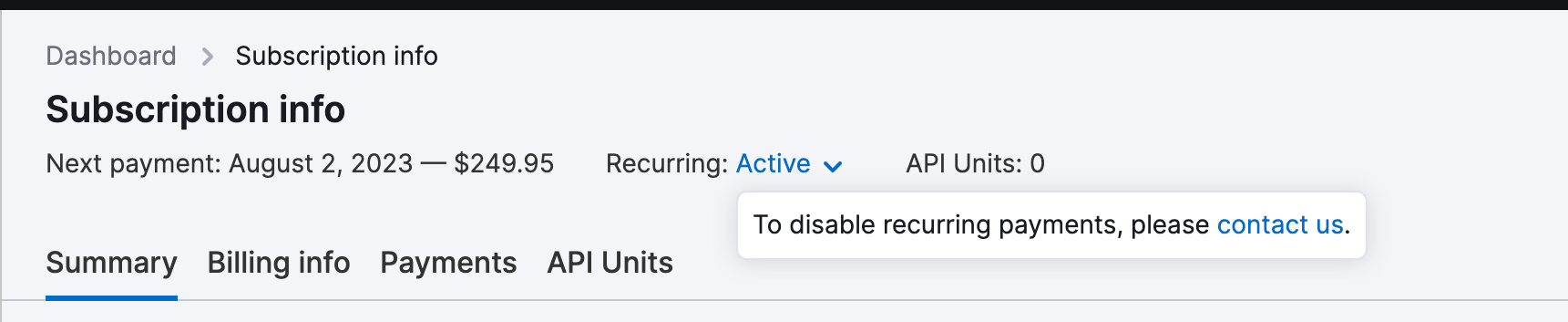
Log in to your account and follow the cancellation link to submit a cancellation request.
Option 2: Contact Support
Email the Semrush support team from the same email address you used to sign up. In your message, include:
-
Your billing amount
-
The date of your last payment
-
The last 4 digits of your credit card
This helps them find your account and cancel your subscription as fast as possible.
What Happens After You Cancel?
Once you cancel, your account switches back to the free version. And don’t worry — Semrush keeps all your project data safe for 30 days, in case you decide to come back.
A Quick Tip Before You Cancel
You won’t pay anything during the two-week unlimited Semrush Free Trial, so you can test Semrush One properly before deciding whether to keep it.
If your subscription renews by mistake, Semrush says you can still request a refund within 7 days of renewal — as long as you’re on an annual plan.
Still, don’t wait until day 13 to act. Instead:
-
Set a reminder
-
Make the most of your trial
-
Cancel early if it’s not the right fit
That way, you get to try Semrush without taking on any unnecessary risk.
What Semrush features to expect in the free trials
One of the best things about the Semrush Free Trial is how much you actually get to use. This isn’t a stripped-down demo — you get access to the same tools I’ve relied on to grow BloggingX into a six-figure-revenue site over the years.
Here are the standout features you can test during your trial:
Keyword Research: The Keyword Magic Tool helps you uncover keyword ideas, check search volume, measure keyword difficulty, and understand search intent. Whether you’re planning blog posts, product pages, comparison articles, or full topic clusters — this tool does the heavy lifting.
Rank Tracking: Track your keyword positions across different devices and locations, and watch how they shift over time. This is especially useful when you publish new content, refresh old posts, or run SEO campaigns for clients.
Competitor Analysis: See exactly which keywords your competitors rank for, where their traffic comes from, which pages perform best, and who links to them. Instead of guessing what works in your niche, you can reverse-engineer what’s already proven.
Site Audits & On-Page SEO: Scan your site for technical issues — broken links, crawl errors, missing metadata, duplicate content, slow pages, and anything else holding your rankings back.
Backlink Analytics: Analyze your backlink profile, find link-building opportunities, compare your backlinks against competitors, and spot harmful links. This helps you grow your site’s authority while protecting it from low-quality backlink risks.
Content Marketing Tools: Get topic research, SEO content briefs, writing optimization, and content performance tracking — everything you need to plan and improve content that ranks.
Local SEO:Semrush gives local businesses the tools to rank in location-based searches. You can track local rankings, manage business listings, optimize your Google Business Profile, and get clear insights into your local visibility — all in one place.
AI-Powered Content Creation: Access AI-assisted tools like ContentShake AI for content ideation, drafting, optimization, and publishing. It also includes WordPress integration, SEO suggestions, and readability guidance — perfect for bloggers and small teams who want to scale content without sacrificing SEO.
Social Media Management: Schedule posts, track social performance, and monitor what your competitors are doing on social. It may not replace a dedicated social tool for every team, but it’s a solid bonus.
Brand Monitoring: Track online mentions of your brand, spot PR opportunities, and understand how people are talking about you across the web.
More Than Just an SEO Tool
What I really like about Semrush is how it keeps expanding beyond traditional SEO. Today, it feels less like a single SEO tool and more like a full digital marketing operating system.
You also get access to extra apps and add-ons through the Semrush app ecosystem — extending the platform into content creation, competitive intelligence, local marketing, analytics, and AI-powered workflows.
One thing to keep in mind: Not every add-on is included in your base subscription. So before you upgrade after your Semrush Free Trial, check which features come with your chosen plan and which ones cost extra.
✅ What We Liked (Pros)
1. Huge Keyword Database
Semrush indexes over 20 billion keywords, giving you real-time SEO insights and trend analysis across almost every industry. Whether you’re targeting a niche blog or a competitive e-commerce store, the data depth is impressive.
2. Deep Backlink Intelligence
With 43 trillion backlinks indexed — complete with quality and authority metrics — you can build links strategically, spot harmful ones, and outrank competitors faster.
3. Solid Local SEO Coverage
142 geodatabases make regional targeting surprisingly precise. If your business depends on local customers, this is a major advantage.
4. AI-Powered Content Tools
Semrush includes AI content creation and optimization tools, plus ChatGPT integration. That means faster drafting, smarter optimization, and less time spent on manual work.
5. Great All-in-One Value
Semrush isn’t the cheapest option out there — but it can replace multiple tools. If you fully use its SEO, content, backlink, competitor research, and reporting features, the value stacks up quickly.
❌ What Could Be Better (Cons)
1. Can Feel Overwhelming at First
There’s a lot inside Semrush — dashboards, reports, tools, and settings. Beginners may need a few days just to learn where everything is.
2. The Free Plan Is Very Limited
Semrush does offer limited free access, but it’s not enough for serious SEO work. The Semrush Free Trial is a much better way to properly test the platform before committing.
3. Mostly Google-Focused Data
Semrush is strongest for Google SEO. If your strategy depends heavily on Bing, Yahoo, or other search engines, you may need to factor that in.
4. Some Advanced Features Cost Extra
Not every add-on or premium app is included in the base plan. Depending on what you need, your total cost can rise beyond the standard subscription price.
Latest Semrush Updates: What’s New in 2026
Semrush is evolving fast — and that’s great news if you want a marketing platform that keeps up with how search is changing. Here are the newest features and updates worth knowing about before (or during) your Semrush Free Trial.
ContentShake AI: This AI writing tool turns your topic ideas into SEO-ready drafts. From ideation to writing, optimization, and publishing — it handles the heavy lifting so you can produce content faster.
Semrush Copilot: Think of this as your built-in AI SEO assistant. It reads your Semrush data, flags priority issues, uncovers fresh opportunities, and tells you what to fix next — all right from your dashboard. No more guessing where to start.
Semrush App Center: A marketplace of Semrush apps and third-party tools. It lets you extend the platform beyond core SEO into areas like analytics, local marketing, and more.
AI-Driven Keyword Research: This goes far beyond basic volume and difficulty. You get personalized keyword difficulty scores, topical authority signals, and intent-based insights — helping you pick keywords you can realistically rank for.
AI Toolkit: A set of tools that shows how visible your brand is across AI search platforms like ChatGPT, Gemini, and Perplexity. Essential if AI search matters to your strategy.
AI Content Detector: Checks whether your content sounds natural and human. Use it as a quality check — not as the final judge of whether a piece is genuinely helpful or ready to publish.
Exploding Topics: Spots fast-growing topics before they blow up. Perfect for creating timely content while competition is still low and the opportunity is fresh.
Semrush Free Trial FAQs: Everything You Need to Know
Got questions about the Semrush Free Trial? Here are answers to the most common ones — clear, honest, and straight to the point.
Trial Basics
Is the Semrush Free Trial really free?
Yes. You won’t be charged during the 14-day extended Semrush Free Trial. Just remember to cancel before the trial ends if you don’t want the paid subscription to kick in.
How long is the Semrush Free Trial?
The standard trial runs 7 days. But as a BloggingX reader, you get the extended 14-day Semrush Free Trial — just use the special link here.
Does Semrush offer a 30-day free trial?
No. The 30-day trial was discontinued years ago and isn’t coming back.
Do I need a credit card to start the Semrush Free Trial?
Yes. You’ll need to enter your card details on Semrush’s secure checkout page to activate the trial.
What happens when the Semrush Free Trial ends?
If you cancel before the 14-day trial period ends, you won’t be charged. If you don’t cancel, your subscription renews automatically based on the plan you picked at signup.
Does Semrush offer a refund if I forget to cancel?
Yes — but only on annual plans. If you signed up for an annual plan, you can request a refund within 7 days of renewal. Monthly plans don’t qualify for refunds.
Can I restart the Semrush Free Trial after it ends?
Generally, no. Semrush typically allows one free trial per account. If you want to keep testing, you’d need to subscribe or contact support to see if you qualify for an extension.
Is there a free plan instead of a trial?
Yes, Semrush offers a limited free account. But it’s nowhere near enough for serious SEO work — the Semrush Free Trial gives you full access for proper testing.
Choosing Your Plan
Which Semrush One trial should I pick: Starter, Pro+, or Advanced?
It depends on what you want to test:
-
Starter → the lowest-cost way to try Semrush One
-
Pro+ → a stronger balance of SEO, competitor research, and AI visibility tools
-
Advanced → best for larger content campaigns, multiple projects, or client SEO work
Is Semrush One worth trying?
Yes — especially if you want to test both traditional SEO and newer AI search visibility workflows in one platform.
What’s the difference between Semrush One and SEO Classic?
Semrush One bundles traditional SEO with AI visibility tools. SEO Classic is the legacy path — SEO only, no AI visibility layer.
Which plan gives the best value during the trial?
Starter is the best entry point for most users. It’s the cheapest way to test the full Semrush One experience, including AI visibility features.
Usability & Learning
Is Semrush good for beginners?
Yes, but expect a learning curve. There are a lot of tools, reports, and dashboards, so it can feel overwhelming at first. Beginners should start with these five core tools:
-
Keyword Magic Tool
-
Site Audit
-
Domain Overview
-
Position Tracking
-
On-Page SEO Checker
Does Semrush offer tutorials or training?
Yes. Semrush has a full Academy with free courses, plus an extensive knowledge base and community forum.
How long does it take to learn Semrush?
Most users get comfortable within a week of daily use. Mastering the full platform can take a few months.
Does Semrush work on mobile?
Yes. There’s a Semrush mobile app for iOS and Android, plus a mobile-friendly browser version.
Comparisons
Is Semrush better than Ahrefs?
It depends on your workflow. Ahrefs shines for backlink analysis and core SEO research. Semrush offers a broader marketing suite — SEO, content marketing, PPC, local SEO, social media, competitive research, and AI visibility tools. The best way to decide? Test it in your real workflow during the Semrush Free Trial.
Is Semrush better than Moz?
Semrush offers a wider feature set and larger keyword database. Moz is often praised for its simpler interface and stronger community. For all-in-one marketing, Semrush usually wins.
Is Semrush better than Ubersuggest?
Yes, for serious SEO. Ubersuggest is beginner-friendly and cheaper, but Semrush has far deeper data, more tools, and AI-powered features Ubersuggest doesn’t offer.
Is Semrush better than SurferSEO?
They serve different purposes. SurferSEO is focused on content optimization. Semrush is a full marketing suite that also includes content tools. Many pros use both together.
Features & Limits
Can I use all Semrush features during the trial?
You get access to most core tools — keyword research, competitor analysis, site audits, backlinks, rank tracking, content tools, and AI visibility features. Some premium add-ons may not be included.
Are there usage limits during the trial?
Yes. Trial accounts have lower limits than paid plans — for example, fewer keywords tracked and fewer reports per day. Enough to test properly, but not for full-scale campaigns.
Does the trial include API access?
No. API access is reserved for higher-tier paid plans like Business or Advanced.
Are Semrush add-ons included in the trial?
No. Add-ons like the AI Visibility Toolkit (as a standalone) or extra user seats are typically not included in the free trial.
How many projects can I create during the trial?
Starter-tier trials generally allow up to 5 projects. Higher tiers allow more.
Adobe Acquisition Questions
Does Adobe’s acquisition change Semrush pricing or trial access?
No. Semrush remains a separate product with its own plans, tools, accounts, and subscriptions.
Can I access Semrush through the Adobe Suite after the acquisition?
No. Semrush is not bundled into Adobe Creative Cloud or any other Adobe software suite. It’s still a standalone product with separate subscription plans.
Will Semrush change after Adobe’s acquisition?
No immediate changes have been announced. Semrush says product access, features, interface, support, billing, and existing agreements remain the same for now.
Billing & Cancellation
How do I cancel my Semrush Free Trial?
Two ways:
-
Log in and submit a cancellation request through your account.
-
Email Semrush support from the same email you signed up with, including your billing amount, last payment date, and the last 4 digits of your card.
When should I cancel to avoid being charged?
Cancel at least 24 hours before your trial ends. Don’t wait until day 13 or 14 — set a reminder.
What happens to my data after cancellation?
Your account switches back to the free version, and Semrush keeps your project data safe for 30 days in case you return.
Can I switch plans during the trial?
Yes. You can upgrade or downgrade your plan anytime during the trial through your account settings.
Does Semrush charge tax on subscriptions?
Yes. Taxes are applied based on your billing country. The checkout page shows the final amount.
Wrapping Up
Is the Semrush Free Trial worth it?
Absolutely. It’s the best way to test the platform properly before paying. You get full access to core tools, plus a real feel for how Semrush fits your workflow.
What should I do first after activating the trial?
Start with these three steps:
-
Run a Site Audit on your website
-
Set up Position Tracking for your main keywords
-
Explore the Keyword Magic Tool to find new content opportunities
Claim Your Extended 14-Day Free Trial of Semrush One
Google isn’t the only place people search anymore.
These days, your brand also needs to show up inside AI search tools, stay visible against competitors, and keep pace with how content gets discovered across the web. That’s the gap Semrush One was built to close.
Instead of juggling separate tools, you get traditional SEO, competitor research, content marketing, and AI visibility all inside one platform. The result? A clear view of where you stand — and a practical path to what you should fix next.
Of course, the ideal Semrush Free Trial depends on what you’re hoping to test in your 7–14 day window.
Use this quick guide to pick your starting point:
-
Testing SEO + AI visibility side by side? → Start with Semrush One Starter
-
Running multiple sites or client accounts? → Choose Semrush One Pro+
-
Need higher limits, API access, or agency-level reporting? → Look at Advanced
-
Focused purely on traditional SEO? → SEO Classic is the better fit
Whichever route you take, the plan is simple: use your 14-day Semrush Free Trial to run real tests on your own website, explore every tool, and figure out whether Semrush belongs in your workflow — all before spending anything.
Grab your extended 14-day Semrush Free Trial now.
Final Thoughts: Is the Semrush Free Trial Worth It?
If you’ve made it this far, you already know the answer — yes.
The Semrush Free Trial gives you full access to one of the most complete digital marketing platforms available today. You get keyword research, competitor analysis, site audits, backlink tracking, content tools, and AI visibility features — all in one place, all free for 14 days.
What makes it worth testing right now is timing. Search is changing fast. Google is no longer the only discovery channel — AI platforms like ChatGPT, Gemini, and Perplexity are becoming major traffic sources. Semrush One is one of the few platforms that lets you track both traditional SEO and AI visibility in a single dashboard.
That said, Semrush isn’t for everyone:
-
Bloggers and content creators → perfect fit for keyword research, content planning, and AI visibility tracking
-
Agencies and marketers → strong value for competitor research, client reporting, and multi-project management
-
Local businesses → solid local SEO tools with 142 geodatabases
-
Total beginners → expect a learning curve, but the trial gives you room to explore
The best part? You don’t have to decide today. Start your 14-day Semrush Free Trial, test it on your own website, and see for yourself whether it fits your workflow. Cancel anytime before the trial ends if it’s not the right fit — no risk, no pressure.

Leave a Comment