
Choosing the right web hosting is a big decision. It can make or break your website’s success. Your hosting provider affects many things. These include speed, security, uptime, and user experience. Whether you run a blog, a business site, or an online store, your choice matters. Even SaaS applications depend on good hosting.
This guide will help you decide. We will compare cloud hosting vs traditional hosting. We’ll explain how each one works. We’ll look at the good and bad sides of both. By the end, you’ll know which one fits your needs best.
What is Cloud Hosting?
Cloud hosting is a modern hosting method. It uses multiple virtual servers instead of one physical server. Your website can pull resources from a connected network. These resources include CPU power, memory, and storage space.
How Cloud Hosting Works
Cloud hosting uses virtualization to distribute website resources across several servers. If one server has a problem, another can help keep your website online. This also makes it easier to handle sudden increases in traffic.
Key Characteristics
- Elastic scalability: Resources grow or shrink on their own. They adjust based on what your site needs. You don’t have to manage this manually. Traffic spikes are handled smoothly.
- High availability: Built-in backup protects your site. Multiple servers mean less downtime risk. If something goes wrong, another server steps in.
- Pay-as-you-go pricing: You only pay for what you use. This includes compute time, storage, and bandwidth. No wasted money on unused resources.
- Distributed infrastructure: Your site runs across many data centers. This gives global reach. Users everywhere enjoy lower latency and faster loading.
Common Use Cases
Cloud hosting works well for many projects. Growing e-commerce stores benefit from it. SaaS platforms rely on its flexibility. Business websites gain reliability. Content-heavy sites perform better. Development projects scale easily. It is especially useful for websites that need flexible resources and dependable performance.
What is Traditional Hosting?
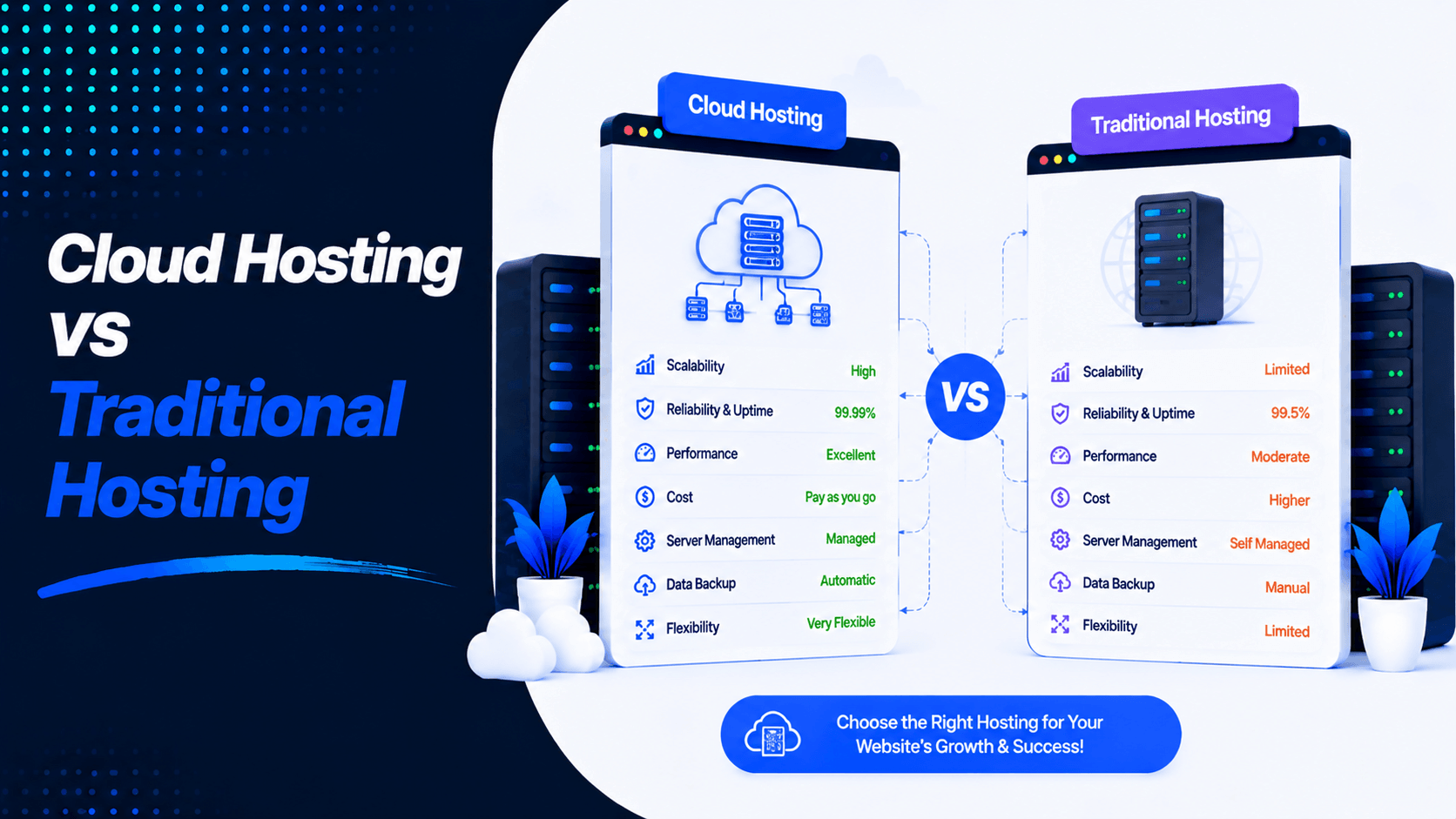
Cloud Hosting vs Traditional Hosting: Quick Comparison
Compare cloud and traditional hosting side by side to understand their key differences and choose the best option for your website.
| Feature | Cloud Hosting | Traditional Hosting |
| Infrastructure | Multiple interconnected servers | Single physical server |
| Performance | High and consistent | Depends on server specs and load |
| Scalability | Instant (scale up/down on demand) | Limited (requires upgrades/migration) |
| Uptime | Very high (redundant servers) | Moderate to high (single point of failure) |
| Reliability | Excellent (failover built‑in) | Good (depends on provider) |
| Cost | Pay for what you use (usage‑based) | Fixed monthly pricing |
| Security | Advanced (distributed infrastructure) | Depends on provider and setup |
| Resource Allocation | Flexible (resources adjust automatically) | Fixed (allocated at purchase) |
| Traffic Handling | Excellent (auto‑scales for spikes) | Limited by server capacity |
| Maintenance | Minimal (provider handles most) | More manual (server‑specific) |
| Best For | Growing websites, variable traffic | Small to medium, predictable traffic |
How Cloud Hosting Works
Cloud hosting uses multiple connected servers instead of relying on one physical machine. This makes websites more flexible, reliable, and easier to scale.
- Distributed Server Network: Website files and resources run across many servers. These servers can be in different locations.
- Load Balancing: Incoming traffic spreads between servers. This keeps performance stable. No single server gets overloaded.
- Automatic Failover: If one server fails, another takes over. The website continues running. This helps reduce downtime significantly.
- Resource Allocation: CPU power adjusts as needed. RAM and storage also scale. Resources increase or decrease based on website demands.
- Data Redundancy: Data stores across multiple servers. This protects information from hardware failures. Your data stays safe and accessible.
How Traditional Hosting Works
Traditional hosting usually relies on a single physical server with fixed resources. Your website’s performance depends on the server’s available CPU, RAM, and storage.
- Fixed Resources: CPU, RAM, and storage are set by the plan. Shared hosting splits these resources among many websites. Each site gets a portion.
- Manual Upgrades: When your website needs more resources, you must act. You can upgrade your plan. Or you may move to another server. This takes time and effort.
- Local Storage: Website files and databases live on the same server. Everything stays in one place. This simplifies management.
- Resource Sharing: In shared hosting, multiple websites share server resources. One site with heavy traffic can slow down others. Performance becomes unpredictable.
- Single Point of Failure: Hardware problems affect your website. If the server fails, your site goes offline. It stays down until the issue gets fixed. This creates risk for your business.
Advantages of Cloud Hosting
- Easy Scalability: You can adjust resources with ease. Increase or decrease CPU, RAM, storage, and bandwidth as traffic changes. This happens with little or no downtime.
- Better Uptime: If one server fails, another takes over automatically. Your website stays available to visitors. You avoid costly downtime.
- High Performance: Workloads spread across multiple servers. This delivers faster loading speeds. You get consistent performance at all times.
- Pay-as-You-Go Pricing: You pay only for what you use. This covers the resources your website consumes. It makes cloud hosting cost-efficient for growing businesses.
- Disaster Recovery: Data copies across multiple servers. You can recover quickly after hardware failures. Unexpected outages become less threatening.
- Global Server Availability: Data centers exist around the world. This reduces latency for international visitors. Loading times improve significantly.
- Automatic Backups: Scheduled backups happen automatically. Your website data stays protected. Restoring files becomes quick and simple.
- Better Traffic Handling: Resources allocate automatically during traffic spikes. Your site prevents slowdowns. Downtime gets avoided entirely.
Disadvantages of Cloud Hosting
Cloud hosting offers great flexibility and scalability. However, it also has some drawbacks. You should consider these before making a choice.
- Can Cost More: Small websites with steady traffic may pay more. Cloud hosting is often pricier than traditional options. Your budget matters here.
- Complex Pricing: Usage-based billing creates uncertainty. Monthly costs become harder to predict. You may not know your bill until it arrives.
- Requires Technical Skills: Proper setup needs expertise. Security configuration demands knowledge. Resource management takes technical know-how. Beginners may find this challenging.
- Higher Costs During Traffic Spikes: More visitors increase resource usage. This raises your hosting bill automatically. Successful marketing campaigns can become expensive. Your costs grow with your traffic.
Advantages of Traditional Hosting
Traditional hosting remains a practical solution. Many websites still benefit from it. Here are the key advantages.
- Predictable Monthly Pricing: Fixed plans make budgeting simple. You pay the same amount each month. No unexpected costs appear on your bill.
- Easy for Beginners: User-friendly control panels help new users. One-click installers simplify setup. First-time website owners find it accessible.
- Simple Management: The hosting provider handles most maintenance. This includes server updates and basic monitoring. You have less technical work to do.
- Lower Starting Cost: Shared hosting plans are affordable. Entry-level VPS options also fit tight budgets. Startups and personal websites benefit greatly.
- Good for Small Websites: You get reliable performance for blogs. Portfolios work well on traditional hosting. Local business websites perform just fine. Sites with stable traffic find it suitable.
Disadvantages of Traditional Hosting
Traditional hosting can be affordable and simple. However, it has several limitations. Cloud hosting often overcomes these drawbacks.
- Limited Scalability: Resources stay fixed with your plan. Upgrading requires changing plans. You may need to move to another server entirely.
- Single Point of Failure: The main server is critical. If it fails, your website goes offline. Nothing can keep it running until repairs happen.
- Higher Downtime Risk: Hardware problems cause outages. Maintenance work takes your site down. Network issues also lead to downtime.
- Fixed Resources: Your website gets limited CPU power. RAM and storage are also capped. You cannot exceed your plan’s allowances.
- Slower During Traffic Spikes: Sudden visitor increases slow your site. Performance drops significantly. Your website may become completely unavailable.
Performance Comparison
Cloud hosting and traditional hosting deliver performance differently. The gap becomes clear when handling traffic and ensuring reliability.
- Website Speed and Response Time: Cloud hosting typically wins here. Cloud environments spread load across multiple servers. This enables faster server response times of 50-150ms. Traditional hosting averages 100-300ms. Page load times also differ. Cloud delivers 1.2-2.5 second loads. Traditional takes 2.1-4.2 seconds.
- Resource Availability: Cloud hosting adjusts resources based on demand. CPU, RAM, and bandwidth scale as needed. Traditional hosting provides fixed resources. These become a limitation as traffic grows.
- High-Traffic Performance: Cloud hosting handles sudden traffic increases well. Resources scale up automatically. Traditional hosting may slow down significantly. Server resources can become exhausted. Your website might even become unavailable.
- Global Accessibility: Cloud hosting uses multiple data centers. CDNs deliver content closer to visitors. Traditional hosting depends on a single server’s location. Performance varies based on user distance.
- Reliability: Cloud hosting uses multiple servers. A problem with one server may not affect your site. Traditional hosting has higher downtime risk. Your website goes offline when the main server fails.
Scalability Comparison
Your website gains traction and traffic grows. How easily can your hosting adapt? This question separates cloud hosting from traditional hosting.
Vertical vs Horizontal Scaling
Traditional hosting relies on vertical scaling. This means scaling up. You upgrade a single server with more CPU, RAM, or storage. This approach has limits. You can only upgrade so far. Hardware capacity eventually stops you. Upgrades often require downtime.
Cloud hosting uses horizontal scaling. This means scaling out. You add more servers to distribute the load. Growth potential becomes virtually unlimited. Built-in redundancy comes automatically.
Handling Sudden Traffic Spikes
Traditional hosting struggles with traffic spikes. A single server can become overwhelmed. This leads to slow pages or crashes. Cloud hosting adds resources in real-time. Load balancers distribute traffic across multiple servers. Your site stays stable during unexpected surges.
Resource Upgrades
Traditional hosting requires manual intervention. You contact support for help. You purchase more capacity. You may migrate to a new server. Downtime often occurs during upgrades. Cloud hosting allows instant adjustments. Use a control panel or API. Changes happen with no downtime.
Business Growth Support
Cloud hosting offers dynamic scalability for growing businesses. Start small and expand resources as traffic grows. Pay only for what you use. Traditional hosting forces upfront predictions. You must guess future needs. Disruptive migrations happen when you outgrow your plan. This creates unnecessary headaches.
Security Comparison
Cloud hosting provides a multi-layered security approach. It is often more robust than what businesses can implement alone. Here are the key security features.
- Data Encryption: Encryption comes standard in cloud environments. Data stays protected in transit using TLS protocols. Data at rest uses strong encryption like AES-256. Your information remains secure at all times.
- Firewalls and Access Controls: Cloud platforms offer advanced firewalls. Zero-trust network architectures enhance protection. Granular role-based access controls limit who can access your data. You decide exactly who gets in.
- DDoS Protection: DDoS protection is built into enterprise-grade cloud infrastructure. Many providers include this feature automatically. Oracle Cloud Infrastructure offers L3/4 DDoS protection with all accounts. No additional configuration is required.
- Automated Backups and Disaster Recovery: Cloud hosting features automatic backups. Cross-region redundancy keeps data safe. If one server fails, another takes over. Interruption stays minimal.
- Compliance Features: Major cloud providers invest billions in security. They maintain important certifications. These include ISO 27001, SOC 2, GDPR, and HIPAA. External auditors validate these standards regularly.
Cost Comparison
Initial Setup Costs
Traditional hosting offers budget-friendly entry points. Shared hosting costs around $3–$20 monthly. VPS hosting runs $20–$100 per month. Dedicated servers range from $80–$300+ monthly. Cloud hosting starts at $5–$30 for basic websites. Costs increase as you use more resources.
Monthly Pricing
Traditional hosting uses fixed monthly pricing. A small business pays $5–$15 for shared hosting. The price stays predictable. Cloud hosting uses usage-based pricing. Basic plans often cost $10–$50 monthly. The final amount depends on CPU, RAM, storage, and bandwidth usage.
Long‑Term Expenses
Steady workloads make traditional hosting cheaper over time. You avoid ongoing usage fees. Cloud costs tend to rise as you scale. Data transfer fees alone can consume 20-30% of your monthly bill. One real-world comparison found interesting results. Public cloud costs reached €1.04 million annually. An equivalent traditional setup cost €979,500. That is just a 6.5% difference.
Hidden Costs
Cloud hosting may include additional charges. Backups cost extra. Storage overages add up. Bandwidth fees appear on your bill. Premium services come at a price. Traditional hosting has its own extras. Maintenance costs add up. Upgrades require payment. Security features may cost more. Server management fees apply.
Cloud Hosting vs Traditional Hosting for Different Websites
Not every website needs the same hosting solution. Here is how cloud and traditional hosting compare for different use cases.
Personal Blogs
Traditional shared hosting wins for personal blogs. It is affordable at under $10 monthly. Setup is simple. It works well for steady, low-volume traffic. If your blog grows unexpectedly, cloud hosting offers flexibility. But for most bloggers, traditional hosting is the most cost-effective starting point.
Small Business Websites
Traditional hosting makes sense for many small businesses. VPS plans often work best. They offer predictable fixed pricing. Performance stays solid for brochure-style business sites. However, growing businesses should consider cloud hosting. It allows easier scaling without disruptive migrations.
eCommerce Stores
Cloud hosting is strongly recommended for eCommerce. Online stores need high uptime. They require reliable performance during traffic spikes like Black Friday. The ability to scale instantly matters greatly. Downtime directly costs sales. Cloud’s distributed architecture keeps your store online when it matters most.
SaaS Applications
Cloud hosting is almost always preferred for SaaS. These applications need fast horizontal scaling. High availability is essential. Cloud handles fluctuating user loads without manual intervention. The pay-as-you-go model also aligns with SaaS revenue cycles.
Enterprise Websites
Enterprise sites need maximum scalability. Reliability and security are critical. Cloud hosting delivers redundant infrastructure. Automatic failover protects your site. Robust compliance features meet enterprise standards. Traditional dedicated servers can still work. But cloud’s flexibility often wins for enterprises needing agility.
High-Traffic News and Media Sites
Cloud hosting is the better choice for these sites. It handles unpredictable traffic surges well. Breaking news and viral content cause no performance issues. CDN integration ensures fast global delivery. Traditional hosting often struggles under such loads. Your readers get a better experience with cloud.
SEO Impact
Cloud hosting improves speed, uptime, and user experience. This helps boost SEO performance and search rankings compared to traditional hosting.
Website Speed: Speed is a confirmed ranking factor. Cloud hosting distributes requests across multiple servers. This reduces load on any single machine. Faster response times happen even under high traffic. Traditional shared hosting slows down when neighboring sites consume resources. A one-second delay can reduce conversions by 7%.
Uptime and Crawling: Uptime determines if Google can crawl your site. Frequent downtime signals unreliability. This reduces crawl frequency. New content appears slower in search results. Cloud environments use redundant infrastructure. If one server fails, traffic routes to others automatically. Traditional single-server setups risk extended outages.
Core Web Vitals: Core Web Vitals directly depend on server infrastructure. These include LCP, INP, and CLS. Server response time drives Largest Contentful Paint (LCP). Cloud platforms deliver consistently lower Time to First Byte (TTFB). This contributes to better LCP scores. Faster page delivery improves user experience. Currently, only 42% of mobile sites pass all three Core Web Vitals.
User Experience: User experience influences bounce rates. Slow pages frustrate visitors. This reduces return traffic regardless of referral source. Cloud hosting provides consistent performance during traffic spikes. Traditional hosting degrades when demand exceeds fixed resources.
Search Rankings: Search engines reward fast, reliable infrastructure. Cloud hosting delivers better speed and uptime under real traffic conditions. The gap between sites on modern infrastructure and those on legacy systems will continue to widen. Algorithms increasingly emphasize user experience.
When Should You Choose Cloud Hosting?
Cloud hosting is the better option if you have:
- Rapid Business Growth: Choose cloud hosting if your website is expanding quickly. You need resources that scale instantly. Downtime should not hold you back.
- Seasonal Traffic Spikes: Cloud hosting works well for seasonal businesses. Sales, promotions, holidays, and special events bring sudden traffic. Resources adjust automatically to handle the load.
- Global Audience: Cloud hosting benefits international visitors. Multiple data centers deliver faster loading speeds worldwide. Users everywhere enjoy better performance.
- Mission-Critical Websites: Uptime is essential for some websites. eCommerce stores need constant availability. Banking platforms cannot afford downtime. Healthcare portals require reliability. Business applications depend on consistent access.
- SaaS Platforms: Cloud hosting provides flexibility for SaaS. Scalability supports growing applications. High availability meets user demands. Your platform stays responsive as users increase.
When Should You Choose Traditional Hosting?
Traditional hosting is ideal for:
- Personal Websites: Traditional hosting works well for personal blogs. Portfolios and resumes perform just fine. Hobby websites with low to moderate traffic benefit. Simple hosting requirements are easily met.
- Small Business Sites: It is a good option for many small businesses. You get reliable performance. Management stays easy. Monthly costs remain predictable. Advanced scalability is not required.
- Local Business Websites: Traditional hosting suits local businesses well. Your website mainly serves a specific city or region. Sufficient speed and resources handle daily operations.
- Budget-Conscious Users: Fixed monthly or yearly pricing helps you plan. Traditional hosting offers affordability for startups. Freelancers and students appreciate the low cost. Anyone with a limited budget can get started.
- Low-Traffic Websites: Stable visitor numbers make traditional hosting efficient. Informational sites run smoothly. Company profiles work without issues. Small service websites operate well. You avoid paying for extra resources you do not need.
Common Myths
here are several misconceptions about cloud and traditional hosting. Understanding the facts can help you choose the right option for your website.
Cloud Hosting Is Always Expensive
Cloud hosting is not always costly. Many providers offer affordable plans for small websites. You can also scale resources based on your needs.
- Suitable for small and large websites
- Flexible resource options
- Pay for resources based on usage
- Easy to scale as traffic grows
Traditional Hosting Is Outdated
Traditional hosting is not old or useless. Many websites still use it. It is a great choice for stable traffic.
- Affordable for small websites
- Simple to manage
- Predictable monthly costs
- Suitable for blogs and business websites
Cloud Hosting Is Only for Large Companies
Cloud hosting is not limited to large businesses. Startups, freelancers, and small businesses can also use cloud platforms.
- Affordable entry-level plans
- Easy resource upgrades
- Suitable for growing websites
- Useful for eCommerce and SaaS websites
Traditional Hosting Can’t Be Secure
Traditional hosting can provide strong security when properly configured and maintained.
- SSL certificates protect data
- Firewalls help block threats
- Regular updates reduce vulnerabilities
- Backups help recover lost data
- Security monitoring can detect potential issues
Tips for Choosing the Right Hosting
Choosing the right hosting helps keep your website fast, secure, and reliable.
- Check Traffic Needs: Choose enough CPU, RAM, storage, and bandwidth for your visitors.
- Set a Budget: Compare monthly prices, renewal rates, and extra fees.
- Plan for Growth: Choose hosting that makes it easy to upgrade resources.
- Check Uptime: Look for at least 99.9% uptime for better reliability.
- Review Security: Make sure SSL, firewalls, malware protection, and backups are available.
- Check Support: Choose a provider with 24/7 customer support.
- Compare Performance: Look for fast storage, caching, and CDN support.
- Check Backups: Automatic backups provide peace of mind. Easy recovery protects your website. Data loss becomes less threatening. Your content stays safe.
Frequently Asked Questions (FAQ)
Is cloud hosting faster than traditional hosting?
In many cases, yes. Cloud hosting delivers faster performance. It distributes workloads across multiple servers. This helps especially during high traffic periods.
Is cloud hosting more secure?
Cloud hosting often includes advanced security features. However, both options can be secure. Proper configuration and maintenance are what matter most.
Which hosting is cheaper?
Traditional hosting usually has lower upfront costs. Monthly fixed rates stay predictable. Cloud hosting costs vary based on resource usage. Your bill changes with your needs.
Can I migrate from traditional hosting to cloud hosting?
Yes, you can. Most hosting providers offer migration tools. Managed migration services simplify the process. Moving your site is straightforward.
Which hosting is best for WordPress?
Small WordPress websites work well on traditional hosting. Larger WordPress sites benefit from cloud hosting. High-traffic sites need cloud scalability.
Is cloud hosting suitable for beginners?
Yes, it is. Many managed cloud services offer user-friendly dashboards. Automated updates reduce technical work. Technical support helps when needed. Beginners find it accessible.
Which option offers better uptime?
Cloud hosting generally offers higher uptime. Multiple servers provide redundancy. Automatic failover keeps your site running. Your website stays online more often.
Conclusion
Choosing between Cloud Hosting vs Traditional Hosting depends on your needs. Consider your traffic levels. Think about your budget. Plan for future growth too.
Traditional hosting works well for many sites. Blogs perform great on it. Portfolios run smoothly. Small business websites with steady traffic benefit. Costs stay predictable.
Cloud hosting suits growing businesses better. eCommerce stores need its features. Websites needing scalability benefit most. Flexibility and high reliability come standard.
Think about your current requirements carefully. Consider your future goals too. Take time before making a choice. The right option keeps your website fast. It stays secure and reliable. Your hosting decision matters for long-term success.

Leave a Comment