


Cloudways is running 80% off for the first two months this Black Friday, with savings of up to $200 per month. The deal covers cloud hosting, AI Agents, the AI Website Builder and add-ons, and prices start at just $2.
Cheap is easy. Picking the right plan is the hard part. So I’ve gone through every Cloudways plan and listed the specs, the Black Friday price and the regular price you’ll pay once the offer ends. Use it to find the one that fits your site.
Quick Answer
The deal is simple: 80% off your first two months. Every plan button reads “Get 80% OFF for 2 Months,” and all prices in this guide are monthly, in USD, before tax.
The offer button opens signup with the coupon code BFCM802 already attached. The site countdown ends on December 6, 2026, which is after both Black Friday (November 27) and Cyber Monday (November 30).
The lowest entry prices right now:
- Flexible: $2.80 a month (Micro, on DigitalOcean, Vultr or Linode)
- AI Agents: $2 a month (Scout)
- Velocity (Node.js): $4 a month (Starter)
- Autonomous: $20 a month (Growth)
Deal at a Glance
| Detail | What the page shows |
|---|---|
| Discount | 80% off |
| Length | First 2 months |
| Maximum saving | Up to $200 off per month (see the note below) |
| Applies to | Hosting plans, AI Agents, AI website builder, add-ons |
| Coupon code | BFCM802, attached to the offer button |
| Ends | December 6, 2026 (timer shows 13:00, no time zone) |
| Free trial | Flexible, no credit card needed |
| Who can use it | New signups, as reported. Confirm at checkout |
The countdown doesn’t show a time zone, so don’t wait until the last hour. Deals like this can end earlier than you expect.
There’s also a limited-time offer on the advanced support add-on: 75% off, so $25 a month instead of $100. Read the terms before you add it.
Grab Your Cloudways Black Friday Deal – Get 80% OFF for 2 Months Today!
Get 80% OFF for 2 months on Cloudways hosting! Use coupon code BFCM802 at checkout and grab this limited-time Black Friday deal.

Cloudways Data Center Locations
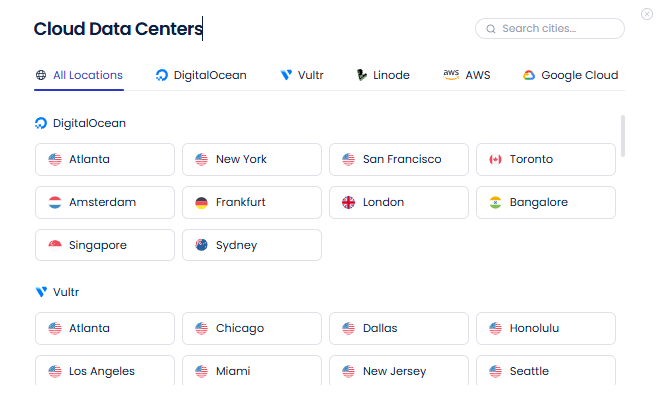
Cloudways lets you pick from five cloud providers, and each has its own list of data centers. The closer the server is to your visitors, the faster your site loads. Here’s how the five stack up.
| Provider | Approx. Locations | Coverage |
|---|---|---|
| DigitalOcean | 10 | North America, Europe, Asia, Australia |
| Vultr | 30+ | Widest spread, including Africa, South America and the Middle East |
| Linode | 20+ | North America, Europe, Asia, Australia, South America, Africa |
| AWS | 30+ | Strong in Asia, the Middle East and Europe |
| Google Cloud | 30+ | Strong in North America and Europe |
Quick tip: Cloudways adds locations over time, so check the live data center picker before you buy.
Before choosing a plan, read our detailed Cloudways hosting review to learn more about its performance, pricing, features, uptime, and customer support.
What You Really Pay After the Deal
The 80% discount lasts two months. Then the regular price kicks in, and it’s five times the deal price. DigitalOcean Basic shows how big the jump is.
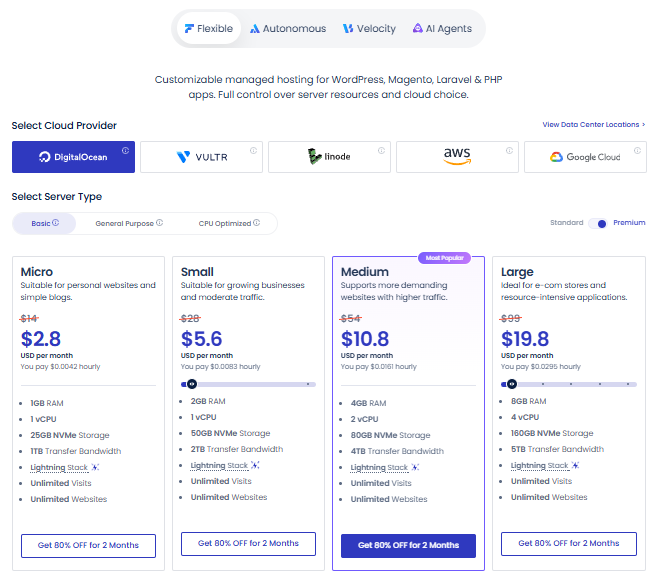
| Plan (DigitalOcean) | Deal price | Total for 2 months | Regular price after |
|---|---|---|---|
| Micro | $2.80 | $5.60 | $14 |
| Small | $5.60 | $11.20 | $28 |
| Medium | $10.80 | $21.60 | $54 |
| Large | $19.80 | $39.60 | $99 |
Here’s the catch: this deal is best for testing a new project or moving a site. If you plan to stay for years, build your budget around the regular price, not the deal price.
How Much You Save in the First 2 Months
Here’s what the discount is worth on popular plans. Totals cover the first two months together.
| Package | Regular, 2 months | With the deal, 2 months | You save |
|---|---|---|---|
| DigitalOcean Basic Micro | $28 | $5.60 | $22.40 |
| DigitalOcean Basic Small | $56 | $11.20 | $44.80 |
| DigitalOcean Basic Medium | $108 | $21.60 | $86.40 |
| DigitalOcean Basic Large | $198 | $39.60 | $158.40 |
| Vultr High Frequency Medium | $120 | $24 | $96 |
| Autonomous Scale | $398 | $80 | $318 |
| Velocity Growth | $100 | $20 | $80 |
Heads up: the banner says “up to $200 off per month.” On a plan with a regular price above $250, 80% would be more than $200, so a cap may apply. That could make the biggest plans cost more than the deal prices listed here. Always check the cart total before you pay.
Cloudways Plan Types in Brief
Cloudways sells four product lines:
- Flexible: managed cloud hosting for WordPress, Magento, Laravel and PHP. You choose the cloud provider and server size.
- Autonomous: managed WordPress hosting that scales by itself. Built for busy WooCommerce and course sites.
- Velocity: managed Node.js hosting with Git-based deployment and flat monthly pricing.
- AI Agents: managed servers for running OpenClaw or Hermes agents without manual setup.
Flexible Hosting: All Plans and Prices
Flexible is the classic Cloudways setup. You pick a cloud provider, a server type and a size. Every plan includes the Lightning Stack, unlimited visits and unlimited websites. Offsite backup storage costs $0.033 per GB extra, and some higher plans include 4 free AI Copilot credits.
DigitalOcean
For most people, DigitalOcean is the safest pick. Basic covers small sites, while General Purpose and CPU Optimized handle heavier loads.
DigitalOcean Basic
| Package | RAM | vCPU | Storage | Transfer | Deal price | Regular price |
|---|---|---|---|---|---|---|
| Micro | 1GB | 1 | 25GB NVMe | 1TB | $2.80 | $14 |
| Small | 2GB | 1 | 50GB NVMe | 2TB | $5.60 | $28 |
| Medium (Most Popular) | 4GB | 2 | 80GB NVMe | 4TB | $10.80 | $54 |
| Large | 8GB | 4 | 160GB NVMe | 5TB | $19.80 | $99 |
- Micro ($2.80) is the budget pick. Fine for a new blog, a portfolio or a test site. Expecting real traffic? Skip it.
- Small ($5.60) doubles the RAM and storage. A solid start for a business site with a few plugins.
- Medium ($10.80) is where I’d start for most people. Two vCPUs and 4GB of RAM give a growing site some breathing room.
- Large ($19.80) brings four vCPUs and 8GB of RAM. This is the entry point for a busy WooCommerce store or several sites on one server.
DigitalOcean General Purpose
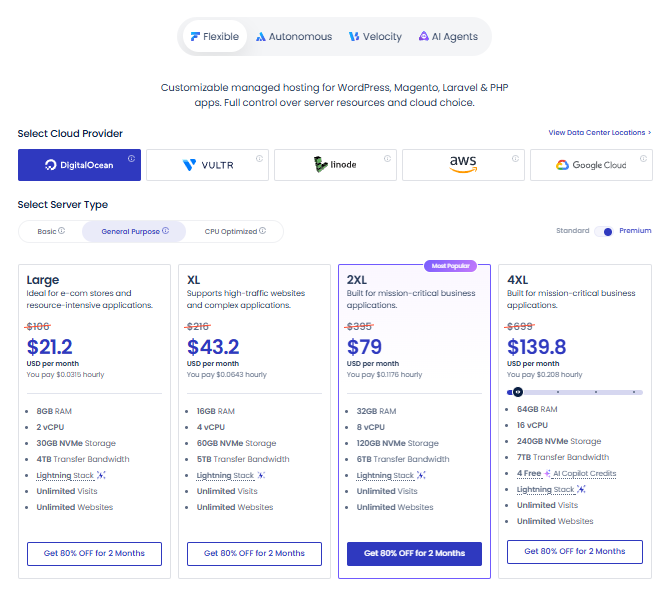
| Package | RAM | vCPU | Storage | Transfer | Deal price | Regular price |
|---|---|---|---|---|---|---|
| Large | 8GB | 2 | 30GB NVMe | 4TB | $21.20 | $106 |
| XL | 16GB | 4 | 50GB NVMe | 5TB | $43.20 | $216 |
| 2XL (Most Popular) | 32GB | 8 | 120GB NVMe | 6TB | $79 | $395 |
| 4XL | 64GB | 16 | 240GB NVMe | 7TB | $139.80 | $699 |
- Large ($21.20): honestly, skip this one. Basic Large gives you the same 8GB of RAM with more vCPUs and more storage, for less money.
- XL ($43.20): 16GB of RAM suits big product catalogs, heavy plugins or a busy membership site.
- 2XL ($79): the favorite in this tier. 32GB of RAM and 8 vCPUs handle steady, heavy traffic.
- 4XL ($139.80): the top of the tier, with 64GB of RAM and 16 vCPUs. Think very large store or several busy apps.
DigitalOcean CPU Optimized
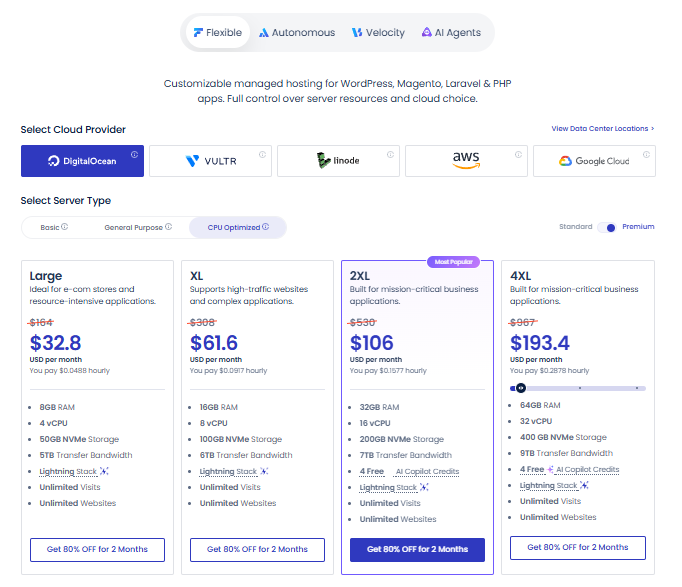
| Package | RAM | vCPU | Storage | Transfer | Deal price | Regular price |
|---|---|---|---|---|---|---|
| Large | 8GB | 4 | 50GB NVMe | 5TB | $32.80 | $164 |
| XL | 16GB | 8 | 100GB NVMe | 6TB | $61.60 | $308 |
| 2XL (Most Popular) | 32GB | 16 | 200GB NVMe | 7TB | $106 | $530 |
| 4XL | 64GB | 32 | 400GB NVMe | 9TB | $193.40 | $967 |
- Large ($32.80): four vCPUs like Basic Large, but with a smaller 50GB disk and a higher price. It favors processing power over storage.
- XL ($61.60): eight vCPUs help when lots of PHP requests land at once, like a store during a sale.
- 2XL ($106): the most chosen plan here. Sixteen vCPUs and 200GB of storage suit large, busy sites.
- 4XL ($193.40): the biggest DigitalOcean plan on the list, with 32 vCPUs, 400GB of storage and 9TB of transfer.
DigitalOcean Data Centers
DigitalOcean keeps its list short, with 10 locations:
- North America: Atlanta, New York, San Francisco, Toronto
- Europe: Amsterdam, Frankfurt, London
- Asia: Bangalore, Singapore
- Australia: Sydney
It works well if your visitors are mostly in the US, Europe or India. Bangalore is the closest DigitalOcean option for South Asia, and Singapore covers Southeast Asia nicely.
Best value overall: DigitalOcean.
Vultr
Vultr matches DigitalOcean on most entry prices. It also offers High Frequency servers, which use faster processors and NVMe storage.
Vultr Standard
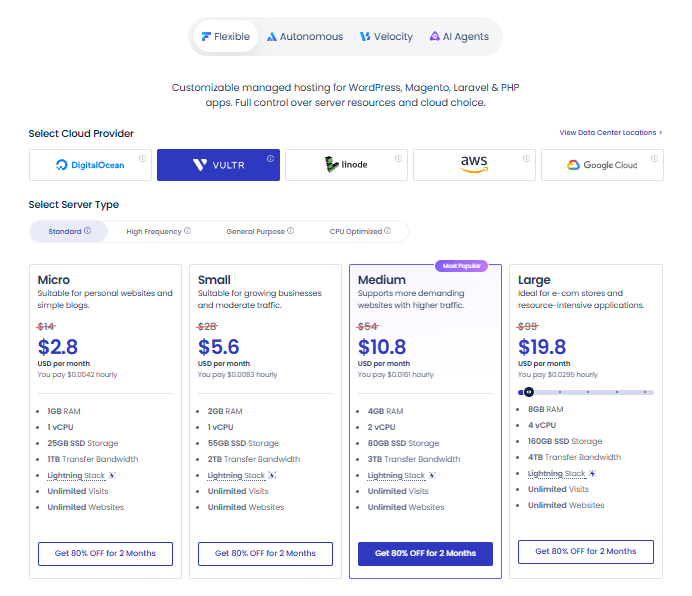
| Package | RAM | vCPU | Storage | Transfer | Deal price | Regular price |
|---|---|---|---|---|---|---|
| Micro | 1GB | 1 | 25GB SSD | 1TB | $2.80 | $14 |
| Small | 2GB | 1 | 55GB SSD | 2TB | $5.60 | $28 |
| Medium (Most Popular) | 4GB | 2 | 80GB SSD | 3TB | $10.80 | $54 |
| Large | 8GB | 4 | 160GB SSD | 4TB | $19.80 | $99 |
- Micro ($2.80): same price as DigitalOcean Micro, but SSD instead of NVMe. A fine first server.
- Small ($5.60): 55GB of storage, 5GB more than DigitalOcean Small at the same price.
- Medium ($10.80): same price as DigitalOcean Medium, with 3TB of transfer instead of 4TB. That’s still plenty for most small stores.
- Large ($19.80): four vCPUs and 8GB of RAM, but 4TB of transfer, which is 1TB less than DigitalOcean Large at the same price.
Vultr High Frequency
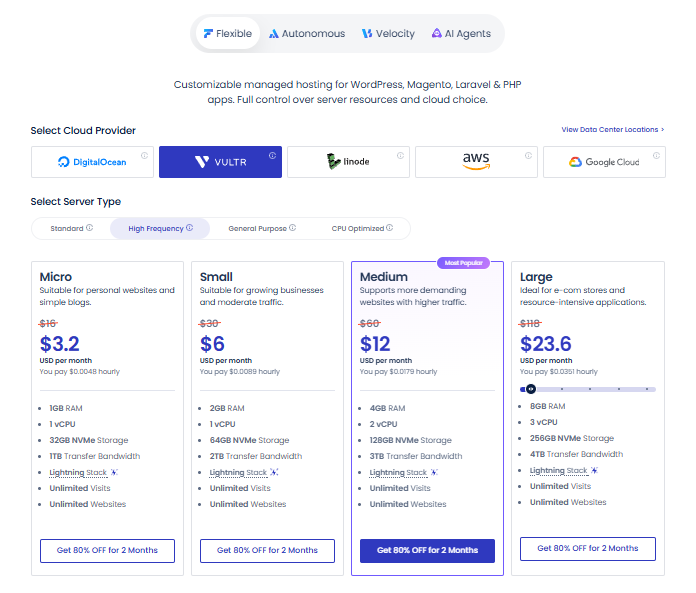
| Package | RAM | vCPU | Storage | Transfer | Deal price | Regular price |
|---|---|---|---|---|---|---|
| Micro | 1GB | 1 | 32GB NVMe | 1TB | $3.20 | $16 |
| Small | 2GB | 1 | 64GB NVMe | 2TB | $6 | $30 |
| Medium (Most Popular) | 4GB | 2 | 128GB NVMe | 3TB | $12 | $60 |
| Large | 8GB | 3 | 256GB NVMe | 4TB | $23.60 | $118 |
- Micro ($3.20): 40 cents more than Standard Micro, and you get 32GB of NVMe storage.
- Small ($6): another 40 cents over Standard Small, with 64GB of NVMe.
- Medium ($12): $1.20 more than Standard Medium, and storage jumps from 80GB to 128GB. Good for sites with big media libraries.
- Large ($23.60): three vCPUs and a roomy 256GB disk. Standard Large has four vCPUs but only 160GB, and costs $3.80 less.
Vultr General Purpose
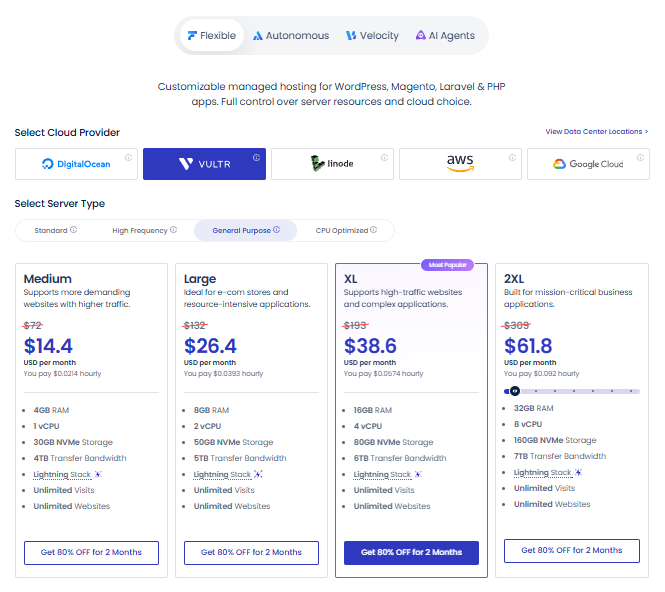
| Package | RAM | vCPU | Storage | Transfer | Deal price | Regular price |
|---|---|---|---|---|---|---|
| Medium | 4GB | 1 | 30GB NVMe | 4TB | $14.40 | $72 |
| Large | 8GB | 2 | 50GB NVMe | 5TB | $26.40 | $132 |
| XL (Most Popular) | 16GB | 4 | 80GB NVMe | 6TB | $38.60 | $193 |
| 2XL | 32GB | 6 | 160GB NVMe | 7TB | $61.80 | $309 |
- Medium ($14.40): one vCPU and 30GB of storage. It only makes sense if you need the 4TB of transfer.
- Large ($26.40): two vCPUs. Standard Large gives you four vCPUs for $19.80, so think twice.
- XL ($38.60): beats DigitalOcean General Purpose XL on price ($43.20) and storage (80GB vs 50GB), with the same 16GB of RAM and 4 vCPUs.
- 2XL ($61.80): cheaper than DigitalOcean 2XL ($79) and with more storage. The trade-off is 6 vCPUs instead of 8.
Vultr CPU Optimized
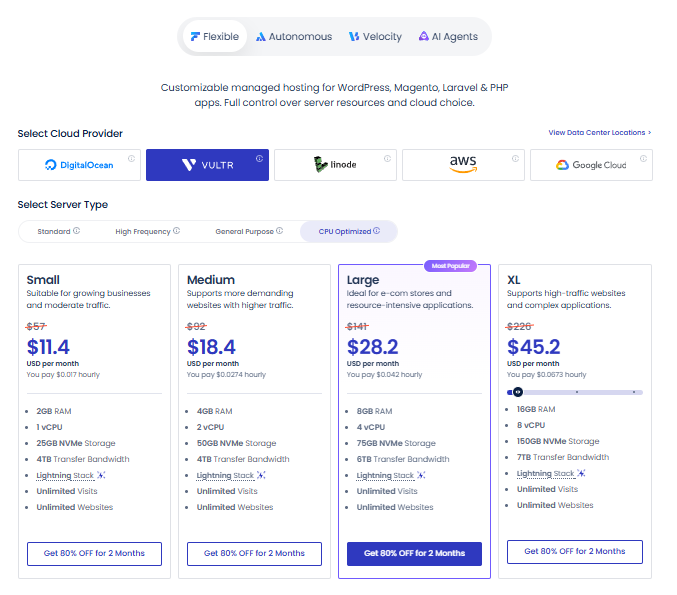
| Package | RAM | vCPU | Storage | Transfer | Deal price | Regular price |
|---|---|---|---|---|---|---|
| Small | 2GB | 1 | 25GB NVMe | 4TB | $11.40 | $57 |
| Medium | 4GB | 2 | 50GB NVMe | 4TB | $18.40 | $92 |
| Large (Most Popular) | 8GB | 4 | 75GB NVMe | 6TB | $28.20 | $141 |
| XL | 16GB | 8 | 150GB NVMe | 7TB | $45.20 | $226 |
- Small ($11.40): about twice the price of Standard Small. The main extra is 4TB of transfer.
- Medium ($18.40): two vCPUs and 4GB of RAM, $7.60 above Standard Medium.
- Large ($28.20): four vCPUs, 8GB of RAM and 6TB of transfer. The 75GB disk is on the small side, so check your storage needs.
- XL ($45.20): eight vCPUs and 150GB of storage. DigitalOcean CPU Optimized XL has the same vCPUs but costs $61.60.
Vultr Data Centers
Vultr has the longest list of the five providers:
- North America: Atlanta, Chicago, Dallas, Honolulu, Los Angeles, Miami, New Jersey, Seattle, Silicon Valley, Toronto
- Europe: Amsterdam, Frankfurt, London, Manchester, Madrid, Paris, Warsaw, Stockholm
- Middle East and Africa: Tel Aviv, Johannesburg
- Asia: Bangalore, Delhi, Mumbai, Singapore, and more
The list continues with more locations in Asia, Australia and South America. If you need a server near a less common region, Vultr is the one to check first. Its three Indian cities (Bangalore, Delhi, Mumbai) are a big plus for South Asian traffic.
Best for unusual locations: Vultr.
Linode
Linode follows the same layout as DigitalOcean but charges a little more at Medium and Large.
Linode Standard
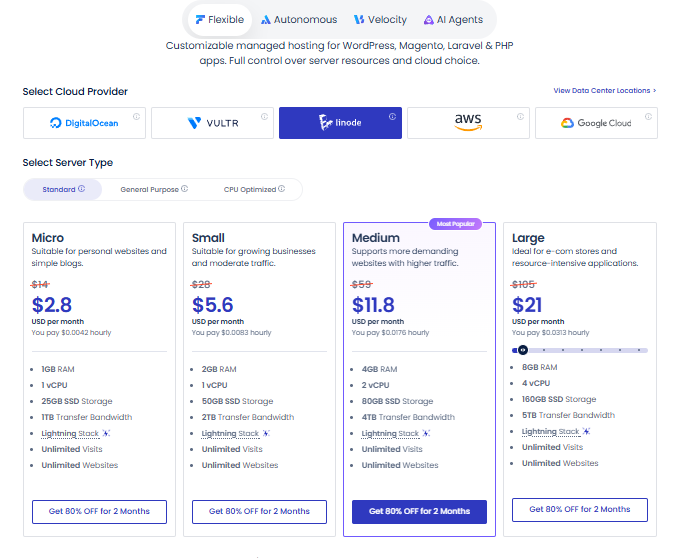
| Package | RAM | vCPU | Storage | Transfer | Deal price | Regular price |
|---|---|---|---|---|---|---|
| Micro | 1GB | 1 | 25GB SSD | 1TB | $2.80 | $14 |
| Small | 2GB | 1 | 50GB SSD | 2TB | $5.60 | $28 |
| Medium (Most Popular) | 4GB | 2 | 80GB SSD | 4TB | $11.80 | $59 |
| Large | 8GB | 4 | 160GB SSD | 5TB | $21 | $105 |
- Micro ($2.80): same price and size as Micro on the other two providers. Pick it if you already know Linode.
- Small ($5.60): matches DigitalOcean Small, apart from SSD instead of NVMe.
- Medium ($11.80): one dollar above DigitalOcean Medium for the same RAM, vCPUs and storage.
- Large ($21): $1.20 above DigitalOcean Large for similar specs, including 160GB of storage and 5TB of transfer.
Linode General Purpose
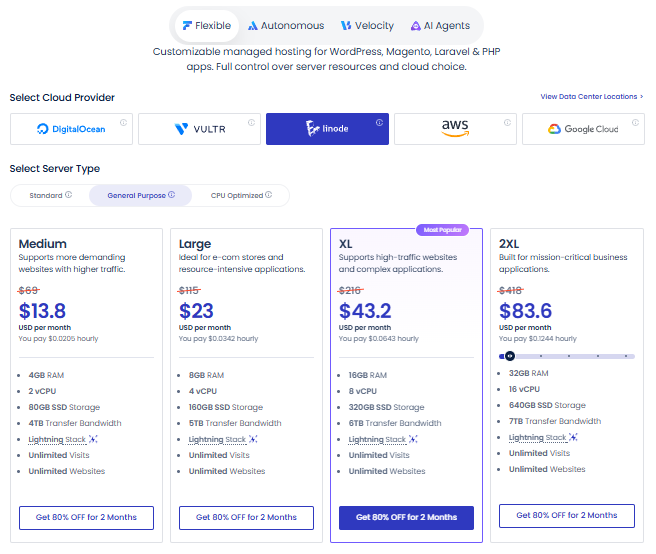
| Package | RAM | vCPU | Storage | Transfer | Deal price | Regular price |
|---|---|---|---|---|---|---|
| Medium | 4GB | 2 | 80GB SSD | 4TB | $13.80 | $69 |
| Large | 8GB | 4 | 160GB SSD | 5TB | $23 | $115 |
| XL (Most Popular) | 16GB | 8 | 320GB SSD | 6TB | $43.20 | $216 |
| 2XL | 32GB | 16 | 640GB SSD | 7TB | $83.60 | $418 |
- Medium ($13.80): same specs as Standard Medium, just $2 more. Not worth it.
- Large ($23): same specs as Standard Large, plus $2 on the bill. Skip.
- XL ($43.20): the best deal in this tier. It costs the same as DigitalOcean General Purpose XL but gives you 8 vCPUs and 320GB, against 4 vCPUs and 50GB.
- 2XL ($83.60): sixteen vCPUs and a 640GB disk, one of the largest on the list. A good match for sites with huge media or data.
Linode CPU Optimized
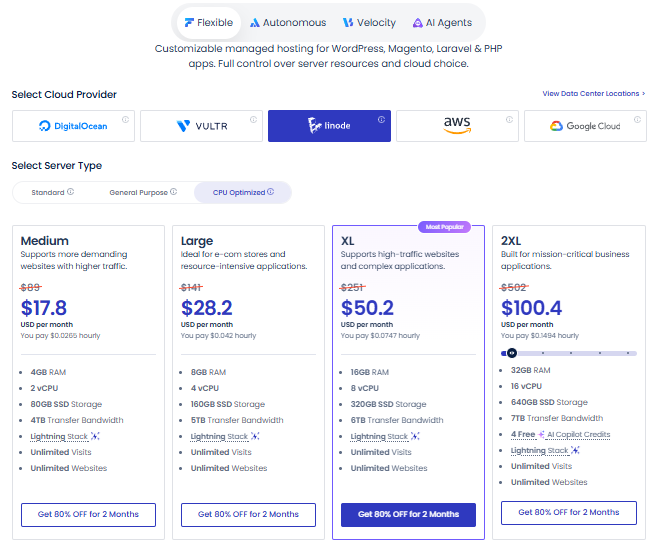
| Package | RAM | vCPU | Storage | Transfer | Deal price | Regular price |
|---|---|---|---|---|---|---|
| Medium | 4GB | 2 | 80GB SSD | 4TB | $17.80 | $89 |
| Large | 8GB | 4 | 160GB SSD | 5TB | $28.20 | $141 |
| XL (Most Popular) | 16GB | 8 | 320GB SSD | 6TB | $50.20 | $251 |
| 2XL | 32GB | 16 | 640GB SSD | 7TB | $100.40 | $502 |
- Medium ($17.80): the listed specs match Standard Medium. The extra $6 buys you the CPU Optimized tier.
- Large ($28.20): same price as Vultr CPU Optimized Large, with more than double the storage but 1TB less transfer.
- XL ($50.20): eight vCPUs and 320GB of storage. It’s $5 above Vultr CPU Optimized XL, with more than twice the disk space.
- 2XL ($100.40): 16 vCPUs, 32GB of RAM and 640GB of storage. DigitalOcean offers the same CPU and RAM for $106, but with only 200GB.
Linode Data Centers
Linode offers a wide global spread:
- North America: Los Angeles, Miami, Newark, Seattle, Washington DC, Toronto
- Europe: Frankfurt, London, Milan, Madrid, Amsterdam, Paris, Stockholm
- Asia: Chennai, Mumbai, Jakarta, Singapore, Osaka, Tokyo
- Australia: Melbourne, Sydney
- South America and Africa: São Paulo, Johannesburg
Linode is a solid middle option. It has more locations than DigitalOcean, with good coverage in Asia and Australia.
Best for big storage: Linode General Purpose XL.
AWS
AWS is the pricey route. Plans include about 20GB of storage and a small transfer allowance, and extra use is billed on top. (Deal prices below are rounded to the nearest cent.)
AWS Standard
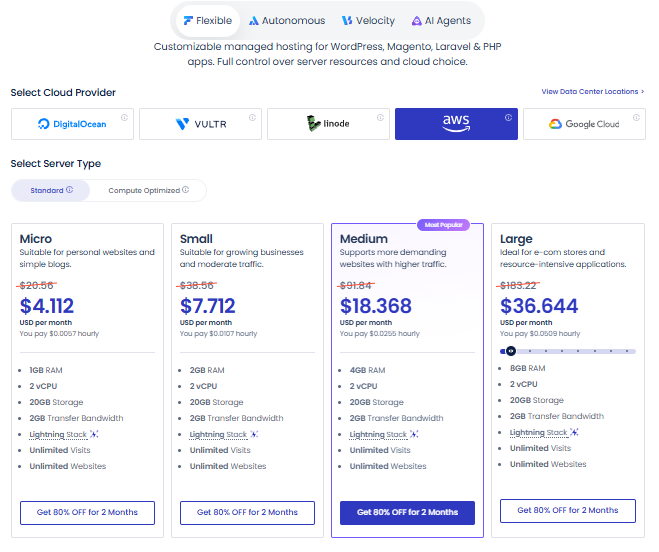
| Package | RAM | vCPU | Storage | Transfer | Deal price | Regular price |
|---|---|---|---|---|---|---|
| Micro | 1GB | 2 | 20GB | 2TB | $4.11 | $20.56 |
| Small | 2GB | 2 | 20GB | 2TB | $7.71 | $38.56 |
| Medium (Most Popular) | 4GB | 2 | 20GB | 2TB | $18.37 | $91.84 |
| Large | 8GB | 2 | 20GB | 2TB | $36.64 | $183.22 |
- Micro ($4.11): the cheapest way into AWS on this list. Choose it only if you specifically need AWS.
- Small ($7.71): 2GB of RAM, against $5.60 on DigitalOcean.
- Medium ($18.37): the most popular AWS plan, but a 4GB DigitalOcean Medium costs $10.80. Unless your company requires AWS, you’re paying extra for the brand.
- Large ($36.64): 8GB of RAM at almost double the price of Vultr Large, which also has more vCPUs.
AWS Compute Optimized
| Package | RAM | vCPU | Storage | Transfer | Deal price | Regular price |
|---|---|---|---|---|---|---|
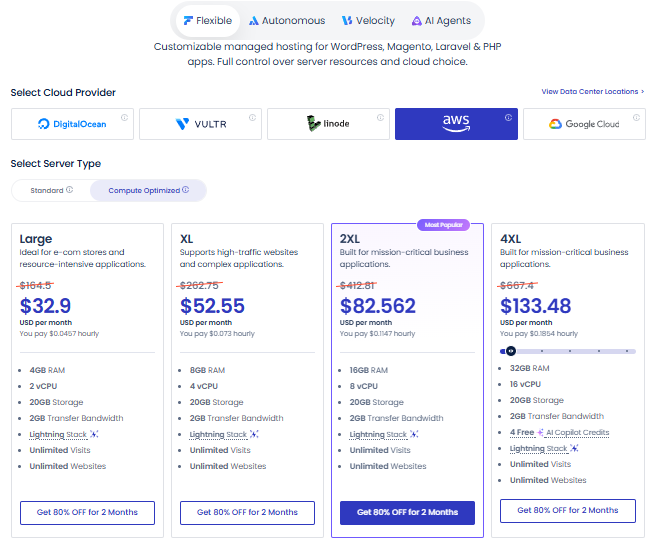
| Large | 4GB | 2 | 20GB | 2TB | $32.90 | $164.50 |
| XL | 8GB | 4 | 20GB | 2TB | $52.55 | $262.75 |
| 2XL (Most Popular) | 16GB | 8 | 20GB | 2TB | $82.56 | $412.81 |
| 4XL | 32GB | 16 | 20GB | 2TB | $133.48 | $667.40 |
- Large ($32.90): about $14.53 more than the 4GB Standard Medium, with the same listed RAM and vCPUs. Pick it only if you want this instance type.
- XL ($52.55): four vCPUs and 8GB of RAM. DigitalOcean CPU Optimized Large offers the same for $32.80.
- 2XL ($82.56): the popular AWS compute plan. Vultr CPU Optimized XL has the same RAM and vCPUs for $45.20, with 150GB of storage.
- 4XL ($133.48): 32GB of RAM and 16 vCPUs. DigitalOcean gives you the same for $106 and adds 200GB of storage.
AWS Data Centers
AWS has the broadest reach in Asia and the Middle East. Some of its locations:
- Europe: Frankfurt, Ireland, London, Milan, Paris, Spain, Stockholm, Zurich
- Middle East: Bahrain, Dubai, Tel Aviv
- Asia: Hyderabad, Mumbai, Bangkok, Hong Kong, Jakarta, Kuala Lumpur, Singapore, Taipei, Seoul, Osaka, Tokyo
- North America: Calgary, Montreal, and more
AWS makes sense for visitors in places other providers don’t reach well, like Bangkok, Kuala Lumpur or Dubai. Just remember that it costs far more than the other three for similar RAM.
Google Cloud
Google Cloud costs more per GB of RAM than DigitalOcean, Vultr or Linode. Storage and transfer beyond the included amount are billed separately.
One catch: the free trial doesn’t cover Google Compute Engine, so you’ll need to upgrade your account to launch these servers.
Google Cloud Standard
| Package | RAM | vCPU | Storage | Transfer | Deal price | Regular price |
|---|---|---|---|---|---|---|
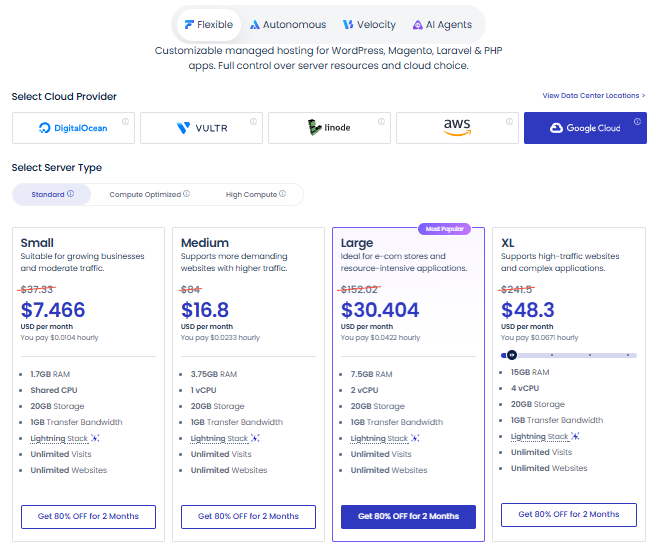
| Small | 1.7GB | Shared | 20GB | 1GB | $7.47 | $37.33 |
| Medium | 3.75GB | 1 | 20GB | 1GB | $16.80 | $84 |
| Large (Most Popular) | 7.5GB | 2 | 20GB | 1GB | $30.40 | $152.02 |
| XL | 15GB | 4 | 20GB | 1GB | $48.30 | $241.50 |
- Small ($7.47): the entry plan, with a shared vCPU. Works for a test site or a small project.
- Medium ($16.80): 3.75GB of RAM and one vCPU. It’s the first step up from a shared CPU.
- Large ($30.40): the popular choice, with 7.5GB of RAM and 2 vCPUs. Only 1GB of transfer is included, so watch your traffic.
- XL ($48.30): four vCPUs and 15GB of RAM. Vultr General Purpose XL gives you a bit more RAM for $9.70 less.
Google Cloud Compute Optimized
| Package | RAM | vCPU | Storage | Transfer | Deal price | Regular price |
|---|---|---|---|---|---|---|
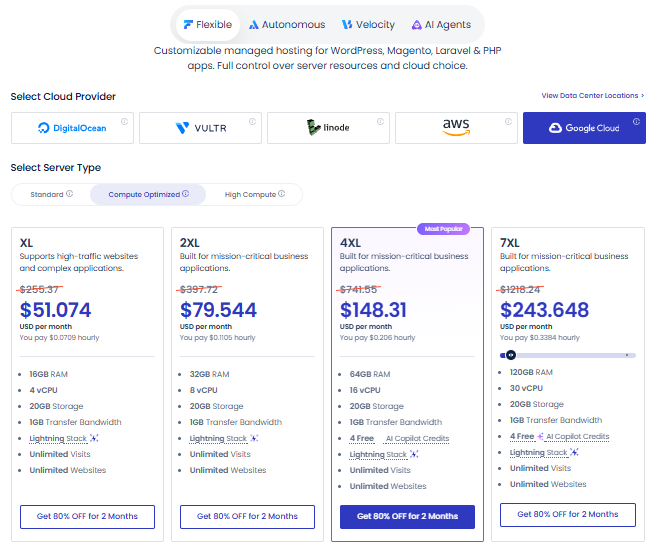
| XL | 16GB | 4 | 20GB | 1GB | $51.07 | $255.37 |
| 2XL | 32GB | 8 | 20GB | 1GB | $79.54 | $397.72 |
| 4XL (Most Popular) | 64GB | 16 | 20GB | 1GB | $148.31 | $741.55 |
| 7XL | 120GB | 30 | 20GB | 1GB | $243.65 | $1,218.24 |
- XL ($51.07): adds 1GB of RAM over Standard XL for about $2.77 more.
- 2XL ($79.54): eight vCPUs and 32GB of RAM. DigitalOcean General Purpose 2XL is $79 and includes 120GB of storage.
- 4XL ($148.31): the popular plan here. DigitalOcean General Purpose 4XL has the same RAM and vCPUs for $139.80, with 240GB of storage.
- 7XL ($243.65): the biggest Flexible plan, with 120GB of RAM and 30 vCPUs. Its regular price is high enough that the $200 cap may matter, so check the cart.
Google Cloud High Compute
| Package | RAM | vCPU | Storage | Transfer | Deal price | Regular price |
|---|---|---|---|---|---|---|
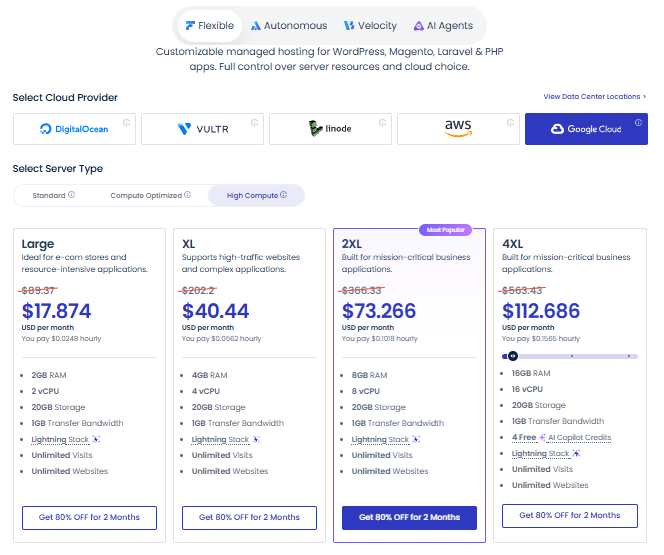
| Large | 2GB | 2 | 20GB | 1GB | $17.87 | $89.37 |
| XL | 4GB | 4 | 20GB | 1GB | $40.44 | $202.20 |
| 2XL (Most Popular) | 8GB | 8 | 20GB | 1GB | $73.27 | $366.33 |
| 4XL | 16GB | 16 | 20GB | 1GB | $112.69 | $563.43 |
- Large ($17.87): two vCPUs with 2GB of RAM, the smallest plan in this tier.
- XL ($40.44): four vCPUs but only 4GB of RAM. Great for processing-heavy work, not for memory-hungry sites.
- 2XL ($73.27): the favorite here, with one vCPU for every GB of RAM across eight cores.
- 4XL ($112.69): sixteen vCPUs and 16GB of RAM, for jobs where raw processing speed matters most.
Google Cloud Data Centers
Google Cloud lists many regions, including:
- North America: Columbus, Iowa, Las Vegas, Los Angeles, N. Virginia, Oregon, S. Carolina, Salt Lake City, Montreal
- Europe: Belgium, Berlin, Frankfurt, Finland, London, Madrid, Milan, Turin, Netherlands, Paris, Warsaw, Zurich
- Middle East and Asia: Doha, Tel Aviv, Delhi, and more
It has a strong spread in Europe and North America. Keep in mind that Google Cloud plans include only 1GB of transfer, and Compute Engine servers aren’t covered by the free trial.
Autonomous Hosting
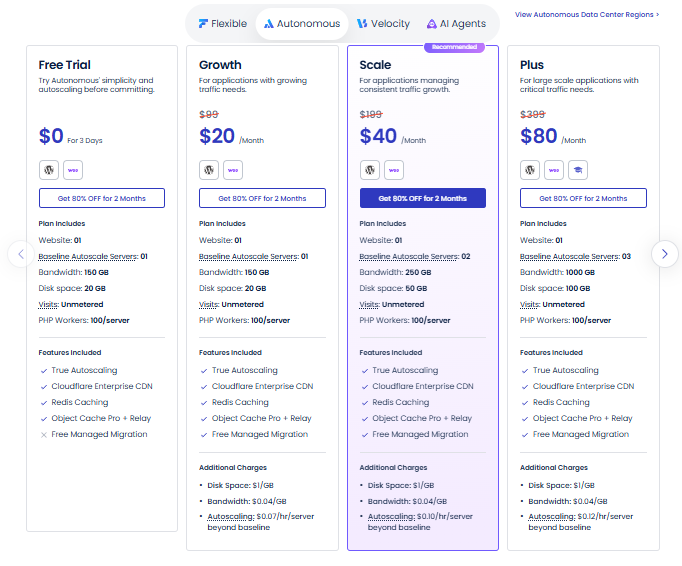
Autonomous is built for WordPress and WooCommerce sites that get sudden traffic jumps, like sales, launches or course enrollments. It adds servers as traffic grows, then scales back down. Each plan covers one website.
| Package | Deal price | Regular price | Baseline servers | Disk | Bandwidth |
|---|---|---|---|---|---|
| Free Trial | $0 | Free | 1 | 20GB | 150GB |
| Growth | $20 | $99 | 1 | 20GB | 150GB |
| Scale (Recommended) | $40 | $199 | 2 | 50GB | 250GB |
| Plus | $80 | $399 | 3 | 100GB | See pricing page |
- Free Trial: a 2-day test of autoscaling for one site. No free migration.
- Growth ($20): one baseline server for a site with occasional spikes. Extra servers cost $0.07 per hour.
- Scale ($40): the recommended plan. Two baseline servers and 50GB of disk suit a busy store or course site. Extra servers cost $0.10 per hour.
- Plus ($80): three baseline servers for sites with heavy, frequent traffic. Extra servers cost $0.12 per hour.
All plans include autoscaling, Cloudflare Enterprise CDN, Redis caching, and Object Cache Pro with Relay. Paid plans add free managed migration. Each server runs up to 100 PHP workers, and visits are unmetered. Extra disk is $1 per GB, and extra bandwidth is $0.04 per GB.
Velocity: Node.js Hosting
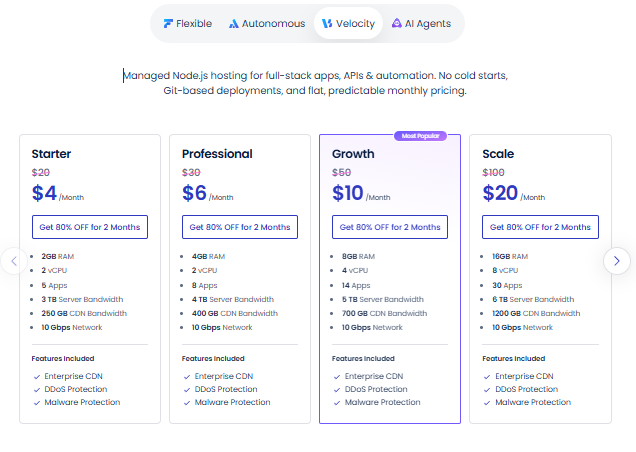
Velocity is made for Node.js apps, APIs and automation. It deploys from Git, avoids cold starts and keeps monthly pricing flat. Offsite backups and CDN bandwidth beyond your plan cost extra.
| Package | Deal price | Regular price | RAM | vCPU | Apps | Server transfer | CDN bandwidth |
|---|---|---|---|---|---|---|---|
| Starter | $4 | $20 | 2GB | 1 | 5 | 3TB | 250GB |
| Professional | $6 | $30 | 4GB | 2 | 8 | 4TB | 400GB |
| Growth (Most Popular) | $10 | $50 | 8GB | 4 | 14 | 5TB | 700GB |
| Scale | $20 | $100 | 16GB | 8 | 30 | 6TB | 1200GB |
- Starter ($4): five apps on 2GB of RAM. Fits side projects, small APIs and automation scripts.
- Professional ($6): twice the RAM and vCPUs of Starter, plus three more apps, for just $2 more. That’s an easy upgrade.
- Growth ($10): the popular pick. Fourteen apps and 700GB of CDN bandwidth suit an agency or a product with several services.
- Scale ($20): the top tier, with 30 apps, 16GB of RAM and 1200GB of CDN bandwidth. Works for a team hosting many services in one place.
Every plan has a 10 Gbps network, Enterprise CDN, DDoS protection and malware protection. You can upgrade or downgrade any time with no lock-in.
AI Agents Hosting
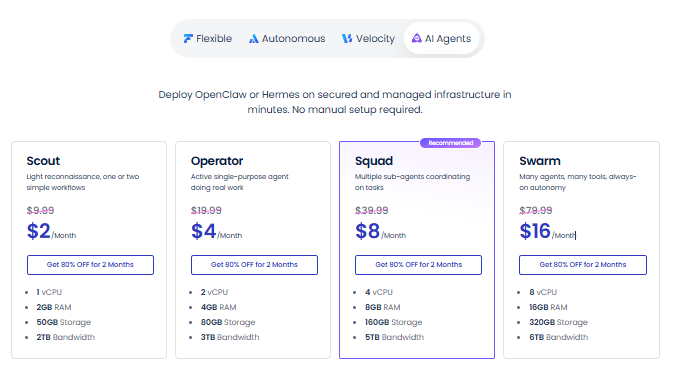
This line is for people who run OpenClaw or Hermes agents. Cloudways sets up and manages the server, so you skip the manual setup and security work.
| Package | Deal price | Regular price | vCPU | RAM | Storage | Bandwidth |
|---|---|---|---|---|---|---|
| Scout | $2 | $9.99 | 1 | 2GB | 50GB | 2TB |
| Operator | $4 | $19.99 | 2 | 4GB | 80GB | 3TB |
| Squad (Recommended) | $8 | $39.99 | 4 | 8GB | 160GB | 5TB |
| Swarm | $16 | $79.99 | 8 | 16GB | 320GB | 6TB |
- Scout ($2): the cheapest plan in this guide. Use it to try a single agent before you commit.
- Operator ($4): double the resources of Scout for $2 more. Suits an agent that runs daily workflows.
- Squad ($8): the recommended plan. Four vCPUs and 8GB of RAM leave more room for a busy agent or a small group of them.
- Swarm ($16): the largest plan, with 8 vCPUs, 16GB of RAM and 320GB of storage. Aimed at teams running many agents together.
Every plan includes isolated instances, managed SQL, automated daily backups, MCP integration and 24/7 expert support.
Which Plan Should You Pick?
| Your site | Suggested package | Deal price |
|---|---|---|
| New blog or portfolio | DigitalOcean Basic Micro or Small | $2.80 to $5.60 |
| Small business site | DigitalOcean Basic Small or Medium | $5.60 to $10.80 |
| WooCommerce store | DigitalOcean Basic Large, or Autonomous Scale if traffic spikes | $19.80 or $40 |
| High-traffic site | DigitalOcean General Purpose XL or CPU Optimized XL | $43.20 or $61.60 |
| Course or membership site with big spikes | Autonomous Scale | $40 |
| Node.js app or API | Velocity Starter or Professional | $4 to $6 |
| AI automation | AI Agents Squad | $8 |
Not sure? Start with DigitalOcean Basic Medium. You can resize Flexible plans later, so there’s no need to guess your final size on day one. A plan that’s one size too small is easy to fix. A plan that’s far too big costs you every month.
Which Cloud Provider Is the Best Value?
For most sites, DigitalOcean or Vultr gives the best value. Their Micro, Small and Large plans cost the same ($2.80, $5.60 and $19.80), and Medium is $10.80 on both. Linode asks a little more at Medium ($11.80) and Large ($21).
Vultr High Frequency costs a bit more than Standard. Medium is $12 instead of $10.80, but you get more NVMe storage.
AWS and Google Cloud are a different story. A 4GB AWS Medium plan is $18.37, while a 4GB DigitalOcean Medium is $10.80. Pick them only if you need that cloud, for example to meet a company rule or to sit near services you already run there.
How to Claim the Deal
- Click the offer button on the Cloudways site. It opens signup with BFCM802 attached.
- Create a new account.
- Pick a product line: Flexible, Autonomous, Velocity or AI Agents.
- For Flexible, choose a cloud provider, a server type and a size.
- Check the cart. It should show 80% off for 2 months and the monthly price you expect.
- If the discount is missing, enter BFCM802 before you pay. Still not showing? Contact support first.
Why Other Sites Show 50% Off
A quick search may show 50% off for 3 months, sometimes with 50 free migrations. That was the 2025 Black Friday and Cyber Monday deal, which ran from November 11 to December 5, 2025. The 2026 offer is 80% off for 2 months. When an older article and the live page disagree, trust the live page.
Pros and Cons
Pros
- The first two months are very cheap.
- Five cloud providers to choose from.
- Plans start from just $2 a month.
- Unlimited websites and visits on Flexible plans.
- Separate options for WordPress, Node.js and AI agents.
Cons
- The discount lasts only 2 months.
- AWS and Google Cloud add extra charges for transfer and storage.
- Google Compute Engine servers aren’t covered by the free trial.
- Offsite backup storage has a separate fee.
How to Choose the Right Data Center
The rule is simple: pick the location closest to most of your visitors.
- Check your analytics to see where your traffic comes from.
- Pick a provider with a data center in or near that region.
- If two providers cover the same city, choose the cheaper one. For most sites, that’s DigitalOcean or Vultr.
- Decide before you launch, because the server location isn’t always easy to change later.
| Your visitors are mostly in | Good choice |
|---|---|
| USA | Any provider, such as DigitalOcean New York |
| Europe | DigitalOcean Frankfurt or London |
| India and South Asia | DigitalOcean Bangalore, or Vultr Delhi and Mumbai |
| Southeast Asia | DigitalOcean Singapore, or AWS Bangkok and Jakarta |
| Middle East | AWS Dubai or Bahrain |
| Australia | DigitalOcean Sydney |
Real Speed Test: A Live Site on Cloudways
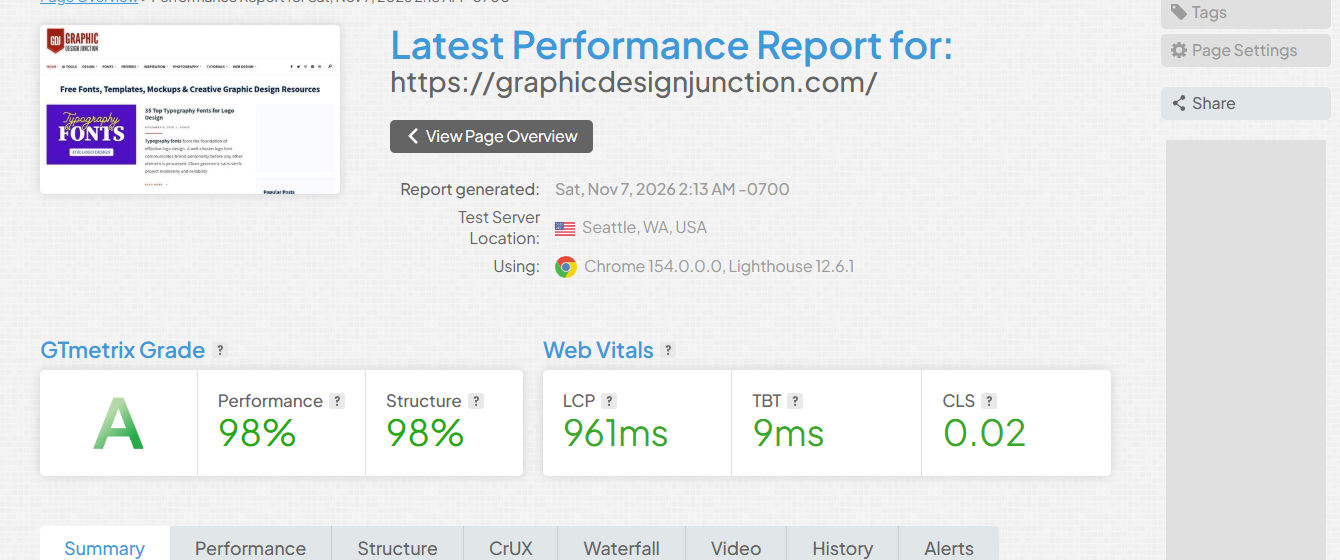
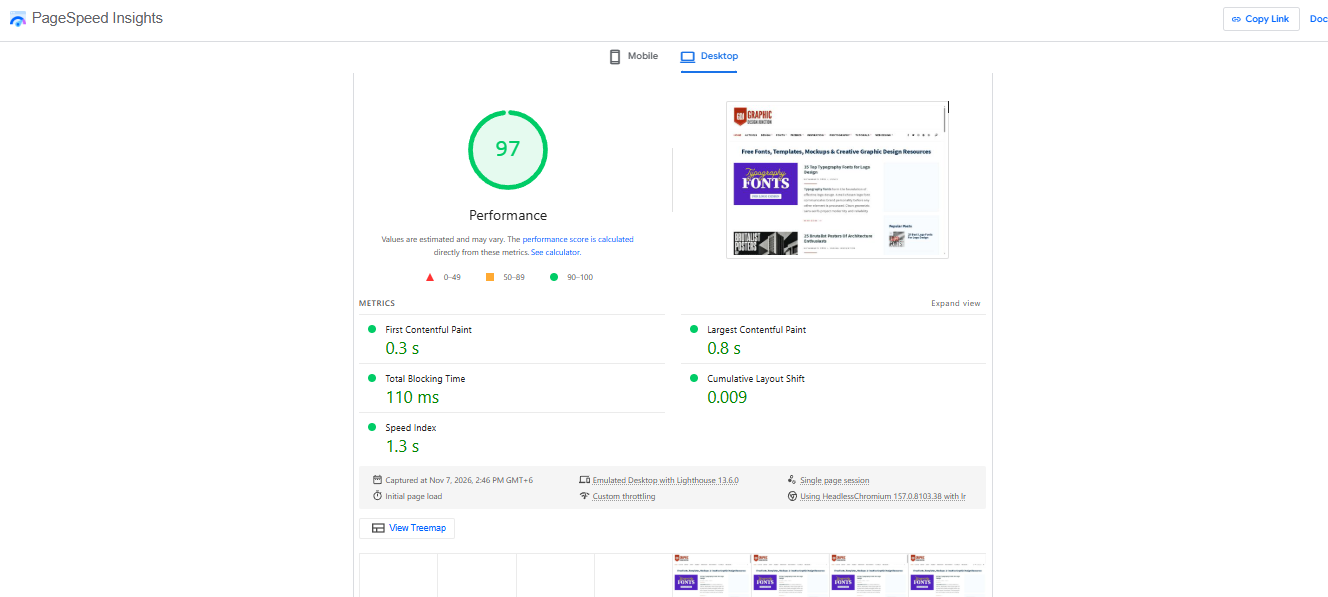
I ran graphicdesignjunction.com, a live site hosted on Cloudways, through ten tools and checks on November 7, 2026. The short version: desktop scores land between 86 and 100, visitors near the server get pages in 0.1 to 0.2 seconds, and the far side of the world waits 1.6 seconds or more. Mobile is the weak spot, but that points at the page, not the host.
Where the server sits
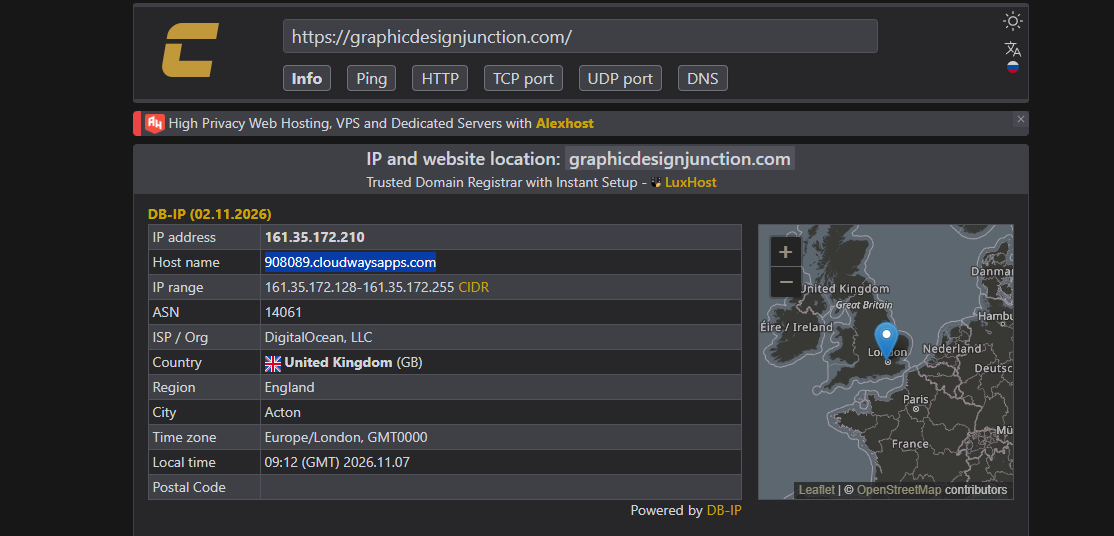
An IP lookup puts the site’s server on DigitalOcean in London (Acton, England), under a cloudwaysapps.com hostname. That matters for everything below, because distance to the server drives most of the speed differences.
Speed scores
| Tool | Test setup | Result | Key numbers |
|---|---|---|---|
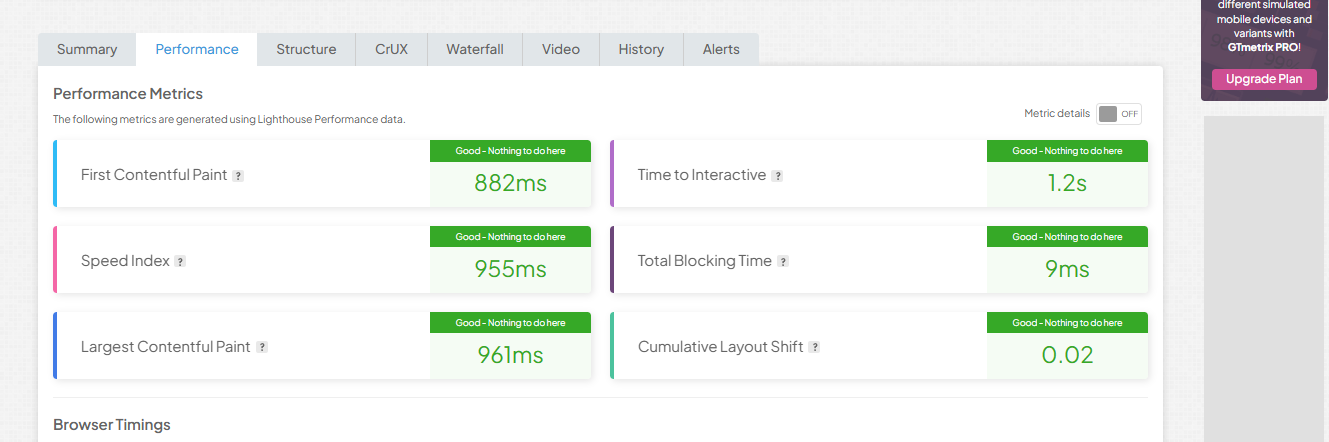
| GTmetrix | Seattle, desktop | Grade A, 98% performance, 98% structure | LCP 961ms, TBT 9ms, CLS 0.02 |
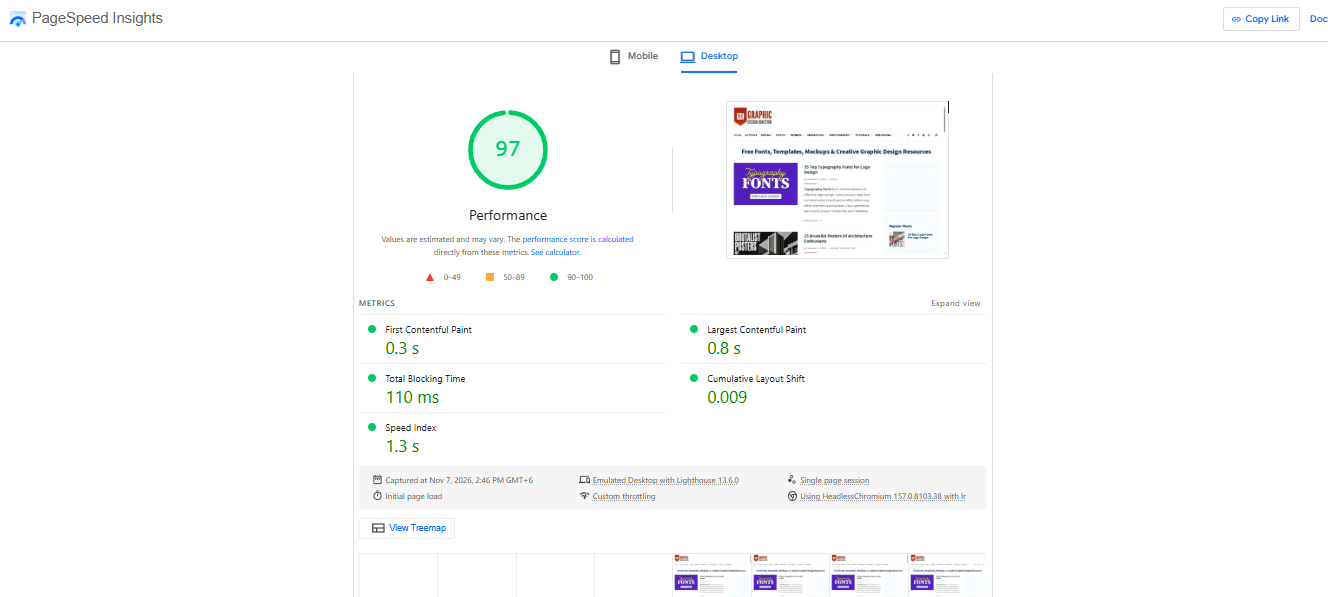
| PageSpeed Insights | Desktop, lab data | 97 | FCP 0.3s, LCP 0.8s, TBT 110ms, CLS 0.009 |
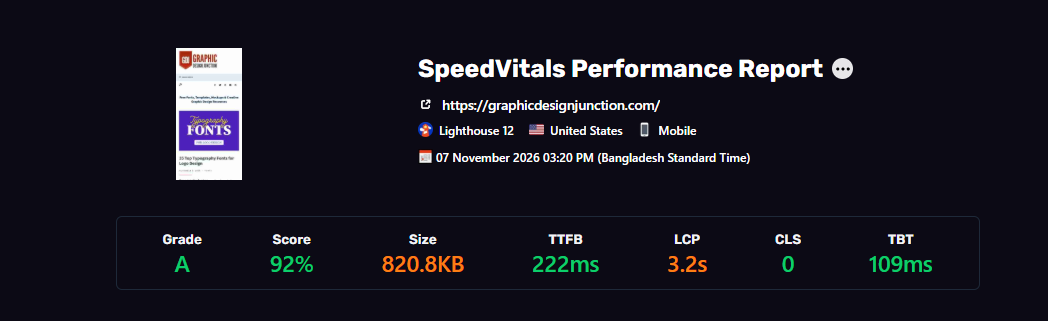
| SpeedVitals | US, mobile | Grade A, 92% | TTFB 222ms, LCP 3.2s, TBT 109ms, CLS 0 |
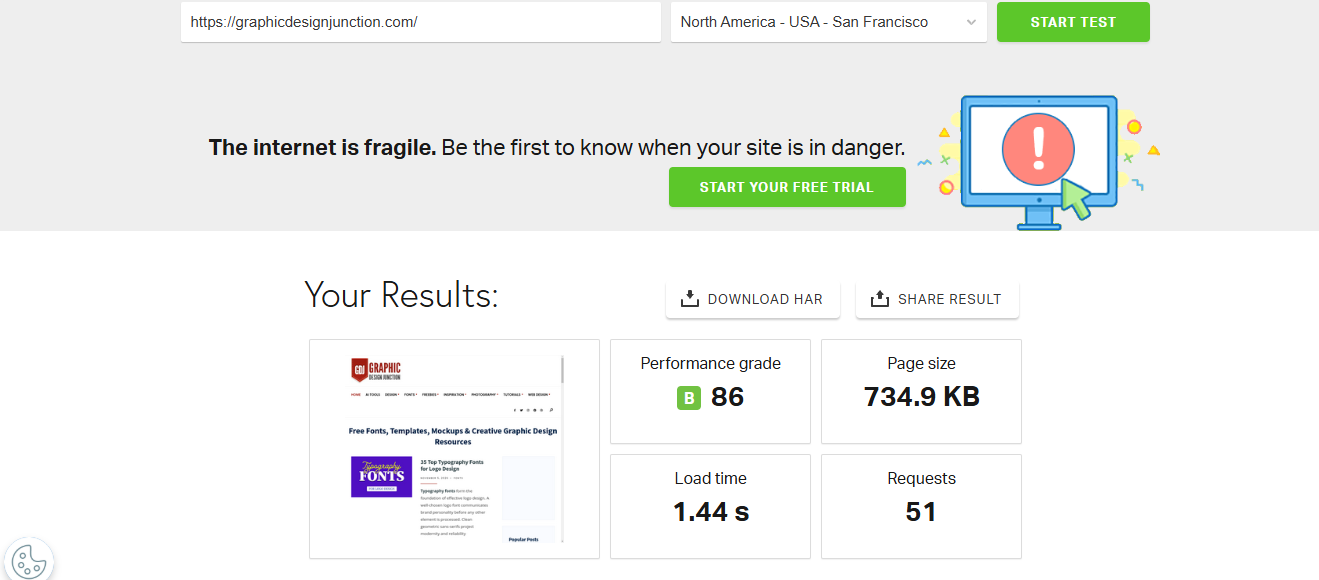
| Pingdom | San Francisco | Grade B, 86 | Load 1.44s, 734.9KB, 51 requests |
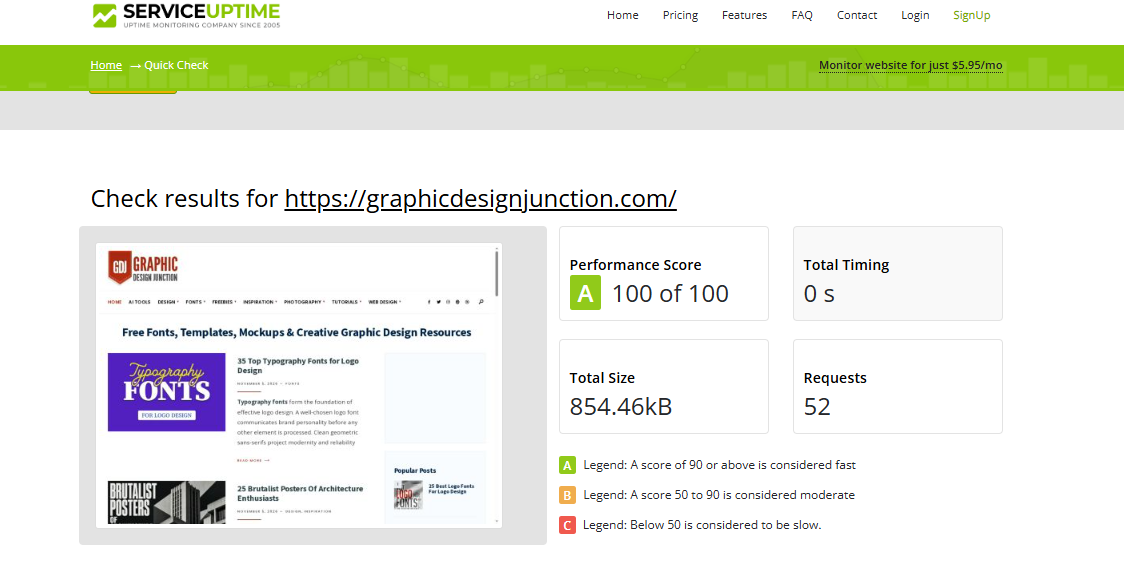
| ServiceUptime | Quick check | Grade A, 100 of 100 | 854.46kB, 52 requests |
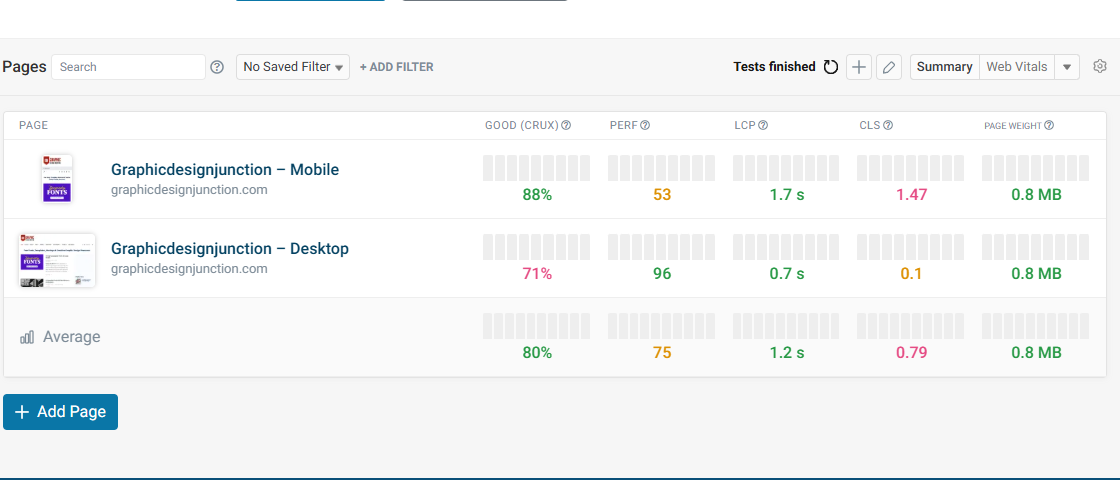
| DebugBear | Desktop | 96 | LCP 0.7s, CLS 0.1 |
| DebugBear | Mobile | 53 | LCP 1.7s, CLS 1.47 |
Every result except DebugBear mobile scored 86 or higher, and the lowest of those (Pingdom, grade B) was run from San Francisco, far from London. Mobile is mixed: SpeedVitals gave 92, DebugBear gave 53. DebugBear’s low score comes from a layout shift of 1.47. Layout shift usually comes from images, ads or fonts moving around on the page, so a bigger server won’t fix it.
Real-user data
Lab tests are one visit from one place. Field data comes from real visitors over about a month, and it tells a slightly different story.
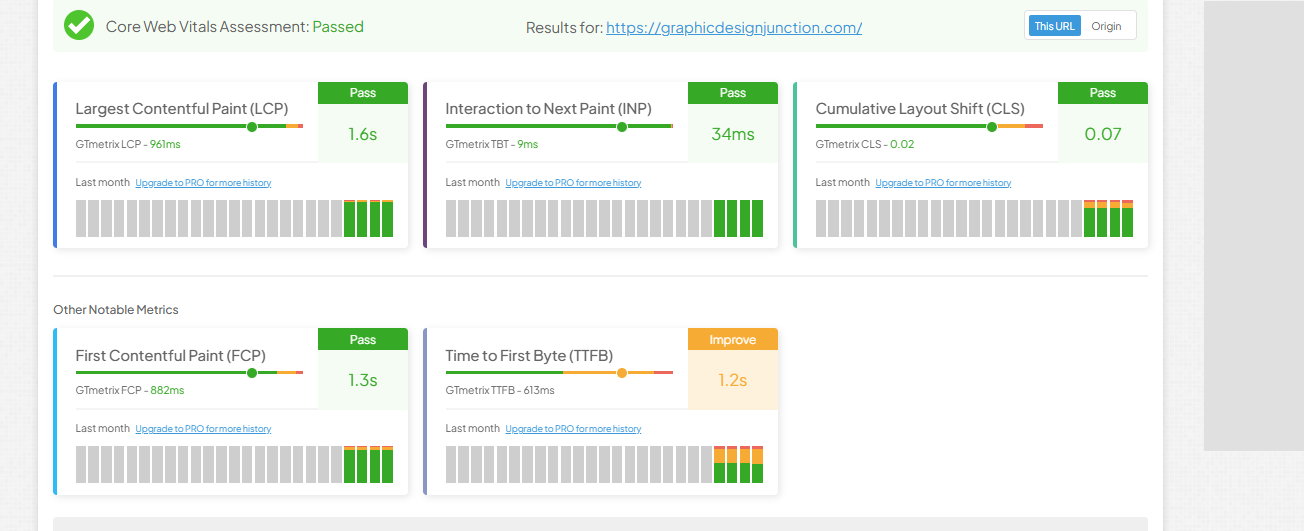
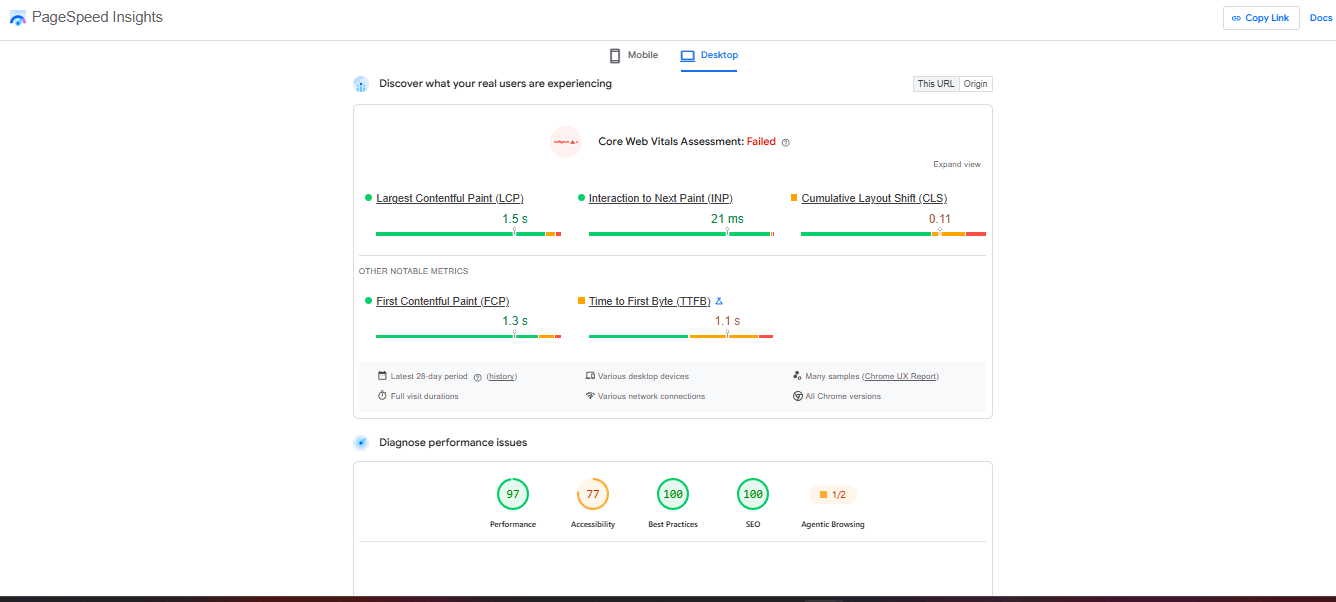
| Metric | GTmetrix (CrUX) | PageSpeed Insights (desktop) |
|---|---|---|
| LCP | 1.6s, pass | 1.5s, pass |
| INP | 34ms, pass | 21ms, pass |
| CLS | 0.07, pass | 0.11, needs work |
| FCP | 1.3s, pass | 1.3s, pass |
| TTFB | 1.2s, improve | 1.1s, needs work |
| Core Web Vitals | Passed | Failed |
The two sources disagree on CLS (0.07 vs 0.11), probably because PageSpeed’s sample covers desktop visitors only. Either way, TTFB is the number to watch. Real visitors see 1.1 to 1.2 seconds, against 222ms in the lab test, and many of them sit far from London.
Speed by location
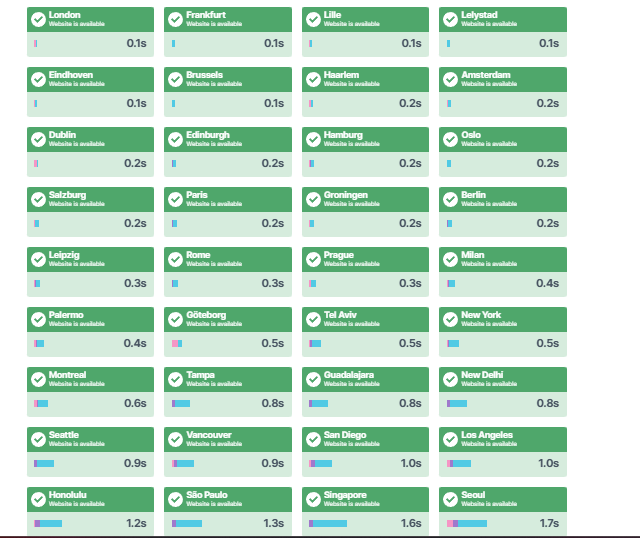
A multi-location check shows the distance effect clearly.
| Region | City | Load time |
|---|---|---|
| Europe | London | 0.1s |
| Europe | Frankfurt | 0.1s |
| Europe | Paris | 0.2s |
| North America | New York | 0.5s |
| South Asia | New Delhi | 0.8s |
| North America | Los Angeles | 1.0s |
| South America | São Paulo | 1.3s |
| Asia-Pacific | Singapore | 1.6s |
| Asia-Pacific | Seoul | 1.7s |
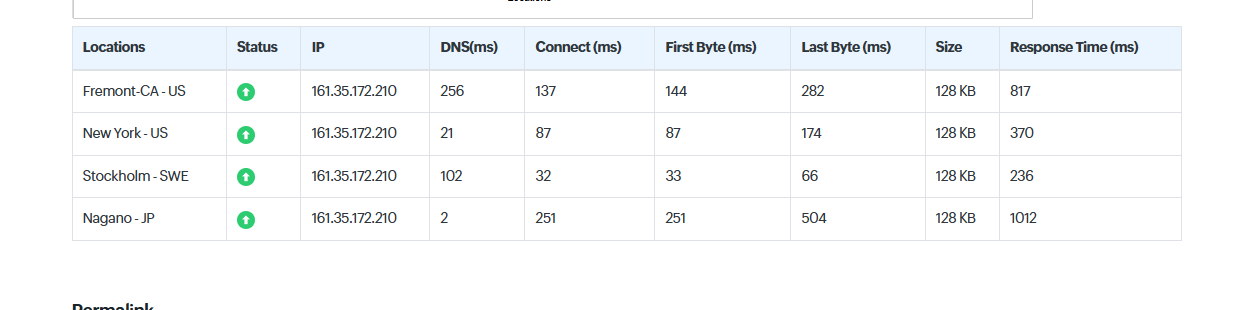
A second four-location check agrees: Stockholm 236ms, New York 370ms, Fremont (California) 817ms and Nagano (Japan) 1,012ms. In the Fremont run, DNS alone took 256ms.
So a London server is great for Europe, fine for the US East Coast and slow for Asia. If your visitors are in South Asia, DigitalOcean Bangalore or Vultr Delhi and Mumbai (listed above) would put the server closer. I haven’t tested those, so treat that as the logical next step, not a result.
Uptime
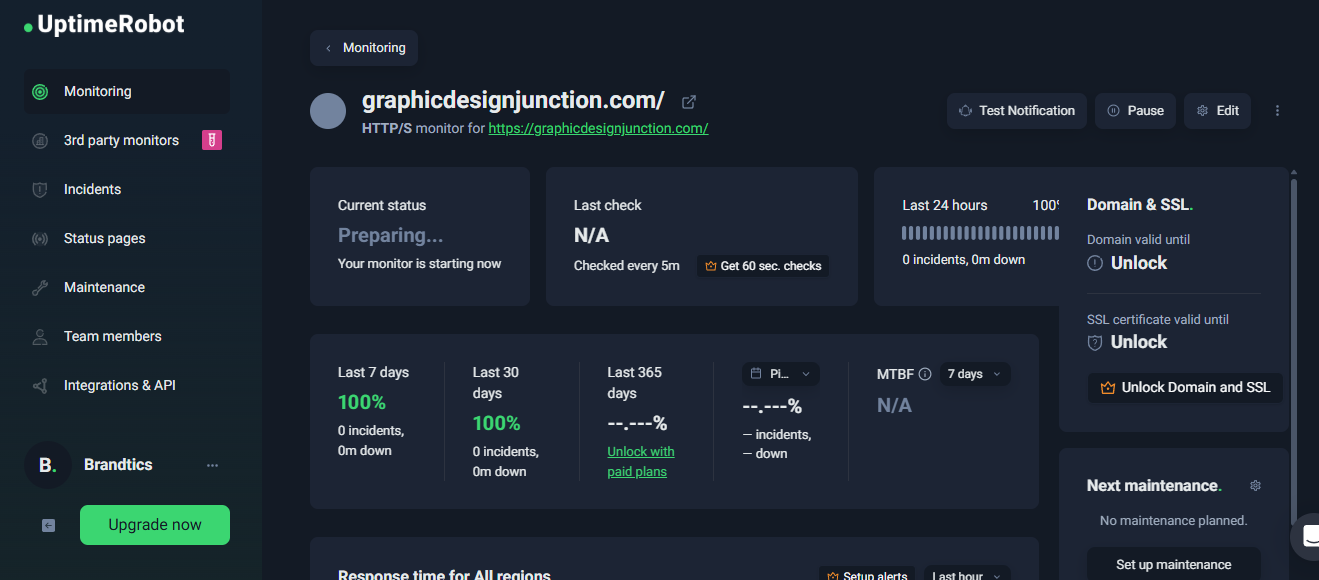
I set up an UptimeRobot monitor on its free plan, which checks every 5 minutes. The screenshot was taken right after setup, so it’s too early to say anything about uptime.
The verdict
Cloudways gave fast pages where the server is close, and strong desktop scores overall. The weak spots were distance and the page’s own layout shift, and more RAM wouldn’t fix either one. Pick your data center by where your visitors are.
Ready to Try It?
If you want to test Cloudways without spending much, this is the best time to do it. Two months of Medium costs $21.60, which is less than most hosts charge for one month.
Just remember the price goes up in month three. Before you pay, check that the cart shows 80% off. The deal ends December 6, so claim it before then.
Prices in this guide come from the Cloudways pricing page at the time of writing. Offers and prices can change, so check the live page before you buy.
Related Articles
- Cloudways Halloween Deals 2026: Get 40% Off for 4 Months + Free Migrations
- Black Friday Web Hosting Deals
- How to Find the Best Web Hosting Deals
- Web Hosting Discounts: How to Save Money on Hosting
- Web Hosting Coupons vs Deals
- DigitalOcean Black Friday & Cyber Monday Deals
- Hostinger Black Friday Deals
- InterServer Black Friday Deal
- HostArmada Black Friday and Cyber Monday Deals
- Cloud Hosting vs Traditional Hosting


Leave a Comment