
Quick answer: What is a VDS server? A VDS, short for virtual dedicated server, is a virtual machine with its own guaranteed CPU, RAM and storage, carved out of a bigger physical host. You get root access just like on a VPS, but your resources are reserved instead of shared. That is why VDS hosting stays fast and steady when neighbours get busy, while costing far less than renting a whole physical machine.
If you have seen “VDS” on a hosting site and wondered how it differs from a VPS, this guide clears it up. You will learn the VDS server meaning, how the technology works, the real difference between VDS and VPS, what a VDS server price looks like in 2026, whether it suits trading bots and gaming, and which VDS hosting providers are worth a closer look.
Key Takeaways
- A VDS reserves CPU, RAM and disk for you, so another customer’s traffic spike cannot slow your server down.
- VDS and VPS are used loosely across the industry. Ignore the label and look for phrases such as “dedicated cores”, “dedicated vCPU” or “no CPU overselling” in the specs.
- Public 2026 listings put entry-level dedicated-CPU plans at roughly $20 to $65 per month. Prices keep shifting, so confirm the live figure before you pay.
- Cheap VDS hosting exists, but the renewal price and what is truly dedicated matter more than the headline rate.
- Ten VDS hosting providers are compared below, each with its strengths and its catches.
What Is a VDS Server? (VDS Server Meaning Explained)
VDS stands for Virtual Dedicated Server. The VDS server meaning is simple: a virtual server whose compute resources are set aside for one customer only. A hypervisor divides a powerful physical machine into several isolated virtual machines, and on a VDS the portion assigned to you is locked in. That means a fixed number of CPU cores or threads, a fixed amount of RAM and your own storage.
A good way to picture it is an office building. Shared hosting is a hot desk where you grab whatever space is free. A typical VPS is a desk in a busy open-plan room. A VDS is a private office with a locked door: the building is shared, but the room, the power and the furniture belong to you alone.
You also get full control. You pick the operating system, install your own software stack and set your own firewall rules, much as you would on a physical dedicated server.
How Does VDS Hosting Work?
VDS hosting works by using a hypervisor to split one physical server into isolated virtual machines, then guaranteeing each machine a fixed share of the hardware.
- A powerful host: the provider runs a physical server packed with CPU cores, plenty of RAM and fast NVMe or SSD drives.
- A hypervisor: virtualization software, most often KVM, divides that hardware into separate virtual machines.
- Reserved resources: your machine is tied to specific cores or threads and a set block of memory that is not promised to anyone else.
- Your own operating system: you receive an independent OS with root or administrator rights.
- Simple management: you control everything through a web panel, an API or SSH, usually with snapshots, backups and firewall tools on offer.
Since the CPU is reserved instead of burstable, response times hold up even while the host is under heavy load. That consistency is the main reason people pay more for a virtual dedicated server.
VDS vs VPS: What Is the Difference Between VDS and VPS?
The difference between VDS and VPS comes down to resource guarantees. A VPS gives you a virtual slice that may share processor time with other tenants, whereas a VDS reserves dedicated resources for you. Both give root access, but the VDS is built for predictable performance.
| Feature | VPS | VDS |
| CPU | Often shared or burstable | Reserved cores or threads |
| Performance consistency | Can dip when neighbours are busy | Stable and predictable |
| Price | Lower | Higher |
| Isolation | Good | Stronger |
| Root access | Yes | Yes |
| Best for | Small sites, testing, light apps | Production apps, busy stores, game and trading servers |
| Naming warning: Plenty of well-known hosts never use the word VDS. They sell the same idea as “dedicated CPU”, “dedicated vCPU” or “CPU-optimized” instances. Others market a plan as a VPS even though it already includes dedicated resources. Always read the CPU description instead of trusting the product name. |
Is VDS Better Than VPS?
It depends on what you run. A VDS is better when you need steady speed for busy production workloads, because nothing is shared. A VPS is better when budget matters more and occasional slowdowns are acceptable.
Pick a VDS if:
- your app, store or bot suffers when the CPU is throttled,
- you run databases, game servers or automation that must stay responsive around the clock,
- you want predictable monthly performance more than the lowest possible bill.
Pick a VPS if:
- you host a small website, a portfolio or a test environment,
- traffic is light or comes in short bursts,
- you are learning Linux and want to keep costs minimal.
VDS vs Dedicated Server (and Shared Hosting): Which Should You Choose?
In the VDS vs dedicated server debate, the trade-off is hardware ownership against price and flexibility. A dedicated server hands you an entire physical machine, while a VDS gives you a reserved virtual slice of one. A VDS sits between shared hosting and a dedicated server: more control and guaranteed resources than the former, and a much smaller bill than the latter.
| Feature | Shared hosting | VDS | Dedicated server |
| Resources | Shared with many sites | Reserved virtual slice | Entire physical machine |
| Root access | No | Yes | Yes |
| Performance | Variable | Consistent | Highest |
| Technical skill | Low | Medium to high | High |
| Scaling | Limited | Quick plan upgrades | Slower, often hardware changes |
| Cost | Lowest | Mid-range | Highest |
| Best for | Blogs, small sites | Growing sites, apps, bots | Very heavy, always-on workloads |
Choose a dedicated server only when you truly need all the raw hardware, for instance very large databases or compliance rules that demand single-tenant machines. For most growing projects, a VDS delivers most of the stability at a fraction of the price.
What Are the Benefits of VDS Hosting?
The main benefits of VDS hosting are predictable performance, full control and a better price than a physical server.
- Guaranteed resources: your CPU and RAM are not watered down by other customers.
- Root or administrator access: install any software, control panel or container stack you like.
- Strong isolation: your workload is walled off from other tenants at the virtual-machine level.
- Easy scaling: most providers let you move up to a bigger plan without migrating to new hardware.
- Cost efficiency: you skip paying for a whole physical server that you might never fully use.
What Are the Disadvantages of a VDS?
A VDS costs more than a VPS and, in most cases, expects you to look after the server yourself.
- Higher price than shared hosting or an entry-level VPS.
- You carry the responsibility: updates, security and backups are yours unless you buy a managed plan.
- Still virtualized: you do not get the raw single-tenant hardware of a physical dedicated server.
- Price movement: several large providers raised cloud prices during 2026, so long-term cost deserves a second look.
Who Should Use a VDS Server?
A VDS suits any project that has outgrown shared hosting or a basic VPS and now needs steady performance.
- High-traffic websites and WooCommerce or other online stores
- API backends, SaaS apps and CI/CD pipelines
- Game servers that need low, stable latency
- Trading bots and automation scripts that must never be throttled (see VDS for trading bots below)
- Agencies hosting many client sites in one controlled environment
- Databases, Docker and Kubernetes workloads that rely on consistent CPU
If you only run a small blog or portfolio, a standard VPS or a decent shared plan will do the job.
VDS for Trading Bots
VDS for trading bots is a popular setup, because bots need two things above all: constant uptime and a CPU that never stalls. On a crowded VPS, a noisy neighbour can delay a loop that reads prices and places orders. Reserved cores remove that risk.
- Pick the region carefully. Choose a data centre close to your exchange’s API servers to cut round-trip latency.
- Run the bot as a service. Use systemd or Docker so it restarts automatically after a crash or reboot.
- Lock it down. Use SSH keys, a firewall, and API keys limited to trading only, with withdrawals disabled.
- Monitor and back up. Keep logs, alerts and a snapshot of a working setup.
Treat any hosting claim about “low latency” as a hypothesis, and test it with your own exchange before you trade real money.
Is VDS Good for Gaming?
Yes, a VDS is good for gaming when you want to host a game server for friends or a community. Many game servers depend heavily on steady single-thread CPU speed, and reserved cores help keep the tick rate smooth. Players’ ping then depends mostly on how close the data centre is to them.
One clarification: a VDS is meant for hosting game servers, not for playing games on a remote desktop. Check the RAM needs of your game, pick a location near most players, and look for built-in DDoS protection, since public game servers are frequent targets.
How Much Does a VDS Cost? (VDS Server Price in 2026)
A VDS server price in 2026 starts at roughly $20 to $65 per month for entry-level dedicated-CPU plans, with mid-range plans usually landing between about €50 and €90 on value-focused providers. Larger machines cost more.
| Tier | Typical specs | Rough monthly range |
| Entry | 1 to 3 dedicated cores, 2 to 24 GB RAM | $20 to $65 |
| Mid-range | 4 to 8 cores, 16 to 48 GB RAM | about €50 to €90 on value providers |
| High-end | 12+ cores, 64 GB+ RAM | €120 and up |
Treat these numbers as a guide, not a quote. The final bill can change because of first-term discounts, renewal increases, VAT, extra IPv4 addresses and paid backups. Hetzner’s June 2026 repricing shows how quickly the market can move.
Cheap VDS Hosting: How to Pay Less Without Losing Performance
Cheap VDS hosting is possible, but the lowest sticker price is rarely the lowest real cost. These habits help:
- Compare the renewal price, not only the promotion. Some plans double after the first term.
- Start small and scale up. Most hosts let you upgrade, so you do not need to buy next year’s capacity today.
- Use hourly billing for experiments. Providers that bill by the hour let you test without a long commitment.
- Confirm the CPU is truly dedicated. An ultra-cheap plan that shares cores is a VPS, whatever it is called.
- Skip add-ons you will not use, and check whether backups and extra IP addresses are charged separately.
- Consider value-focused providers such as Contabo, Cherry Servers or Kamatera, then benchmark during the refund or trial window.
How to Choose the Best VDS Hosting
To choose the best VDS hosting for your project, check what is actually dedicated, how fast the storage is, where the data centres are and what the plan will really cost after the first term.
- Dedicated CPU in writing: look for “dedicated cores” or “dedicated vCPU”, and learn whether a vCPU is a full core or a single thread.
- Storage type: NVMe is clearly faster than older SSD or HDD options.
- Network and traffic: compare port speed (for example 1 Gbps) and monthly transfer limits.
- Data centre location: users in South Asia often get lower latency from a Singapore location than from Europe. Contabo and Hetzner both list Singapore among their locations.
- Uptime SLA and support: read the guarantee and find out what credit you actually receive.
- Backups and DDoS protection: see whether they are included or sold as extras.
- Renewal price: confirm what you will pay after any introductory period.
- Refund terms: a trial or money-back window lets you benchmark before committing.
Top 10 VDS Hosting Providers in 2026
These VDS hosting providers all sell virtual servers with dedicated or reserved CPU. They appear in no particular order, and the figures come from the public sources listed at the end. Prices are entry points from 2026 listings and may have changed.
| Provider | Dedicated-resource product | Entry point (public data, 2026) | Best for |
| Contabo | Cloud VDS | about €35 to €43 per month (S plan) | Maximum specs per euro |
| IONOS | Dedicated Core VMs | about $46 per month (1 core, 2 GB) | Core-for-core dedication |
| Hetzner | Cloud CCX | repriced June 2026, check current price | EU-based dedicated vCPU |
| Vultr | Optimized Cloud Compute | from about $28 to $30 per month | Global locations, hourly billing |
| DigitalOcean | CPU-Optimized and General Purpose Droplets | from about $42 per month | Developers and startups |
| Kamatera | Type B and Type D servers | Type D base about $19 per month, scales up | Custom-built configurations |
| Akamai (Linode) | Dedicated CPU plans | from about $36 per month | Stable production workloads |
| Cherry Servers | Cloud, Premium and Performance VDS | about €49 per month (Cloud VDS 2) | True VDS naming and API |
| OVHcloud | Public Cloud and bare metal | bare metal from about €50, cloud c3 about €60 | Value plus large infrastructure |
| Liquid Web | Managed VPS and cloud | introductory pricing, renews higher | Fully managed support |
Quick Picks
- Best value for specs: Contabo
- Best for true VDS naming and automation: Cherry Servers
- Best for custom sizing: Kamatera
- Best for developers: DigitalOcean
- Best for global reach: Vultr
- Best for hands-off management: Liquid Web
1. Contabo
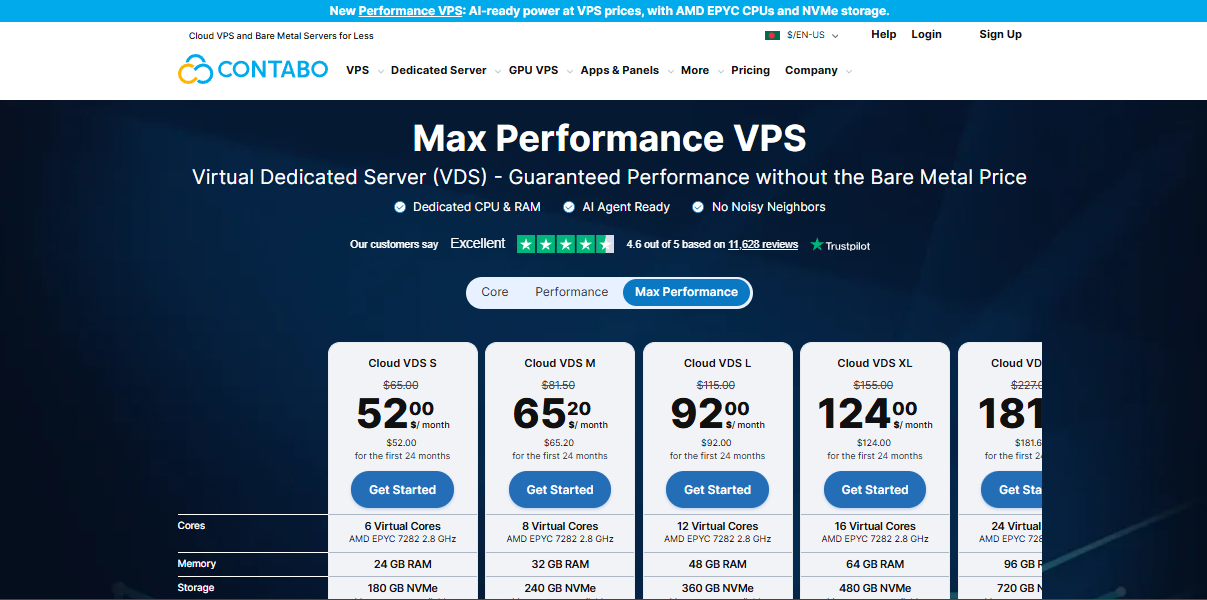
Contabo is a German company with a product literally named Cloud VDS. Plans start at the S tier with 3 physical cores, 24 GB of RAM and 180 GB of NVMe, and climb to larger tiers with 12 cores and 96 GB of RAM. Outbound traffic of 32 TB is included, and standard versus discounted prices differ by around 20 percent on some tiers, so read the checkout page closely.
Why consider it: very high resources for the money.
Watch out for: VPSBenchmarks graded Contabo’s VDS plans well for performance stability but only moderately for disk and network tests, with grades between C and E in those areas. Run your own workload during the refund window.
2. IONOS
IONOS sells Dedicated Core virtual machines inside its Cloud Compute Engine. The company says one virtual core maps to a dedicated physical core with two hyper-threads, so nobody else touches that core. A 1-core, 2 GB plan showed up at about $46 per month in a third-party benchmark listing.
Why consider it: clear core-level dedication and pay-as-you-go billing.
Watch out for: the dedicated-core range costs noticeably more than IONOS’s cheaper VPS line, so compare plan names carefully.
3. Hetzner
Hetzner’s CCX line offers dedicated AMD vCPUs, where each vCPU is one thread of a core. Data centres sit in Germany, Finland, the USA and Singapore. On 15 June 2026 Hetzner raised cloud prices, and the dedicated-vCPU range took the biggest hit. One analysis estimated the CCX increase at roughly 113 to 169 percent in Germany and Finland, with a large CCX plan moving from about €250 to about €533 per month.
Why consider it: strong hardware, hourly billing and a Singapore location.
Watch out for: the new pricing. Hetzner’s cheaper shared lines rose far less, so make sure you really need dedicated vCPU.
4. Vultr
Vultr’s Optimized Cloud Compute line uses dedicated vCPUs, with entry plans listed from about $28 to $30 per month. The company also introduced a VX1 line in 2026 aimed at efficient dedicated-CPU workloads, and it publishes data centres across many regions with hourly billing.
Why consider it: wide global reach and flexible billing.
Watch out for: dedicated-CPU entry prices are far above Vultr’s $5 to $6 shared plans, and the plan lineup was reshuffled during 2026.
5. DigitalOcean
DigitalOcean offers dedicated-CPU Droplets in General Purpose, CPU-Optimized, Memory-Optimized and Storage-Optimized flavours. Published entry points include about $42 per month for a 2 vCPU, 4 GiB CPU-Optimized Droplet and about $63 per month for a 2 vCPU, 8 GiB General Purpose Droplet. Premium variants add NVMe storage and faster networking.
Why consider it: polished tooling, strong documentation and a developer-friendly ecosystem.
Watch out for: a higher cost per core than value-focused European providers.
6. Kamatera
Kamatera lets you assemble a server from scratch across four CPU classes. Type B assigns a dedicated CPU thread, while Type D assigns a full dedicated physical core with two threads. The Type D baseline was listed at about $19 per month before adding cores, RAM and storage, and configurations scale from 1 to 104 vCPUs. A 30-day trial has been widely reported.
Why consider it: exact sizing, so you pay only for what you need.
Watch out for: custom pricing demands careful maths, and the cheapest Type A option is not dedicated.
7. Akamai Cloud (Linode)
Akamai’s documentation lists Dedicated CPU plans from about $36 per month, covering 4 GB to 512 GB of memory and 2 to 256 dedicated vCPUs. Newer G7 and G8 dedicated generations exist, and prices vary by region.
Why consider it: a mature platform for steady production workloads.
Watch out for: several reviewers say Linode costs more than comparable European options.
8. Cherry Servers
Cherry Servers is a Lithuanian infrastructure company operating since 2001, with a range literally called Cloud VDS, Premium VDS and Performance VDS. A Cloud VDS 2 plan gives 4 vCPUs, 16 GB of RAM and 100 GB of NVMe with 10 TB of egress traffic, and was listed at about €49 per month after discount. Premium plans run on AMD EPYC processors, and servers can be ordered through an API.
Why consider it: true VDS naming, API automation and a 15-day money-back guarantee reported in directory listings.
Watch out for: larger tiers climb quickly, for example about €89 list for the 8 vCPU, 32 GB Cloud VDS 4.
9. OVHcloud
OVHcloud’s entry VPS plans are very cheap, but a benchmark listing for its 2026 VPS-1 shows no dedicated CPU, so those plans are not true VDS. For guaranteed resources, look at the Public Cloud instances (a 4 vCPU, 8 GB c3 plan was listed near €60 per month) or the bare-metal servers, which start around €50 per month. OVHcloud reportedly raised some VPS prices in April 2026.
Why consider it: a broad product range and included anti-DDoS protection.
Watch out for: confirm which products truly have dedicated CPU before ordering.
10. Liquid Web
Liquid Web focuses on managed hosting. Its VPS plans can be self-managed or fully managed, and reviewers praise the expert support and proactive monitoring. One 2026 pricing review listed managed VPS from $36 per month on a one-month plan, renewing at $72, while other sources show lower promotional prices.
Why consider it: hands-on support for businesses that would rather not run servers themselves.
Watch out for: renewal pricing and the premium you pay for management.
How These Providers Were Evaluated
This list draws on public product documentation, official pricing pages where available, and third-party benchmark and pricing trackers such as VPSBenchmarks. Providers were included only if they sell a dedicated-CPU or VDS-style product, and vendor claims are marked as the vendor’s own.
[Author: add your own hands-on results here, such as CPU score, disk I/O, network speed and uptime from your test servers, with test dates. Original data makes the page more trustworthy and more likely to be cited. Delete this note before publishing.]
Frequently Asked Questions About VDS Hosting
What does VDS stand for in hosting?
VDS stands for Virtual Dedicated Server. It is a virtual machine with CPU, RAM and storage reserved for a single customer, running on a larger physical host. You receive root access and strong isolation, but you do not share processing power with other tenants.
What is the difference between VDS and VPS?
A VPS may share CPU time with other users, so speed can vary. A VDS reserves cores and memory for you, so performance stays steady. Both give root access, but a VDS usually costs more. Because providers use the terms loosely, always check whether the CPU is described as dedicated.
Is VDS better than VPS?
Not always. A VDS is better for busy production sites, databases, game servers and bots that need steady performance. A VPS is cheaper and perfectly fine for small websites, testing and learning. Choose by workload and budget, and verify the dedicated CPU claim in the plan details.
Is VDS the same as a dedicated server?
No. A dedicated server is a whole physical machine rented by one customer, while a VDS is a virtual machine with reserved resources on a shared host. In the VDS vs dedicated server comparison, a VDS is cheaper and easier to scale, and a dedicated server gives raw single-tenant hardware.
How much does a VDS cost?
In 2026, entry-level dedicated-CPU plans were listed from roughly $20 to $65 per month. Mid-range plans run about €50 to €90, and high-end machines start near €120. Always compare renewal prices, since introductory discounts can end after the first term and add-ons raise the bill.
Is VDS good for gaming?
Yes, for hosting game servers. Reserved CPU cores keep tick rates smooth and reduce lag spikes, especially under player load. Choose a data centre close to your players, enough RAM for your game, and DDoS protection. A VDS is not meant for playing games on a remote desktop.
Is a VDS good for trading bots?
Yes. Trading bots need constant uptime and a CPU that does not stall, which a VDS provides through reserved cores. Pick a data centre near your exchange to lower latency, secure SSH and API keys, and run the bot as a service that restarts automatically.
Is there cheap VDS hosting that is still reliable?
Yes, value providers such as Contabo, Cherry Servers and Kamatera offer low entry prices. To stay safe, confirm the CPU is dedicated, read the renewal price, check the uptime guarantee, and use any trial or refund window to benchmark the server before committing.
Do I need technical knowledge to manage a VDS?
Usually, yes. Most VDS plans are self-managed, so you handle installation, updates, firewalls and backups. If you lack those skills, choose a managed provider such as Liquid Web, or hire a server administrator to look after updates, security and backups for you.
Conclusion: Is a VDS Server Right for You?
A VDS gives you the control of a VPS plus reserved resources that keep performance consistent, at a fraction of the cost of a physical server. If you want the best specs per euro, start with Contabo or Cherry Servers. If you value mature tooling, look at DigitalOcean, Vultr or Akamai. If you want someone else to handle the server, consider Liquid Web. Whichever of the VDS hosting providers you pick, get the dedicated CPU in writing, check the renewal price and use any trial window to benchmark your own workload.

Leave a Comment