
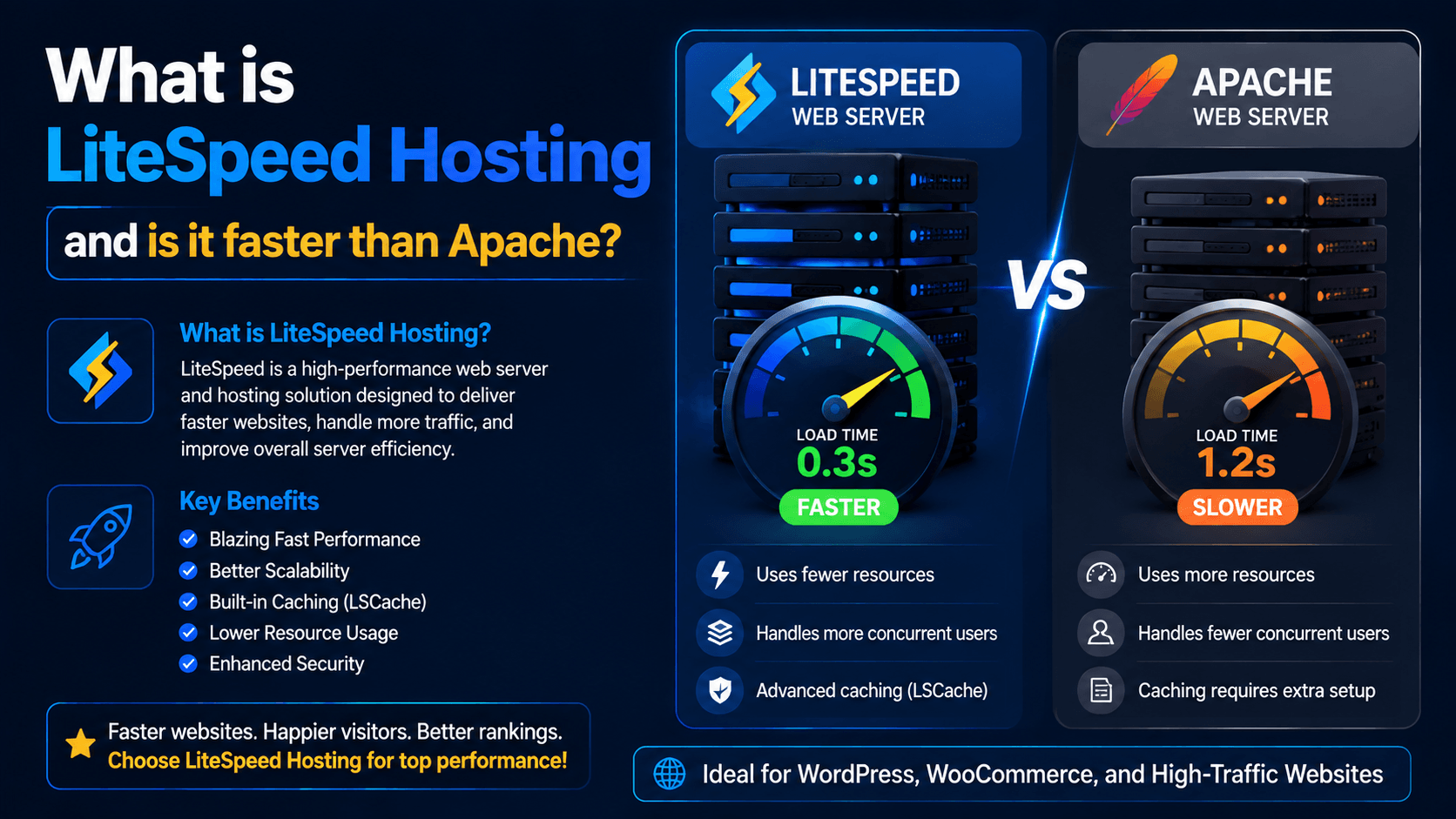
Website speed can make or break your online success. A fast website keeps visitors happy. It also helps with search rankings. Speed boosts conversions and lowers bounce rates. Your web server plays a big part in that speed.
The web server handles visitor requests. It delivers your website content to them. Two popular choices are LiteSpeed Web Server and Apache HTTP Server. Apache is a trusted name. Many people use it. LiteSpeed is known for better performance. It uses fewer resources. It also has built-in caching.
This guide will explain What is LiteSpeed hosting. You will see how it stacks up against Apache. And you will find out if LiteSpeed can speed up your website.
What Is LiteSpeed Hosting?
LiteSpeed hosting runs on the LiteSpeed Web Server. This is a different system from Apache. The main focus is speed and efficiency. It helps websites handle requests faster. It also uses fewer server resources.
How LiteSpeed Works
Every visitor triggers a request. Their browser sends it to your hosting server.
The LiteSpeed Web Server processes that request by:
- Receiving incoming connections
- Processing PHP and database requests
- Serving cached content whenever possible
- Delivering files efficiently
- Handling thousands of simultaneous visitors with minimal server load
LiteSpeed Web Server vs LiteSpeed Hosting vs LiteSpeed Cache
These terms are often confused, but they refer to different things.
| Term | Meaning |
| LiteSpeed Web Server (LSWS) | The web server software installed on the hosting server. |
| LiteSpeed Hosting | A hosting plan that uses LiteSpeed Web Server. |
| LiteSpeed Cache (LSCache) | A powerful caching system and WordPress plugin that speeds up websites. |
When a hosting company advertises LiteSpeed hosting, it means your website is hosted on a server running LiteSpeed Web Server instead of Apache.
What Is Apache Web Server?
Apache is one of the oldest web servers. It is also one of the most widely used. The Apache Software Foundation created it. For decades, it has powered millions of websites. Its popularity comes from being free and open-source. It is also flexible. A large community of developers supports it.
Its popularity comes from several strengths:
- Open-source and free
- Highly customizable
- Large ecosystem of modules
- Excellent documentation
- Massive community support
- Compatible with almost every hosting environment
Apache is still a solid choice. It continues to power a huge share of websites globally.
But there is a downside. Its older design can use more server resources. This becomes a problem when handling large crowds of visitors. Newer web servers handle traffic more efficiently.
LiteSpeed vs Apache: Key Differences
The table below shows the main differences between LiteSpeed and Apache. These differences are in architecture and function.
| Feature | LiteSpeed | Apache |
| Performance | High speed; designed for performance under high traffic | Good; industry standard for many years |
| Architecture | Event-driven, asynchronous | Process/thread-based |
| Resource Usage | Lower; handles more connections with fewer resources | Higher; consumes more memory per connection |
| HTTP/3 Support | Built-in support | Limited; requires additional configuration |
| Cache Support | Advanced built-in caching (LSCache) with plugins for popular CMSs | Available, but requires additional modules and setup |
| Compatibility | Fully Apache-compatible; reads .htaccess files automatically | Native standard |
The main speed difference comes from the architecture. LiteSpeed uses an event-driven system. It handles many connections in one process. Apache uses a process or thread for each connection. This uses more memory.
Why LiteSpeed Can Be Faster Than Apache
LiteSpeed’s speed comes from its modern design and built-in caching. These features help it handle heavy traffic better than Apache.
Event-Driven Architecture
LiteSpeed uses an event-driven system. This lets it manage many connections at once. Apache uses an older process-based model. More connections mean more resources for Apache. LiteSpeed performs better during traffic spikes. It also uses fewer server resources to do it.
Built-in Caching System
LiteSpeed Cache is a major advantage. It stores ready-to-serve versions of web pages. This cuts down on repeated PHP processing. It also reduces database queries. Loading times improve a lot. This helps WordPress sites and other dynamic websites.
Better Handling of High Traffic
Traffic spikes can overwhelm traditional servers.
LiteSpeed is specifically designed to handle:
- More concurrent users
- Sudden traffic surges
- Large websites
- Busy WooCommerce stores
- High-traffic blogs
Because it uses resources more efficiently, websites remain responsive even during peak traffic.
LiteSpeed Cache Explained
LSCache saves dynamic pages as static HTML copies. When someone visits your site, the server looks for a saved copy. If it finds one, it serves that copy right away. This is much faster than building the page from scratch. It also uses far fewer server resources.
Key features include:
- Full-page caching
- Browser caching
- Object caching
- Image optimization
- Lazy loading
- CSS optimization
- JavaScript optimization
- HTML minification
- Database optimization
- CDN integration
- QUIC.cloud support
Is LiteSpeed Always Faster Than Apache?
Not necessarily.
There are situations where Apache performs very well.
Examples include:
- Properly optimized Apache configurations
- Low-traffic websites
- Servers with sufficient CPU and RAM
- Websites using high-quality caching solutions
- Static websites with minimal processing
Website speed depends on much more than the web server alone.
Other important factors include:
- Hosting provider quality
- SSD or NVMe storage
- CPU performance
- RAM availability
- PHP version
- Database optimization
- Website code quality
- Number of plugins
- Image optimization
- Content Delivery Network (CDN)
LiteSpeed Hosting for WordPress Websites
LiteSpeed has become very popular among WordPress users.
Why WordPress Users Choose LiteSpeed
- Faster page load times: LiteSpeed is built for speed. It handles more traffic with fewer resources. For WordPress sites, every millisecond matters. Visitors get faster page loads.
- Better Core Web Vitals potential: Google uses Core Web Vitals for rankings. LiteSpeed’s performance helps WordPress sites score better on LCP and FID. This directly helps search engine positions.
- Easy cache management: LSCache works well with WordPress. It removes the need for complex third-party caching plugins. This makes site management simpler. It also brings big speed gains.
- Compatibility with popular plugins: LiteSpeed works fully with WordPress. It supports .htaccess files and mod_rewrite rules. It also works well with WooCommerce, Yoast SEO, and page builders. Moving from Apache is smooth and easy.
LiteSpeed Hosting vs Shared Hosting Performance
Shared hosting means many sites share the same resources. CPU, RAM, and bandwidth are split among users. This keeps costs low. But one busy site can slow down others on the same server.
LiteSpeed Web Server focuses on speed and efficiency. This makes it a strong option for shared hosting environments.
How LiteSpeed Improves Shared Hosting
People often call LiteSpeed a “drop-in replacement” for Apache. It supports .htaccess and mod_rewrite rules. Its main strengths come from smart design.
- Faster Rule Processing: LiteSpeed handles .htaccess rules with less overhead. This reduces server strain.
- Better Caching: LiteSpeed works with LSCache to serve pages faster. WordPress sites benefit the most.
- Event-Driven Architecture: LiteSpeed manages many connections at once. It uses less CPU and memory than Apache.
Resource Management Benefits
In shared hosting, no single user should take all the resources. LiteSpeed has features to prevent this.
- PHP SuExec Max Connections: This limits PHP processes per account. The default is 10, which works for most cases. If needed, you can raise it to 15 or 20. But you must balance this with available CPU and RAM.
- WaitQ Monitoring: Real-Time Stats show the “WaitQ” value. A WaitQ above zero may mean the limit is too low. But it could also mean the server CPU is maxed out. In that case, adding more workers won’t help.
LiteSpeed’s design stops one user from slowing down everyone else. This is a common problem in shared hosting, and LiteSpeed handles it well.
Who Should Choose LiteSpeed Hosting?
LiteSpeed hosting is an excellent choice for:
- ✅ WordPress websites
- ✅ Business websites
- ✅ WooCommerce stores
- ✅ High-traffic blogs
- ✅ Membership websites
- ✅ News websites
- ✅ Websites focused on SEO
- ✅ Websites requiring fast loading times
LiteSpeed may not be necessary for:
- Small static HTML websites
- Local development servers
- Testing environments
- Highly customized Apache configurations
How to Check If Your Hosting Uses LiteSpeed
Wondering if your hosting provider uses LiteSpeed? You can check it in a few simple ways without technical knowledge.
- Check server headers: This is one of the quickest methods. Use an HTTP header checker or your browser’s Developer Tools and open the Network tab. Look for a
Server: LiteSpeedresponse. If you see Apache or nginx instead, your site is using a different web server. - Check your hosting control panel: Many hosting panels show the active web server. In cPanel/WHM, check the server information or look for a LiteSpeed option. If you use CyberPanel, your server may be running OpenLiteSpeed.
- Ask your hosting provider: Contact support. Just ask, “Does my plan use LiteSpeed or Apache?” They can confirm it quickly.
- Use technology detection tools: Tools like Wappalyzer or BuiltWith can identify your web server. They are easy to use and give fast results.
Common Myths About LiteSpeed Hosting
LiteSpeed Web Server is known for strong performance. But some myths surround it. Here are the facts.
Myth 1: “LiteSpeed automatically makes every website fast.”
Reality: LiteSpeed can boost speed. But it is not a magic fix. Caching and smart design help reduce load times. Yet poorly coded themes, large images, and too many plugins can still slow you down. Proper caching, PHP settings, and site optimization still matter.
Myth 2: “Apache is outdated.”
Reality: Apache is still reliable. Many websites use it. Its flexibility and large ecosystem make it a good choice for many sites. LiteSpeed may perform better in some cases. But that does not make Apache old or useless.
Myth 3: “LiteSpeed replaces all optimization needs.”
Reality: Your server is just one piece of the puzzle. Your CMS, theme, plugins, images, database, and external scripts all affect speed. LiteSpeed can reduce server load. But combining it with a lean, well-optimized site gives the best results.
Choosing Between LiteSpeed and Apache Hosting
Use this checklist to decide which hosting option suits your needs.
Choose LiteSpeed if:
- You want maximum website speed
- You run a WordPress website
- You need built-in caching
- You expect high traffic
- You manage an eCommerce store
- You want better Core Web Vitals performance
Choose Apache if:
- You require extensive server customization
- You depend on specific Apache modules
- You have advanced server configurations
- Your hosting environment already performs well with Apache
Final Verdict: Is LiteSpeed Faster Than Apache?
LiteSpeed is generally faster than Apache. Its architecture is more efficient. It uses fewer resources. Its caching is powerful. If you are wondering What is LiteSpeed hosting, it simply means hosting that uses LiteSpeed Web Server instead of Apache.
LiteSpeed works great for WordPress sites. It is ideal for online stores. It also handles high-traffic websites well. Its caching can boost page speed. It can also manage more visitors with ease.
Apache is still a solid choice. It is reliable and flexible. But if speed and scalability matter most, LiteSpeed hosting is often the better option. Ready to improve your website’s performance? Choose reliable LiteSpeed hosting today.

Leave a Comment