
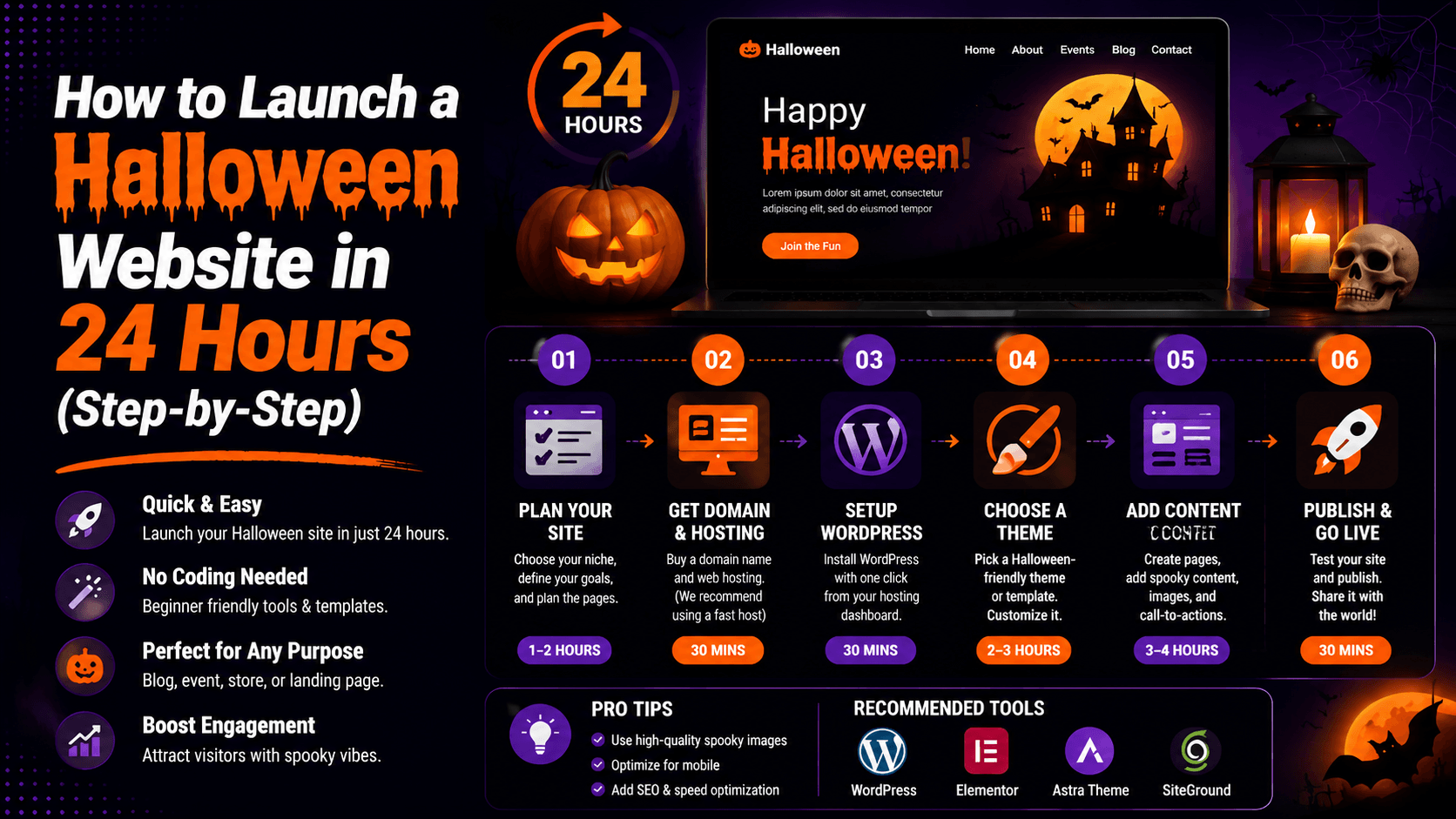
Halloween is big business. Millions of people search for costumes, decorations, and party ideas every year. This seasonal spike brings huge traffic potential. A Halloween website can tap into that demand. You can earn money with ads, affiliate links, or product sales. And you can do it before the peak season hits.
Here is the best part. You do not need months of work. You do not need weeks of planning. With the right tools and a clear roadmap, you can build a working site fast. A full Halloween website can go live in just 24 hours.
This guide shows you exactly how. How to Launch a Halloween Website and step-by-step what to do. You will see how to optimize for search engines. You will know how to get your site online quickly. No fluff. No filler. Just a straightforward plan that works.
Why Launch a Halloween Website Fast?
Launch early. It helps you catch seasonal traffic before the competition gets fierce.
Capture Seasonal Search Traffic:
Every October, millions search for Halloween ideas. They look for costumes, haunted houses, and spooky decorations. Many also want easy DIY treats. A well-optimized site ranks for these popular keywords. It pulls in free, targeted visitors from Google. The earlier you launch, the better. Your site gets more time to climb rankings. This happens before demand hits its peak.
Promote Halloween Events and Products:
Maybe you sell costumes. Maybe you run a haunted house. Or perhaps you promote a Halloween party. A dedicated website becomes your digital storefront. You can showcase products. You can sell tickets. Publish event schedules. Collect email subscribers. Everything lives in one place.
Generate Affiliate or Ad Revenue:
You don’t need your own products to earn money. Promote Halloween items through affiliate programs. Try Amazon Associates or ShareASale. Or place display ads. Use Google AdSense or Mediavine. Put them on content-rich pages. Examples include “top 10 costumes” or “last-minute decoration ideas.”
Step 1: Define Your Halloween Website Goal (Hour 1)
Before you buy anything, decide your website type. What do you want to create? Here are your main options.
Halloween Blog
A blog is all about content. Share costume ideas. Post decoration tutorials. Offer party planning tips. List local events. You earn money through display ads. Try Google AdSense or Mediavine. Affiliate links also work well. Amazon Associates is a good choice. This path fits writers and content creators best.
Costume Store
This is an eCommerce site. Sell costumes, wigs, masks, and accessories. You will need product photos. Write clear descriptions. Manage your inventory. Set up a payment gateway. This option works for retailers or dropshippers.
Party Supplies Shop
This resembles a costume store. But you focus on decorations, tableware, lighting, and novelties. Parents buy for annual parties. This creates recurring purchases. It can be very profitable.
Haunted House Event Website
Build a single-page or multi-page site. Promote a real-world haunted house. Advertise corn mazes or other Halloween events. Sell tickets online. Publish event schedules. Share location details clearly.
Halloween Printables and Digital Downloads
Sell digital files. Offer invitation templates. Create coloring pages. Design treat bag tags, wall art, and party games. Overhead stays low because you hold no physical inventory. Deliver instantly after purchase. This suits graphic designers perfectly.
Step 2: Choose a Halloween-Themed Domain Name (Hour 2)
Your domain name should be memorable, easy to spell, and relevant to Halloween.
Tips for Selecting a Memorable Domain
- Keep it short and simple
- Avoid complicated spellings
- Make it easy to remember
- Choose a brandable name
Using Halloween Keywords
Consider keywords such as:
- Halloween
- Spooky
- Haunted
- Pumpkin
- Costume
- Trick or Treat
- Ghost
- Horror
Checking Domain Availability
Search for your Halloween domain using Namecheap, GoDaddy, or Porkbun. If your first choice is taken, try variations, add descriptive words, or use extensions like .shop or .co. Choose a .com if possible, then register it quickly. Domains typically cost $10–$15 per year.
Step 3: Purchase Fast and Reliable Hosting (Hour 3)
Your hosting provider directly impacts website speed, uptime, and security.
What to Look for in Hosting
- Fast loading speeds
- Reliable uptime
- Strong customer support
- WordPress compatibility
- Affordable pricing
One-Click WordPress Installation
Most quality hosts offer one-click WordPress installation. WordPress powers over 40% of all websites. It is beginner-friendly. After installing, pick a Halloween-themed template. Start adding content right away. No coding skills needed.
SSL and Security Essentials
SSL (Secure Sockets Layer) encrypts data between your site and your visitors. Without SSL, browsers label your site “Not Secure,” scaring away visitors. Most hosts include free SSL certificates (Let’s Encrypt). Enable it during setup. Also enable automatic backups and firewall protection to guard against hacks.
Step 4: Install WordPress and Basic Settings (Hours 4–5)
WordPress is the fastest and easiest platform for launching a Halloween website.
Configure Site Title and Tagline
Go to Settings > General. Enter your site title (e.g., “Spooky Celebrations”) and a tagline (e.g., “Halloween Costumes, Decor & Party Ideas”). The tagline appears in search engine results and browser tabs. Keep it short (under 60 characters) and include a Halloween keyword.
Set Up Permalinks
Go to Settings > Permalinks. Select the “Post name” option. This creates clean URLs like yourdomain.com/sample-post/. These URLs are keyword-rich. They help with SEO. Visitors find them easier to remember. Do not leave the default “plain” setting. That gives you yourdomain.com/?p=123. It looks ugly. It is also less search-friendly.
Install Essential Plugins
Recommended plugins:
- SEO plugin
- Security plugin
- Caching plugin
- Contact form plugin
- Image optimization plugin
Step 5: Choose a Halloween Website Theme (Hours 6–7)
Your theme determines your website’s appearance and user experience.
Free Halloween-Friendly Themes
On a tight budget? Several free WordPress themes work well for Halloween. Astra and GeneratePress are lightweight and fast. They are highly customizable too. Use dark color schemes. Add orange accents. Pick spooky fonts. These themes adapt easily for Halloween. Both are free. Find them in the WordPress theme directory.
Premium Theme Options
Premium themes provide more Halloween-focused designs. They include extra features too. Happy Wen Halloween offers dark colors and spooky animations. It has pre-designed layouts and countdown timers. WooCommerce support comes built-in. Zakra also offers a Halloween starter site. Import it quickly with one click. Premium themes cost $30–$60. This is a one-time purchase.
Customizing Colors, Fonts, and Branding
Use Halloween-inspired branding elements:
- Orange
- Black
- Purple
- Dark gray
- Spooky typography
- Themed graphics
Maintain readability while creating a festive atmosphere.
Step 6: Create Essential Pages (Hours 8–10)
Every professional website needs core pages.
-
Home Page: Explain what your website offers. This could be costumes, decorations, party ideas, or events. Add strong CTAs. Try “Shop Now,” “Read the Blog,” or “Get Tickets.” Use Halloween-themed images and colors. This creates a spooky atmosphere.
-
About Us: Introduce your website. Explain why you created it. Share your Halloween interests. Tell visitors about your experience or expertise. This helps them connect with your brand.
-
Contact Page: Add a simple contact form. Include a business email. Link your social media profiles. Add your physical address or event location if you have one. Make it easy for visitors to reach you.
-
Privacy Policy: Explain how your website collects information. Cover emails, cookies, and analytics data. This is important if you collect visitor information. Be clear and transparent.
-
Terms and Conditions: Include rules for using your website. Cover refunds, shipping, and payment policies. List user responsibilities too. If you use affiliate links or ads, include the right disclosures.
Maintain readability while creating a festive atmosphere.
Step 7: Add Halloween Content Quickly (Hours 11–15)
Content is what attracts visitors and search engine traffic.
Halloween Costume Guides
Write posts like “Top 10 Couples Costumes for 2025.” Create “Last-Minute DIY Costumes from Clothes You Already Own.” Publish “Best Pop Culture Costumes Inspired by This Year’s Movies.” Include affiliate links to Amazon or costume retailers.
Party Planning Tips
Share “How to Throw a Spooky Halloween Party on a Budget.” Offer “Halloween Party Games for Adults and Kids.” Create a “Halloween Playlist: 50 Spooky Songs.” Add downloadable checklists. Use them as lead magnets to collect emails.
Halloween Decoration Ideas
Post “Outdoor Halloween Decorations That Wow the Neighborhood.” Write “Mason Jar Ghost Lanterns DIY.” Share “Budget-Friendly Indoor Decor.” Use high-quality images. Include step-by-step instructions.
Pumpkin Carving Tutorials
Publish “How to Carve a Pumpkin Like a Pro (Video).” Offer “50 Free Printable Pumpkin Stencils.” Share “No-Carve Pumpkin Decorating Ideas for Kids.” Give away free printable stencils. This helps capture email addresses.
Haunted House Recommendations
Write “Best Haunted Houses Near [Your City].” Post “What to Expect at a Professional Haunt.” Share “DIY Backyard Haunted House on a Budget.” If you have an event, sell tickets directly on the page.
Step 8: Optimize for SEO (Hours 16–18)
SEO helps your Halloween website attract free organic traffic.
Keyword Research for Halloween Traffic
Target keywords such as:
- Halloween costume ideas
- Halloween party decorations
- Pumpkin carving patterns
- Halloween activities
- Halloween website
On‑Page SEO Checklist
For each page (homepage, product pages, blog posts), optimize these elements:
- Title tag: Include primary keyword near the beginning. Keep under 60 characters. Example: “DIY Halloween Costumes | Easy Last‑Minute Ideas”
- Meta description: Write a compelling summary. Use 150-160 characters. Include your keyword and a call-to-action. Example: “Discover 25+ easy DIY Halloween costumes you can make tonight. No sewing required. Get inspired now!”
- Heading structure: Use one H1 per page (main title). Use H2s for main sections and H3s for subsections. Include keywords naturally.
- URL slug: Keep short and keyword‑rich. Example: “/diy-halloween-costumes” not “/post-123”.
Image Optimization
Images slow down your site if not optimized. Use a plugin like Smush or ShortPixel. Compress images without losing quality. Rename files before uploading. Use “diy-halloween-costume-ghost.jpg.” Avoid “IMG_4532.jpg.” Add descriptive alt text for every image. This helps visually impaired users. It also improves image search rankings.
Internal Linking Strategy
Link related pages together. This helps users and search engines navigate your site. Link a DIY decorations post to your string lights product page. Link a costume ideas post to your face paint affiliate page. Aim for 2–5 internal links per page. This strengthens site structure and SEO.
Step 9: Add Monetization Methods (Hours 19–20)
Turn seasonal traffic into income. Here are the best ways.
Affiliate Marketing
Join affiliate programs like Amazon Associates, ShareASale, or Impact.com. Promote Halloween costumes, decorations, party supplies, and spooky home décor. Write honest reviews or “best of” lists. Include your unique affiliate links. You earn a commission when someone clicks and buys.
Display Ads
Sign up for Google AdSense. It is easy to enter. Or try premium networks like Mediavine or AdThrive. These require higher traffic. Ad networks place banner and video ads on your site. You earn money from impressions or clicks. For a seasonal site, display ads are passive income. Set them up once and they keep running.
Sponsored Content
As your site gains authority, brands may notice you. Halloween companies could pay you to write reviews. They might ask for tutorials or product mentions. Sponsored posts typically earn $50-500+. The amount depends on your traffic. Always disclose sponsored content. This follows FTC guidelines.
Digital Product Sales
Sell your own Halloween printables, e-books, templates, or planning guides. Create products like “Halloween Party Planner PDF.” Offer “Spooky Invitation Templates.” Write a “DIY Decoration Guide.” These have high profit margins. You hold no physical inventory. There is no shipping costs either.
Step 10: Prepare for Launch (Hours 21–22)
Perform final quality checks before going live.
Mobile Responsiveness Check
Over 60% of searches happen on mobile devices. Your Halloween website must work on phones and tablets. Check every page. Ensure text is readable. Buttons must be easy to tap. Menus should work on small screens. Aim for buttons of at least 48px. Use Google’s Mobile-Friendly Test for a quick check.
Speed Optimization
A one‑second delay reduces conversions by up to 7%. Test your site speed with Google PageSpeed Insights or GTmetrix. Aim for a score above 90 on mobile. Optimize images (use WebP format and compress large files). Enable caching (use a plugin like WP Rocket or W3 Total Cache). Use a Content Delivery Network (CDN) like Cloudflare.
Test Forms and Links
Click every link on your site. Ensure navigation menus lead to the correct pages. Test your contact form—submit a test message and verify it arrives at your email. If you sell products, complete a test purchase (use a sandbox payment gateway). Check that email order confirmations are sent. Fix any broken links or form errors before launch.
Step 11: Launch and Promote Your Halloween Website (Hours 23–24)
Now it’s time to attract visitors.
Share on Social Media
Post your website link on Facebook, Instagram, TikTok, and X (formerly Twitter). Use Halloween hashtags: #HalloweenIdeas, #SpookySeason, #CostumeInspo, #HalloweenDIY. Tag local event pages or influencers. Create a short video walkthrough of your site for TikTok and Instagram Reels.
Submit to Search Engines
Google does not automatically know about your new site. Submit your sitemap to Google Search Console and Bing Webmaster Tools. This speeds up indexing so your pages appear in search results faster.
Start Email Marketing
Did you collect email addresses during pre-launch? Send a launch announcement. Use a simple, eye-catching Halloween template. Offer a small incentive. Try a 10% off code. Give away a free printable. Offer early access to a costume guide.
Create Halloween Pinterest Pins
Pinterest is a visual search engine, perfect for Halloween content. Create vertical pins (600 x 900 pixels) with your website URL. Link to your blog posts, product pages, or printables. Join group boards in the Halloween niche for wider reach.
24-Hour Halloween Website Launch Checklist
You need a clear checklist to track your progress and ensure no critical steps are missed. Use this checklist to stay organized and focused.
- Domain registered – Purchase a memorable, Halloween‑themed domain (.com preferred).
- Hosting activated – Choose fast, reliable hosting (Cloudways, SiteGround, or Hostinger).
- WordPress installed – Most hosts offer one‑click WordPress installation.
- Theme customized – Install a Halloween‑friendly theme and adjust colors, fonts, and branding.
- Essential pages published – Create Home, About, Contact, Blog, and Shop (if eCommerce) pages.
- 5–10 blog posts added – Publish helpful content: costume ideas, decoration tutorials, party tips.
- SEO completed – Install RankMath or Yoast SEO. Add meta titles, descriptions, and alt tags.
- Monetization enabled – Set up affiliate links, ad networks, or payment gateways (e.g., PayPal, Stripe).
- Website tested – Check mobile responsiveness, page speed, and all forms/links.
- Promotion started – Share your site on social media, email lists, and Halloween forums.
Common Mistakes to Avoid When Launching a Halloween Website
Avoid these common errors. This will help you capture the October surge. It will maximize your traffic and revenue.
Waiting Too Long Before Halloween
The biggest mistake is launching too late. Consumers start searching for Halloween products in mid-September. A site launched on October 20th misses weeks of search traffic. It loses affiliate clicks and sales. Launch by the end of September at the latest. This captures the full season.
Ignoring Mobile Users
Over 60% of Halloween searches happen on mobile phones. A site that looks perfect on desktop but is hard to tap or slow to load on mobile will lose visitors. Test your site thoroughly on your own phone before launch.
Using Large Unoptimized Images
High‑resolution images slow down your site. A one‑second delay reduces conversions. Compress images before uploading. Use WebP format for better compression and quality.
Publishing Thin Content
Search engines rank pages with helpful, detailed content. A single sentence about a costume or a paragraph of generic text will not rank. Write comprehensive articles, use headings, and include images. Your goal is to answer the searcher’s question fully.
Frequently Asked Questions
Can I really launch a Halloween website in 24 hours?
Yes. Use WordPress and reliable hosting. Follow a clear plan. Most Halloween websites can launch within a single day.
How much does it cost to start a Halloween website?
Most beginners spend $50–$200. Costs depend on your domain, hosting, theme, and marketing expenses.
What type of Halloween website makes the most money?
Affiliate websites do well. eCommerce stores are profitable. Digital product websites work too. High-traffic Halloween blogs also generate strong revenue.
How can I get traffic before Halloween?
Publish content early. Optimize for SEO. Use Pinterest marketing. Promote on social media. Build an email list.
Conclusion
Launching a Halloween website does not have to be hard. It does not have to take much time either. Follow this 24-hour plan. You can build a professional site. Publish useful content. Optimize for SEO. Start attracting traffic before demand peaks.
The key is to start early. Follow this guide on how to launch a Halloween website. Take action today. You could begin attracting visitors within 24 hours. Start generating leads. Start earning revenue too.
Ready to get started? Choose your domain. Set up reliable hosting. Launch your Halloween website today. Do it before the seasonal rush begins.

Leave a Comment