

Most hosting companies ask you to pick a plan. Cloudways lets you pick a cloud first. That extra step gives you control over price and location.
Cloudways is a managed hosting company. It runs on servers from five cloud providers, then sets them up, secures them, and backs them up for you. You choose three things: the provider, the server type, and the size.
This guide explains each choice in plain words. It also lists every Flexible plan with its price. The prices come from Cloudways’ own pricing pages and were checked in November 2026, during the Black Friday sale.
The Short Answer
Which cloud provider should a beginner choose on Cloudways? Start with DigitalOcean or Vultr. Their entry plans cost the least, and their prices are close to each other.
DigitalOcean Standard Micro is the cheapest Flexible plan at $2.20 a month during the sale.
Vultr and Linode start at $2.80 for the same 1GB size.
AWS and Google Cloud cost more for the same RAM. They also bill extra for traffic and storage. Choose them only if you need that cloud.
All prices are monthly, in USD, and before tax. “Deal price” includes the 80% Black Friday discount, which lasts for the first 2 months and takes up to $200 per month off.
Before choosing a server, read our detailed Cloudways review to learn more about its pricing, performance, features, and hosting experience.
How Cloudways Works
Cloudways does not own data centers. It runs on the five clouds in this guide. You pay Cloudways, not the cloud provider. Your invoice shows a single cost for the server, plus any extras.
Cloudways handles the hard parts. It sets up the server, adds a firewall, applies security updates, runs backups, and watches the server around the clock. Support is open 24/7 through live chat and tickets.
You keep control of the things that matter. You pick the region. You resize the server when you need more power. You set the PHP version for each app. You also get SSH and SFTP access.
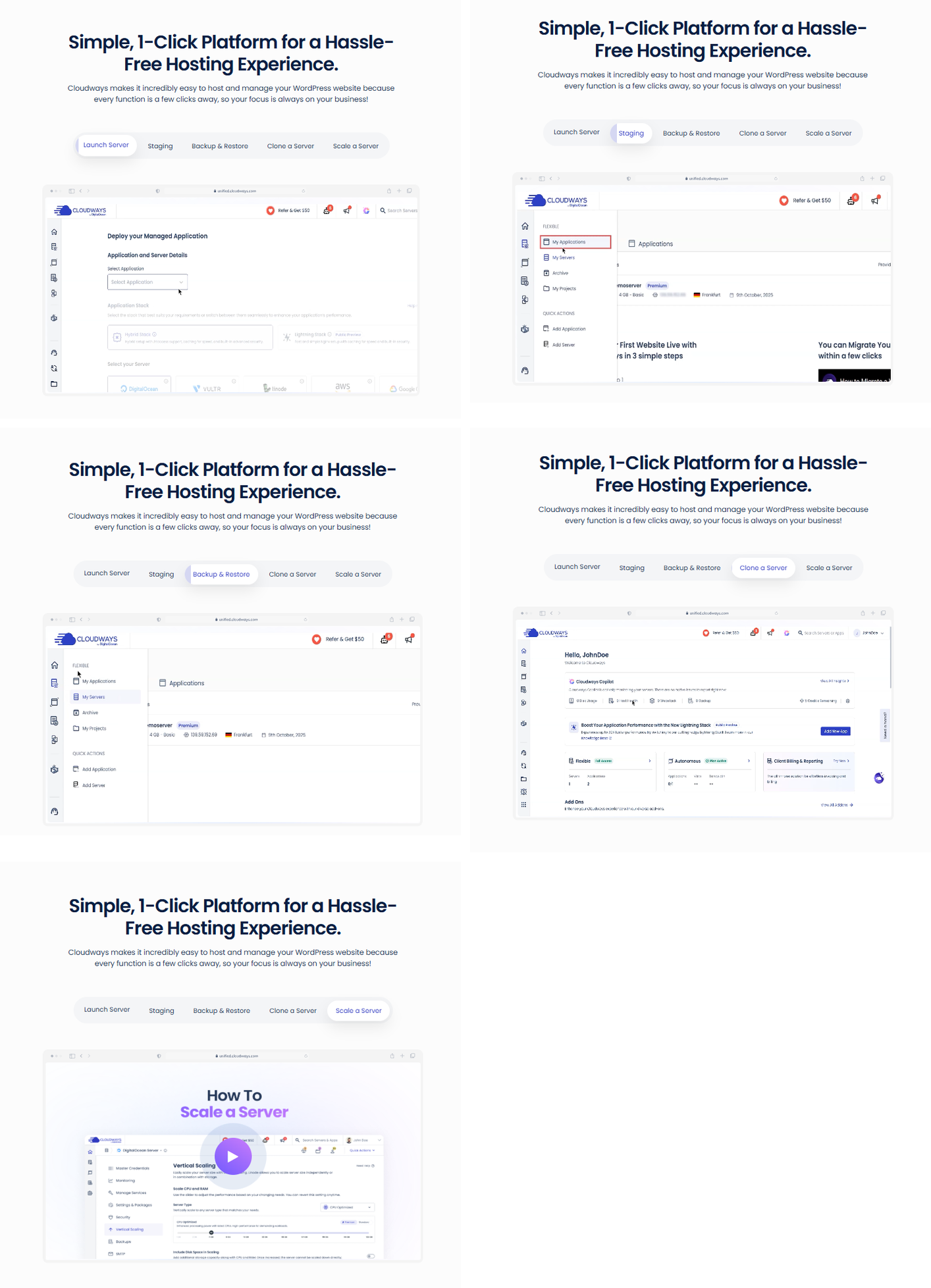
Screenshot: the Cloudways dashboard steps for launching, staging, backing up, cloning and scaling a server.
Cloudways offers four hosting product lines: Flexible, Autonomous, Velocity, and Managed AI Agents. Only Flexible lets you pick the cloud provider. This guide focuses on Flexible and covers the others near the end.
Choose in Three Steps
Provider. This is the company that owns the data center: DigitalOcean, Vultr, Linode, AWS, or Google Cloud.
Server type. This is the kind of hardware, such as Standard, General Purpose, or CPU Optimized.
Size. This runs from Micro up to 7XL. A bigger size means more RAM and more CPU, and on most providers, more storage.
You do not need to get the size right on day one. Cloudways supports vertical scaling, so you can resize a server later. A short interruption can happen during a resize, so do it at a quiet hour.
Server Types in Plain Words
SSD and NVMe are both fast storage. NVMe is the newer and faster kind. The price gap between them is small during the sale, as the DigitalOcean tables below show.
What the Size Names Mean
Cloudways uses the same size names on every provider. Here is how it describes them on its pricing pages.
Treat these as a rough guide. Two sites of the same size can need different servers. A busy WooCommerce store needs more than a quiet portfolio.
The Five Providers and Their Plans
Each table below covers one server type. Specs are the same ones shown on Cloudways’ pricing page. Every Flexible plan includes unlimited visits, unlimited websites and the Lightning Stack. An extra $0.033 per GB applies if you use offsite backup storage.
DigitalOcean
DigitalOcean is Cloudways’ parent company, and it is the most beginner-friendly choice. It has the most plan tables and the lowest entry prices.
Cloudways sells two tiers of DigitalOcean servers. Use the Standard and Premium switch on the pricing page to see each one. Premium uses NVMe storage. Standard uses SSD.
The location picker lists 10 cities: Atlanta, New York, San Francisco, Toronto, Amsterdam, Frankfurt, London, Bangalore, Singapore and Sydney. Some Cloudways pages still say 9.
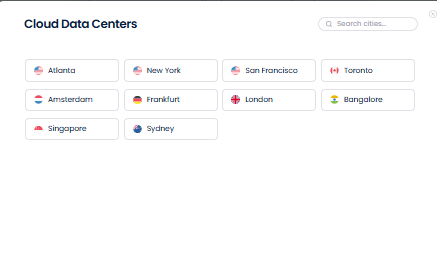
Screenshot: DigitalOcean locations in the Cloudways location picker.
DigitalOcean Premium: Basic
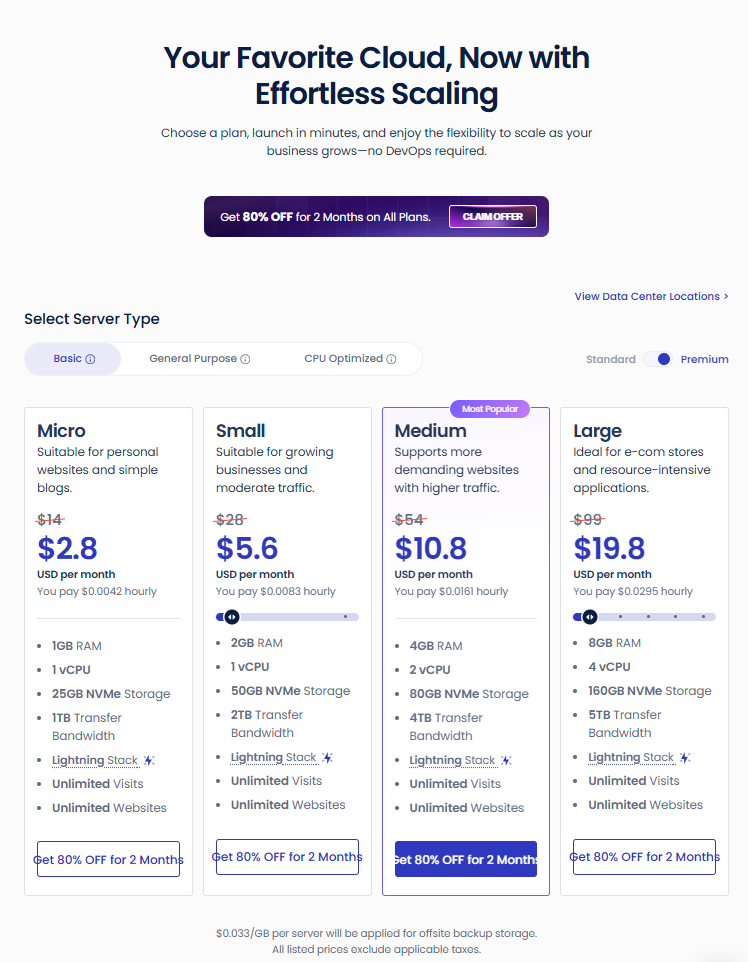
Screenshot: DigitalOcean Premium, Basic plans on the Cloudways pricing page.
DigitalOcean Premium: General Purpose
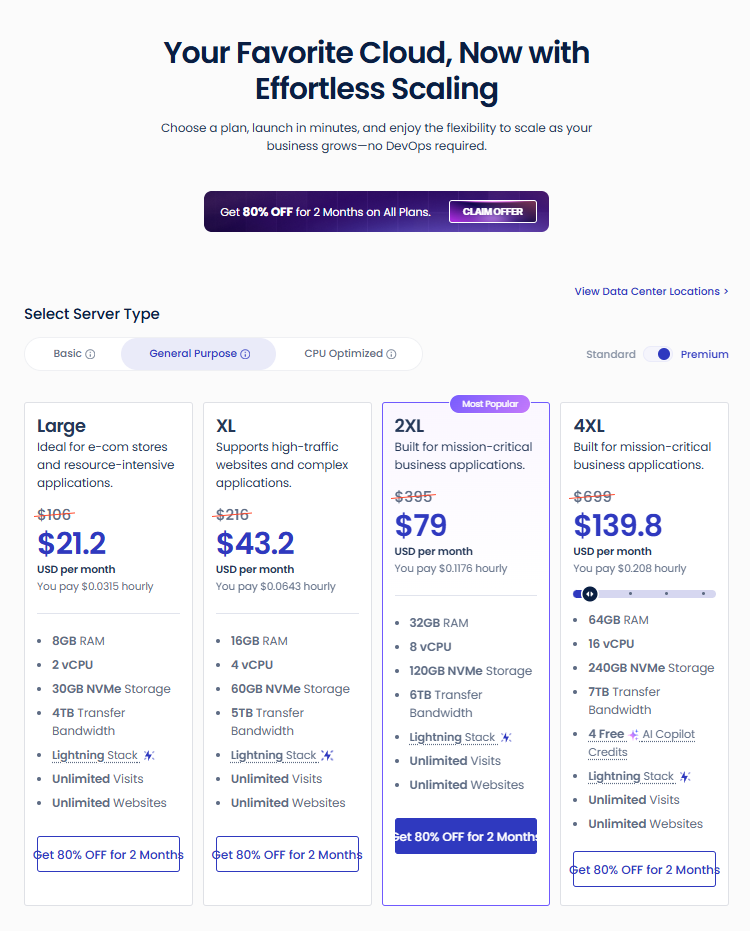
Screenshot: DigitalOcean Premium, General Purpose plans.
DigitalOcean Premium: CPU Optimized
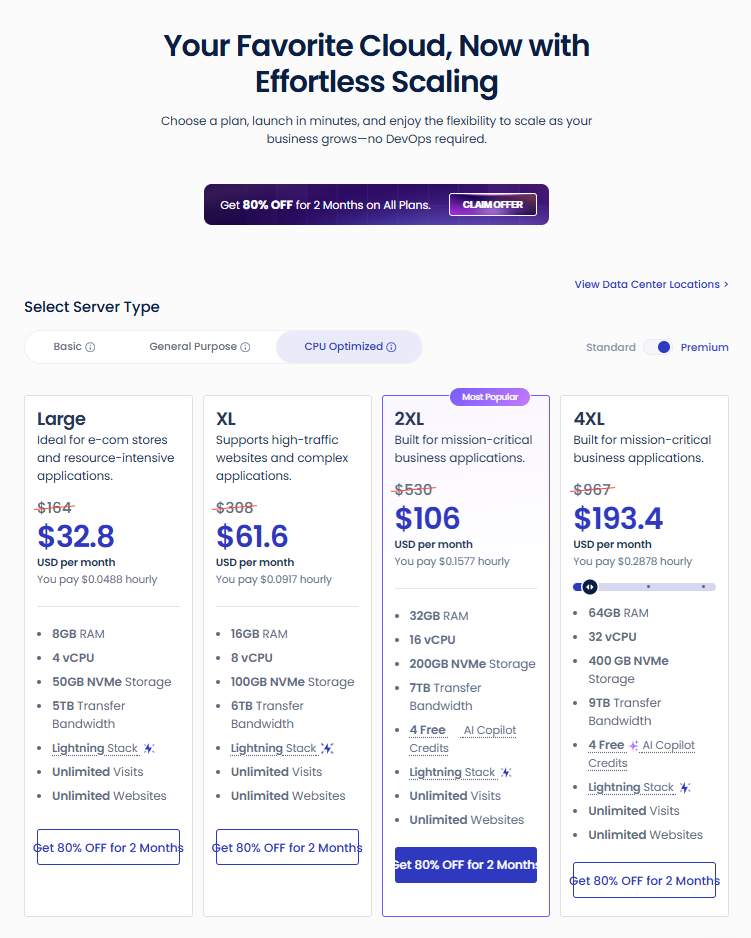
Screenshot: DigitalOcean Premium, CPU Optimized plans.
DigitalOcean Standard: Basic
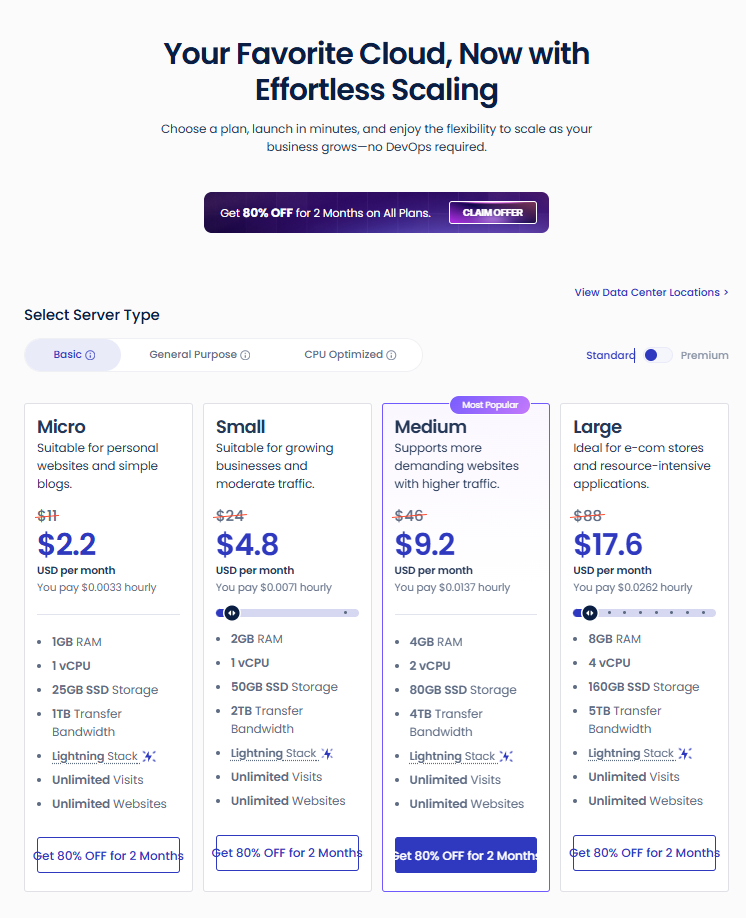
Screenshot: DigitalOcean Standard, Basic plans.
DigitalOcean Standard: General Purpose
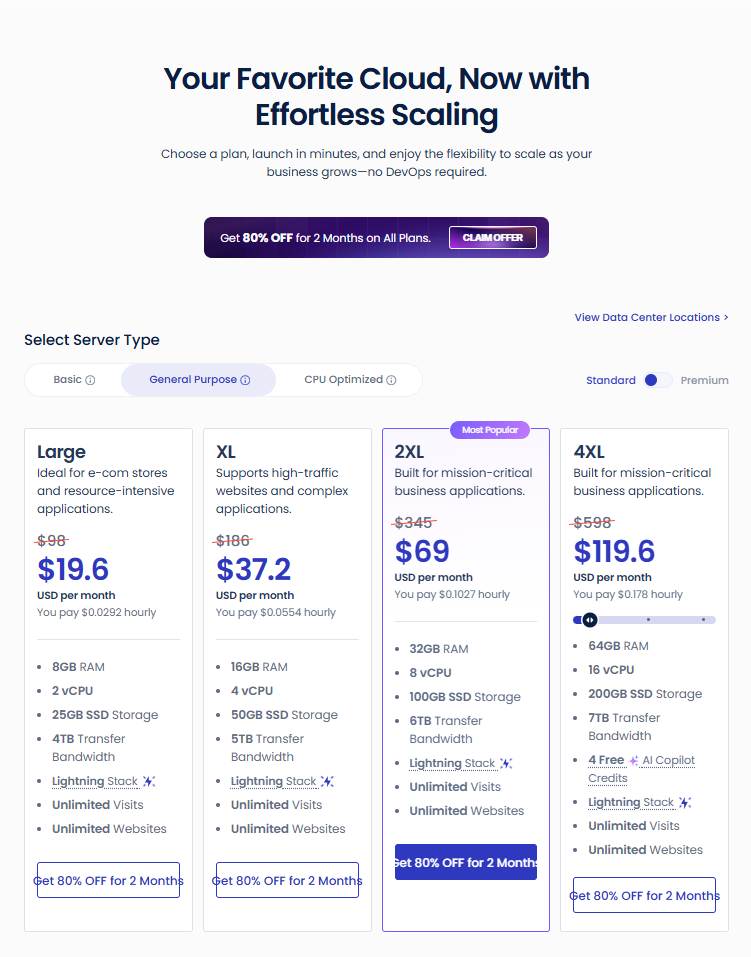
Screenshot: DigitalOcean Standard, General Purpose plans.
DigitalOcean Standard: CPU Optimized
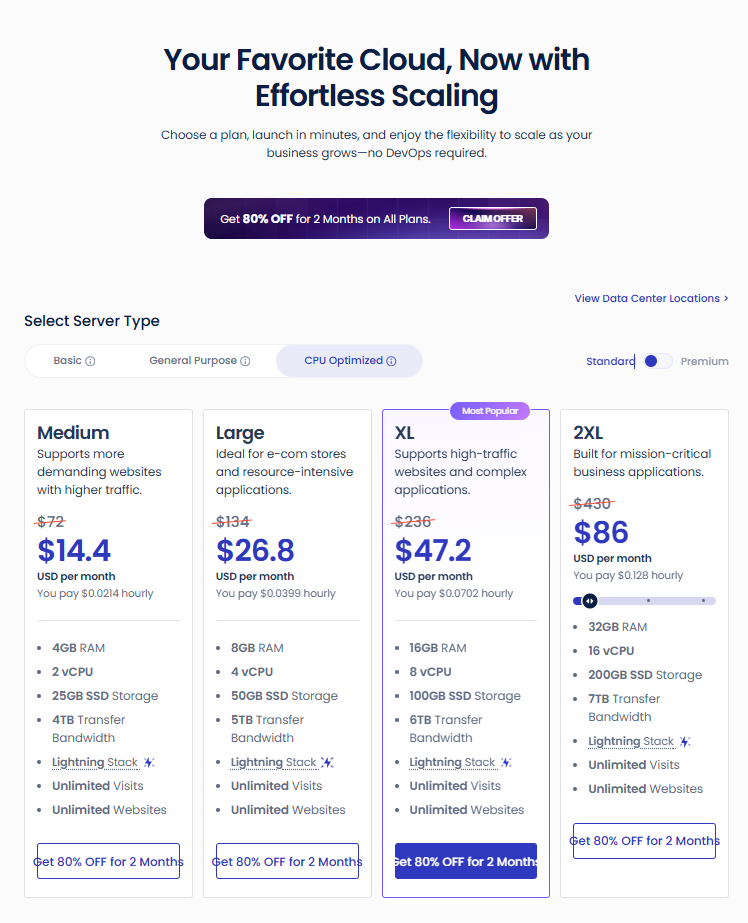
Screenshot: DigitalOcean Standard and CPU Optimized plans.
What to notice. At the Basic sizes, Premium costs $0.60 to $2.20 more than Standard during the sale and $3 to $11 more at regular prices. For that, you get NVMe storage. Basic Large is also a better deal than General Purpose Large in both tiers. It has 4 vCPUs and 160GB of storage for less money, while General Purpose Large has 2 vCPUs and far less storage. Pick General Purpose only when you want that server type.
Vultr
Vultr matches DigitalOcean on most entry prices and has far more locations. It also has a High Frequency option that pairs faster processors with NVMe storage. Cloudways also gives free Object Cache Pro on Vultr servers with 4GB of RAM or more.
The location picker lists 32 cities. They are in North America (11), Europe (8), Asia (7), South America (2), Australia (2), the Middle East (1), and Africa (1).
Vultr Standard
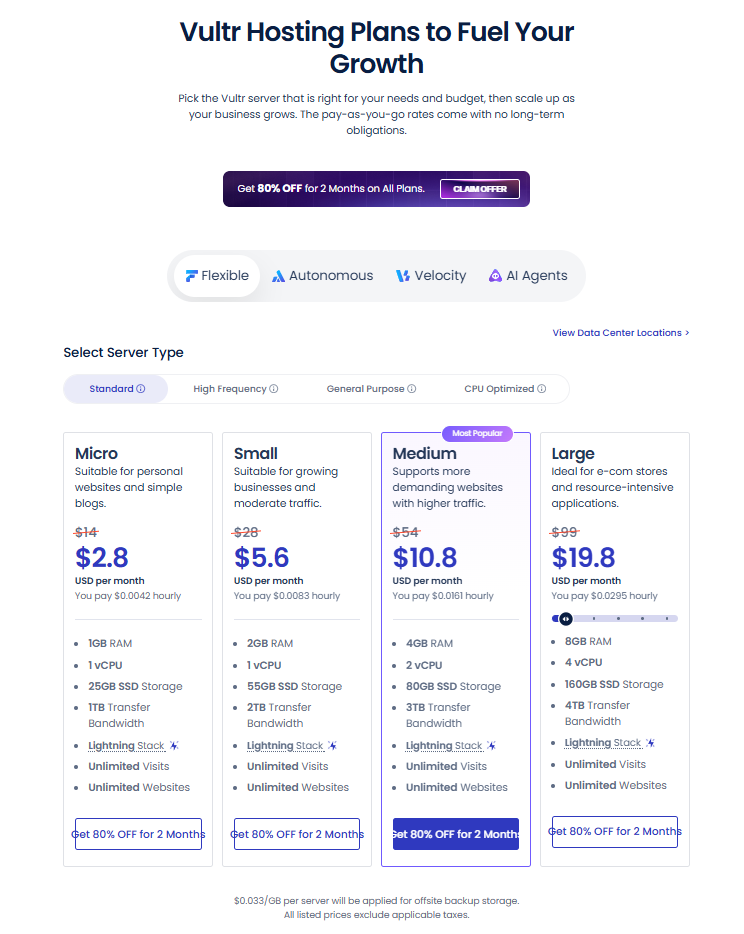
Screenshot: Vultr Standard plans on the Cloudways pricing page.
Vultr High Frequency
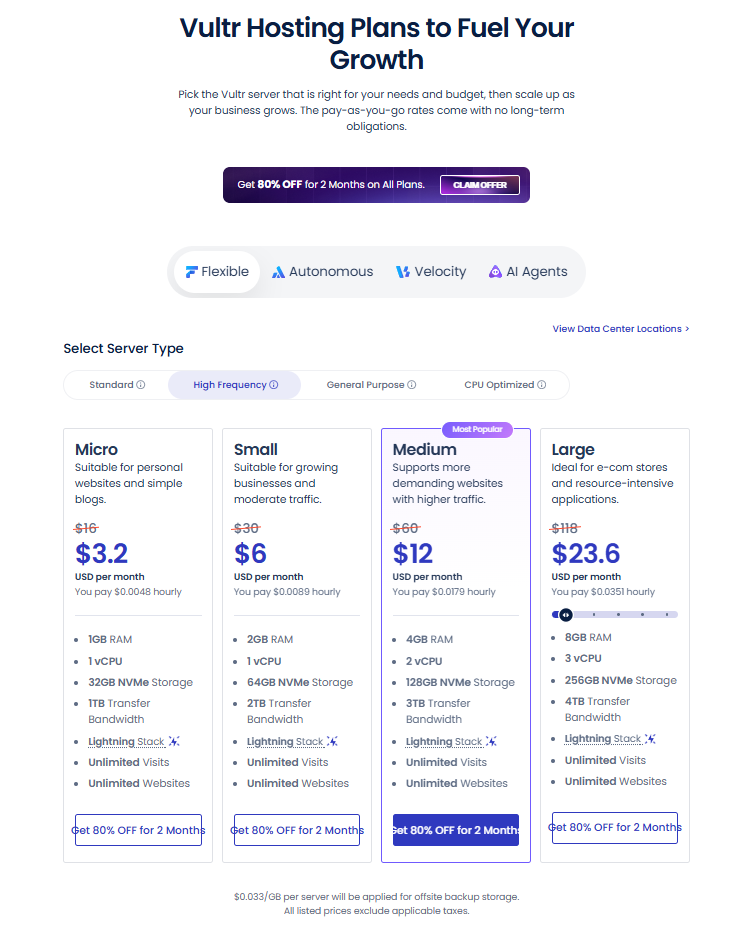
Screenshot: Vultr High Frequency plans.
Vultr General Purpose
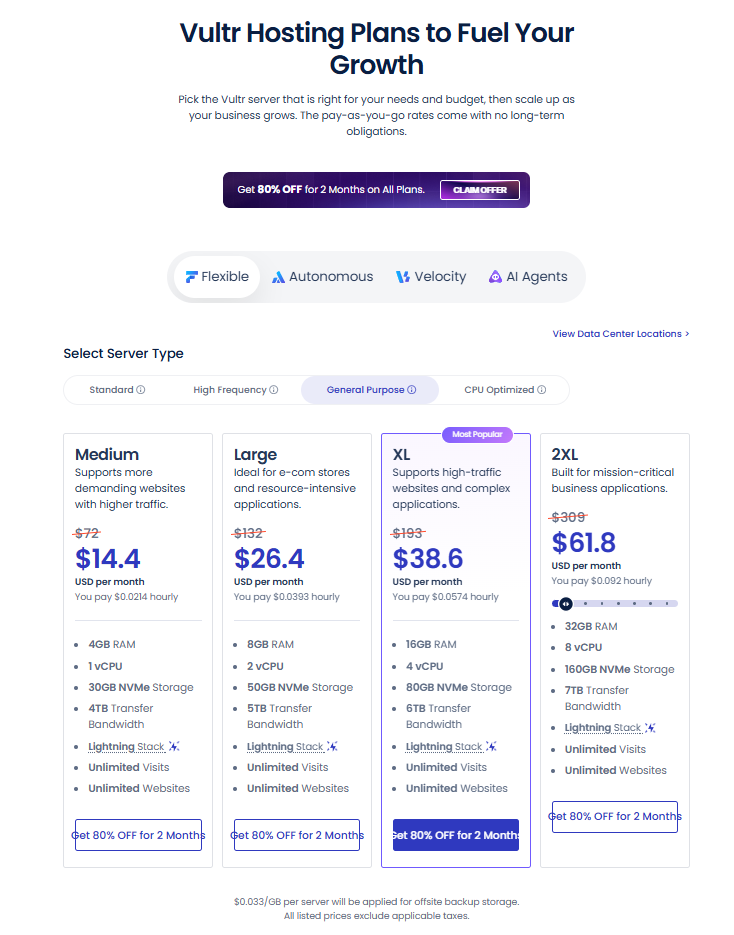
Screenshot: Vultr General Purpose plans.
Vultr CPU Optimized
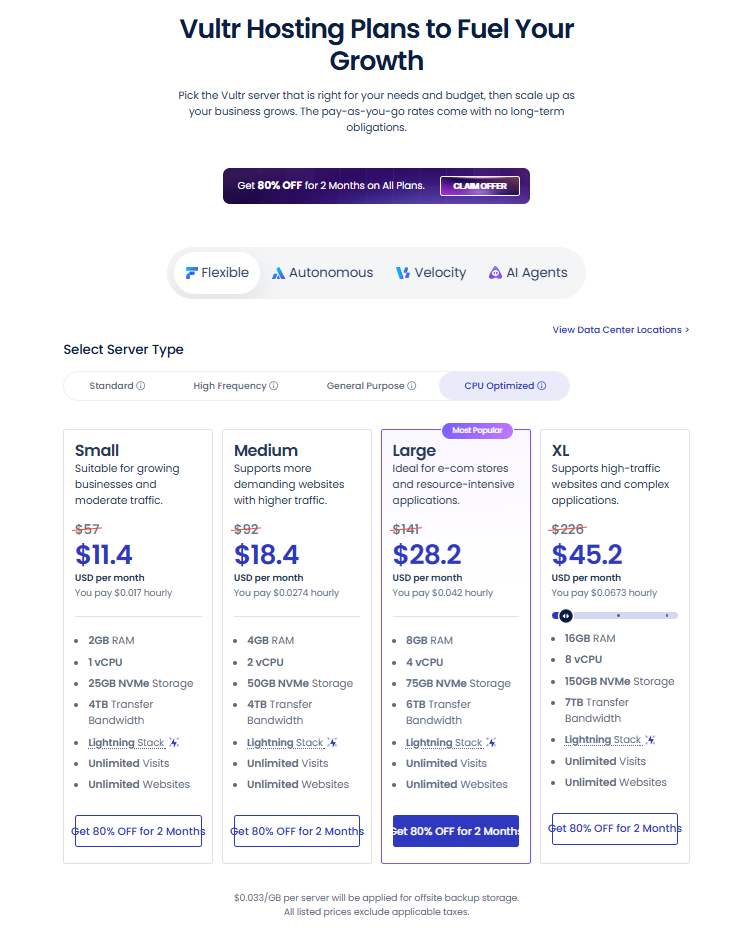
Screenshot: Vultr CPU Optimized plans.
What to notice. Vultr Standard Medium costs the same as DigitalOcean Premium Medium ($10.80) but has SSD storage and 3TB of transfer. High Frequency adds $0.40 to $3.80 over Standard during the sale and gives you more, faster storage. General Purpose Medium has only 1 vCPU and costs $3.60 more than Standard Medium during the sale, and Standard Medium has 2.
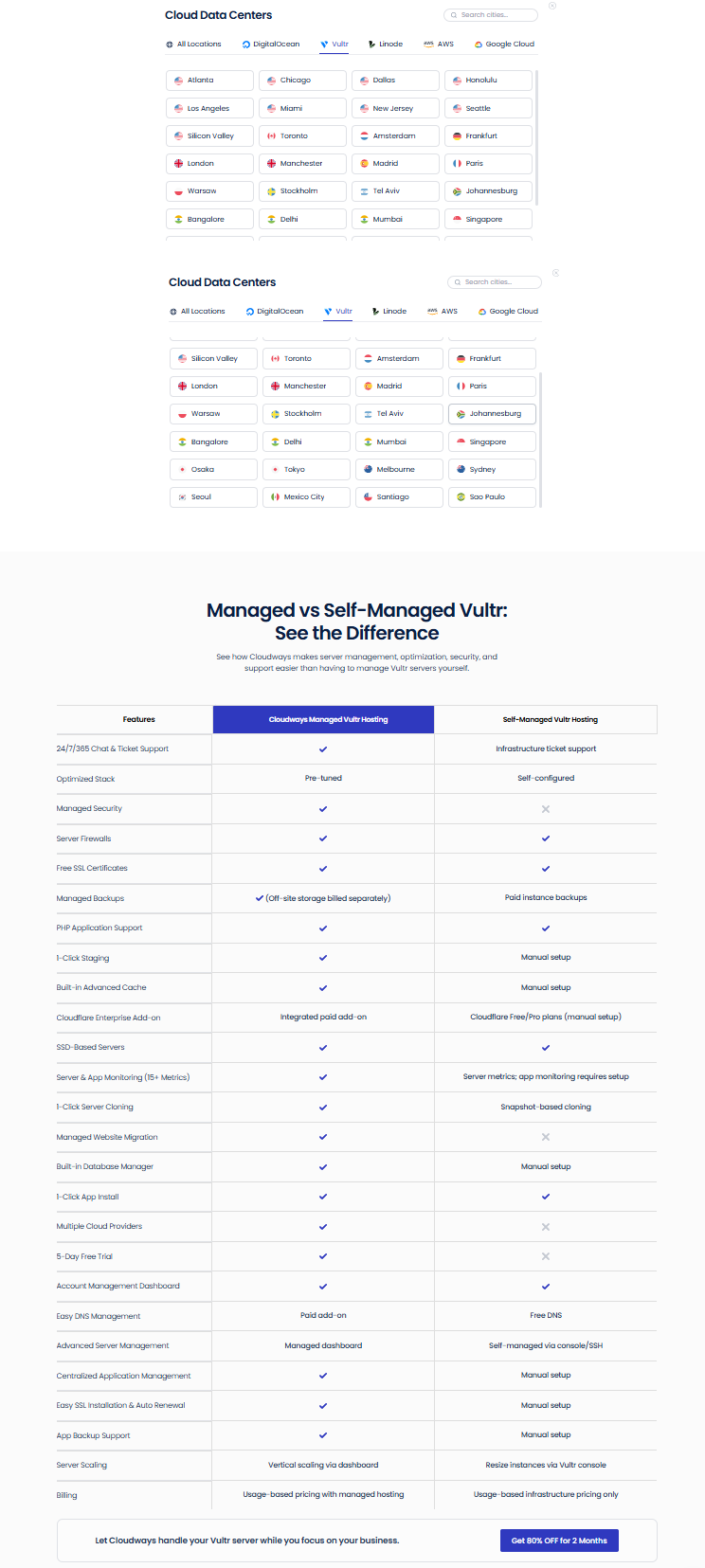
Screenshot: Vultr locations in the Cloudways picker, and Cloudways’ own comparison with self-managed Vultr.

Screenshot: feature panels and hero from Cloudways’ Vultr page.
Linode
Linode follows the same layout as DigitalOcean. It has three server types and all of them use SSD storage. Micro and Small cost the same as the other two. Medium and Large cost a little more.
The location picker lists 27 cities. They sit in North America (10), Europe (7), Asia (6), Australia (2), South America (1) and Africa (1). Cloudways’ page text says 25.
Linode Standard
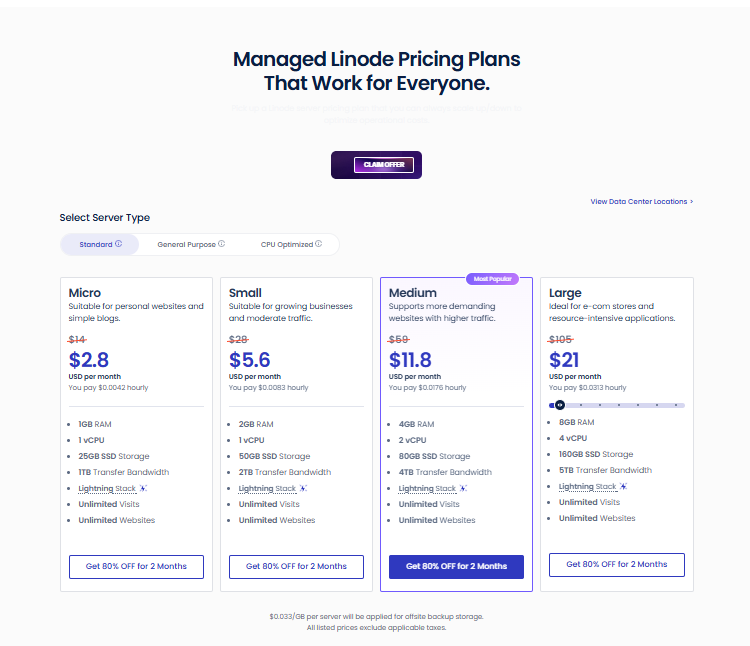
Screenshot: Linode Standard plans on the Cloudways pricing page.
Linode General Purpose
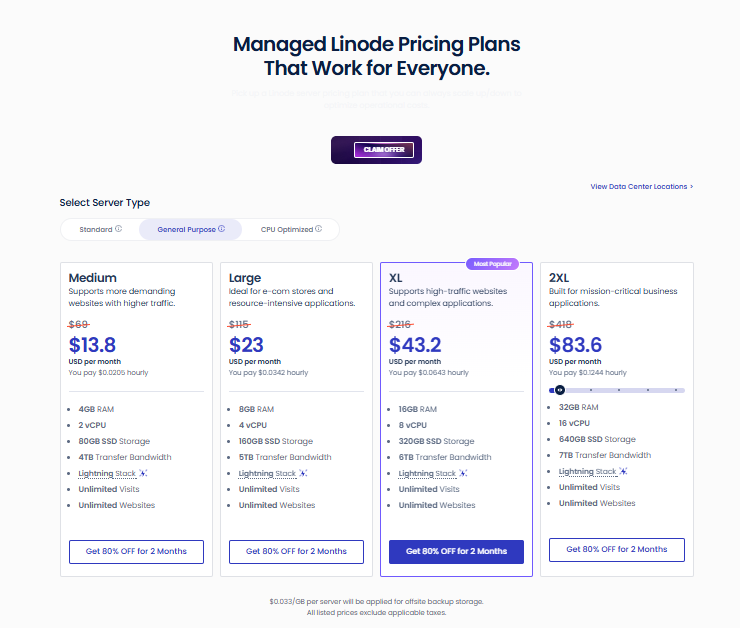
Screenshot: Linode General Purpose plans.
Linode CPU Optimized
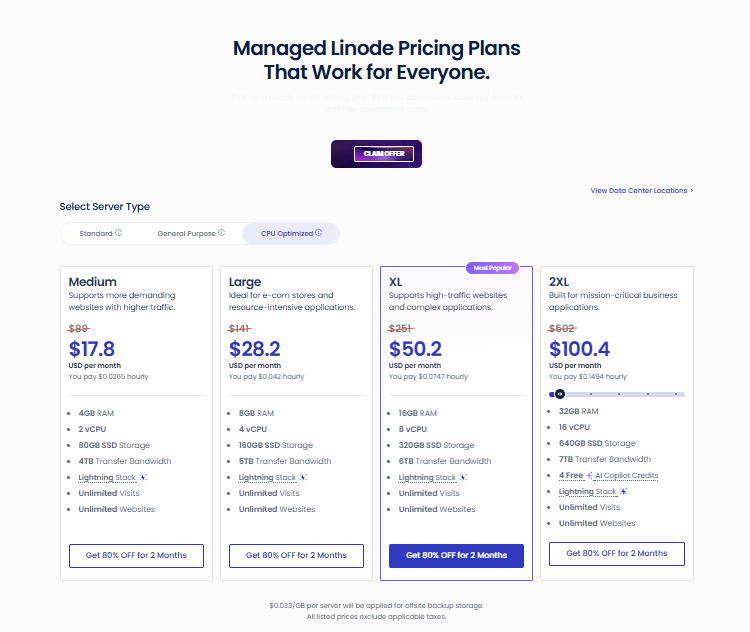
Screenshot: Linode CPU Optimized plans.
What to notice. General Purpose and CPU Optimized list the same RAM, vCPU, storage, and transfer at every size, but they are not the same server. Cloudways’ knowledge base says that CPU Optimized uses dedicated vCPUs and is best suited to compute-heavy workloads, while General Purpose balances CPU and RAM for business sites and stores. In Cloudways’ own uncached test on 16GB servers, CPU Optimized averaged 954 ms per page, compared to 3,554 ms for General Purpose, though Cloudways says the test favors CPU-heavy work. CPU Optimized costs $4 to $84 more a month during the sale and $20 to $84 more at regular prices. Standard Medium and Large list the same RAM and vCPU as General Purpose for $2 less during the sale and $10 less at regular prices, but Cloudways calls General Purpose the upgraded tier.
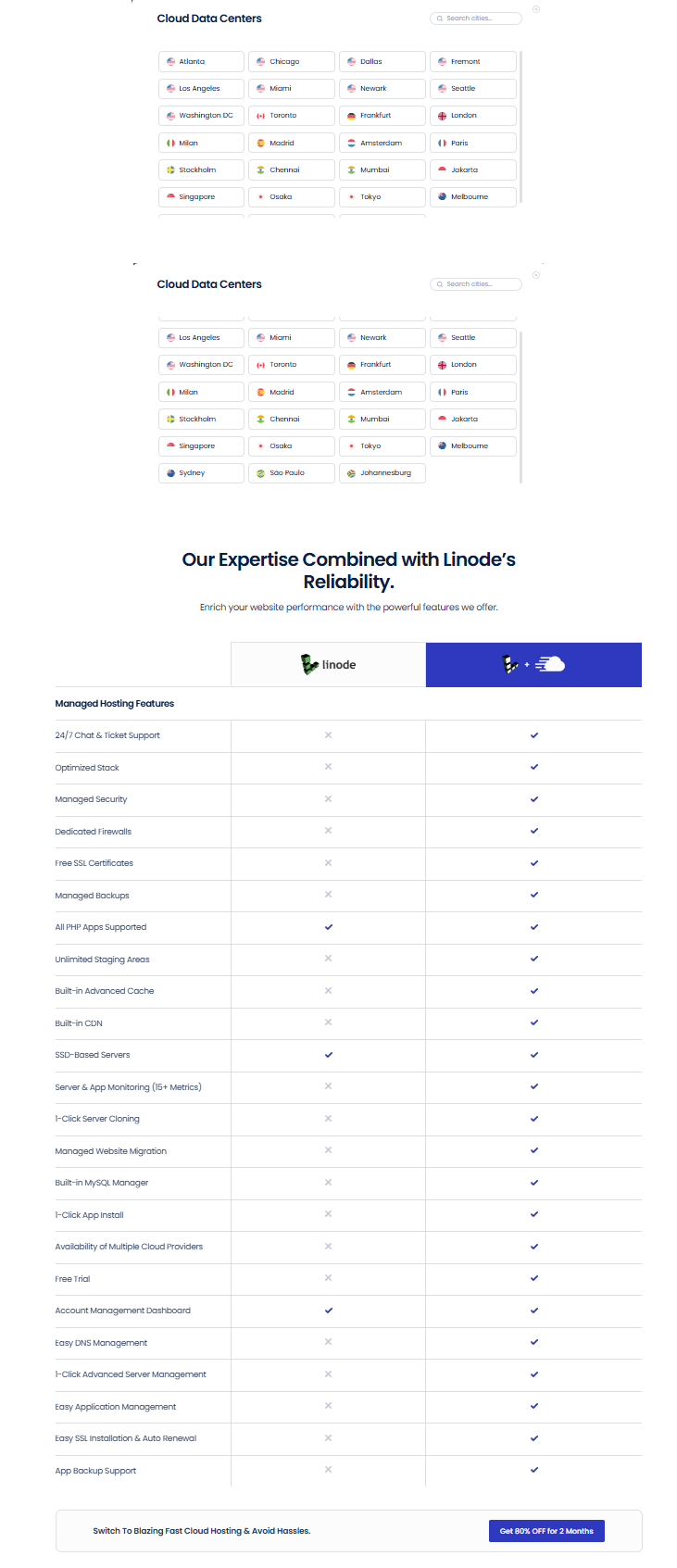
Screenshot: Linode locations in the Cloudways picker, and Cloudways’ own comparison table.
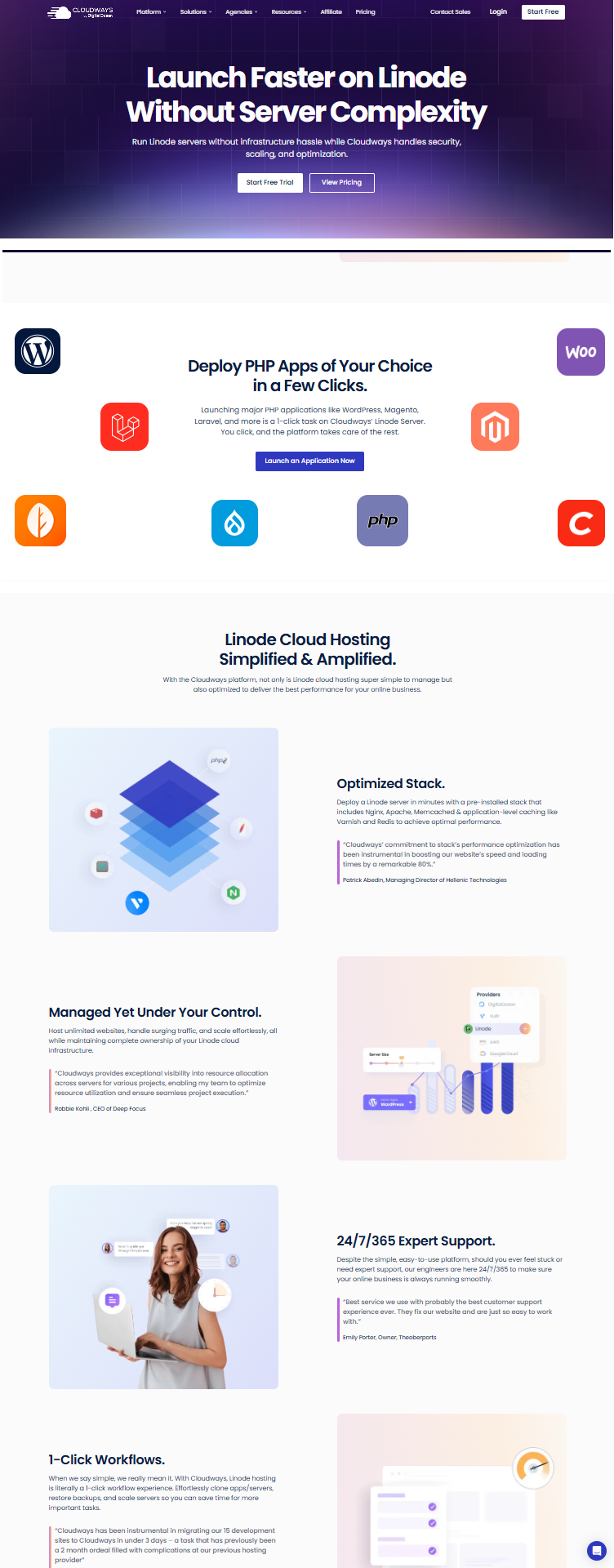
Screenshot: Cloudways’ Linode page.
AWS
AWS is the biggest cloud brand, but it is the pricier route on Cloudways. Every AWS plan includes 20GB of storage and 2GB of transfer. Anything beyond that is billed.
Extra use costs $0.12 per GB of transfer and $0.10 per GB of disk. The disk fee applies to web files and databases separately. Cloudways gives one example: 100GB of extra transfer adds $12 to your monthly invoice.
AWS servers scale by hand. You can raise or lower CPU and RAM, but there is no automatic scaling. If you need that, look at Cloudways Autonomous. There is also no free trial for AWS. You need a paid account to launch a server.
The location picker lists 33 cities. They sit in Asia (11), Europe (8), North America (7), the Middle East (3), Australia (2), Africa (1) and South America (1). Cloudways’ page text says 28 in one place and “more than 30” in another.
AWS Standard
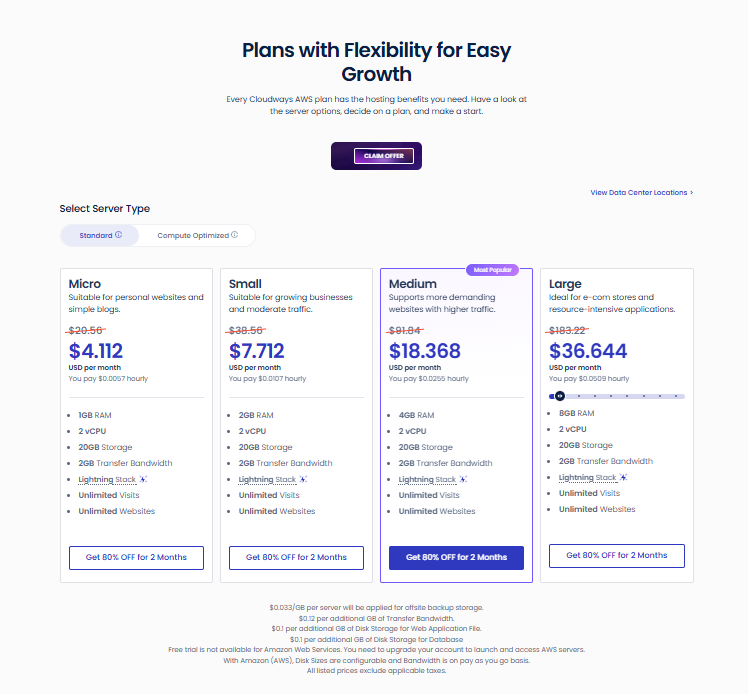
Screenshot: AWS Standard plans, with the extra-fee notes under the cards.
AWS Compute Optimized
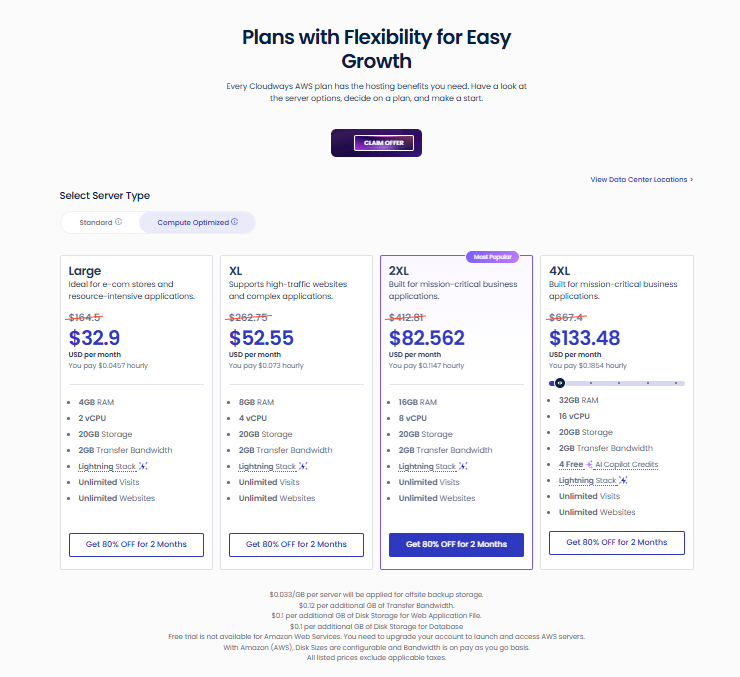
Screenshot: AWS Compute Optimized plans.
What to notice. The 4GB AWS Standard Medium costs $18.37 during the sale. The 4GB plans on DigitalOcean, Vultr, and Linode cost between $9.20 and $11.80 during the sale.
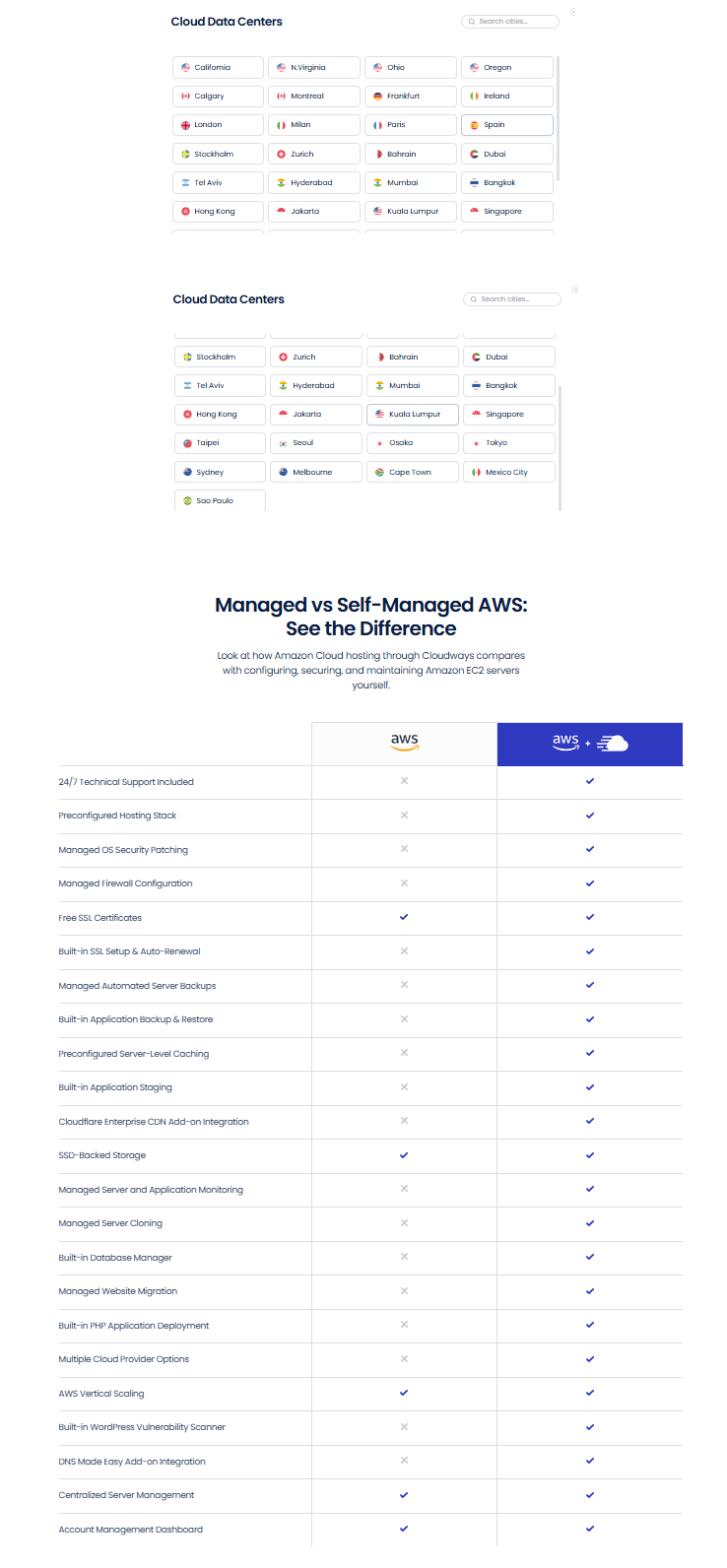
Screenshot: AWS locations in the Cloudways picker, and Cloudways’ own comparison with self-managed AWS.
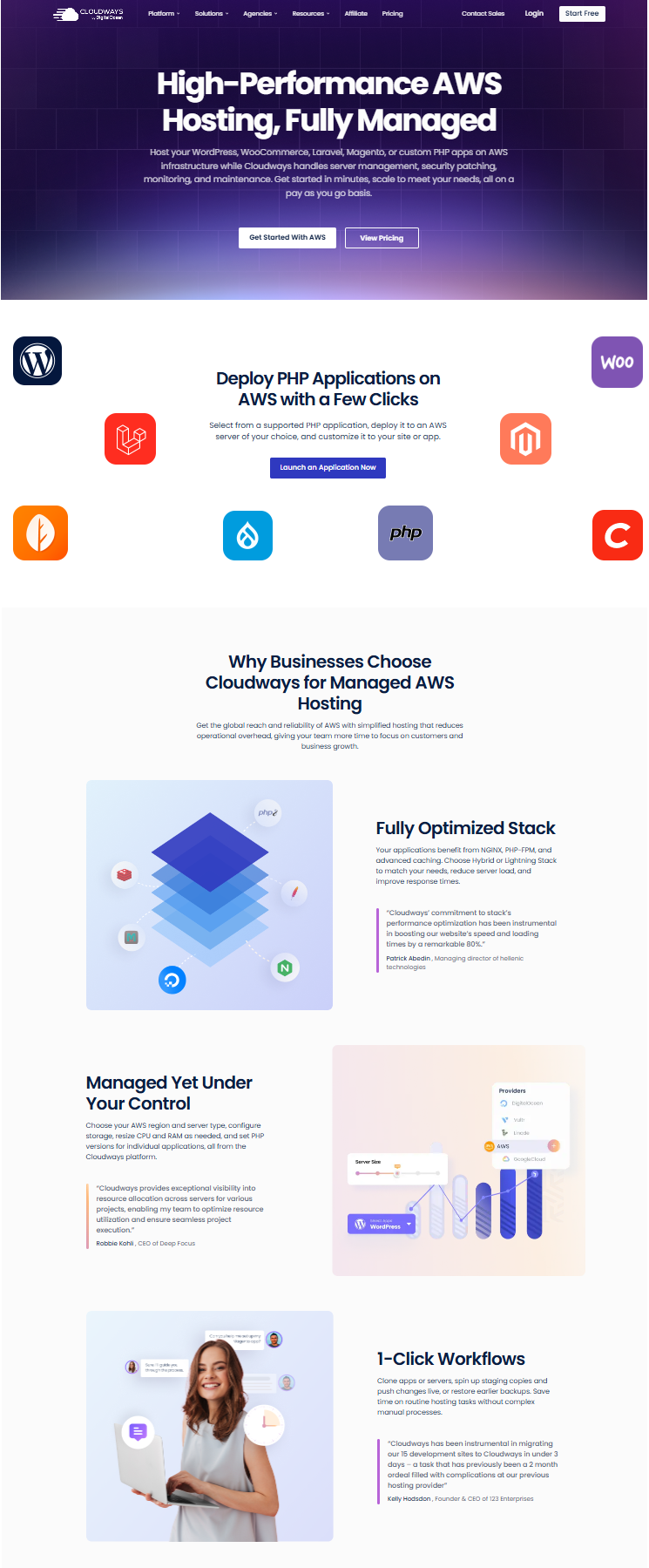
Screenshot: Cloudways’ AWS page.
Google Cloud
Google Cloud runs on Google Compute Engine, often shortened to GCE. It has the most locations of the five. It also has the same catch as AWS: a small allowance and extra fees.
Every Google Cloud plan includes 20GB of storage and 1GB of transfer. Extra transfer costs $0.11 to $0.17 per GB, depending on the region. Extra disk costs $0.17 per GB for web files and for databases. A free trial is not available for Google Compute Engine, so you must upgrade your account to launch one.
The location picker lists 36 cities. They sit in Europe (12), North America (9), Asia (9), South America (2), the Middle East (2), Australia (1) and Africa (1). Cloudways’ page text says 28.
Google Cloud Standard
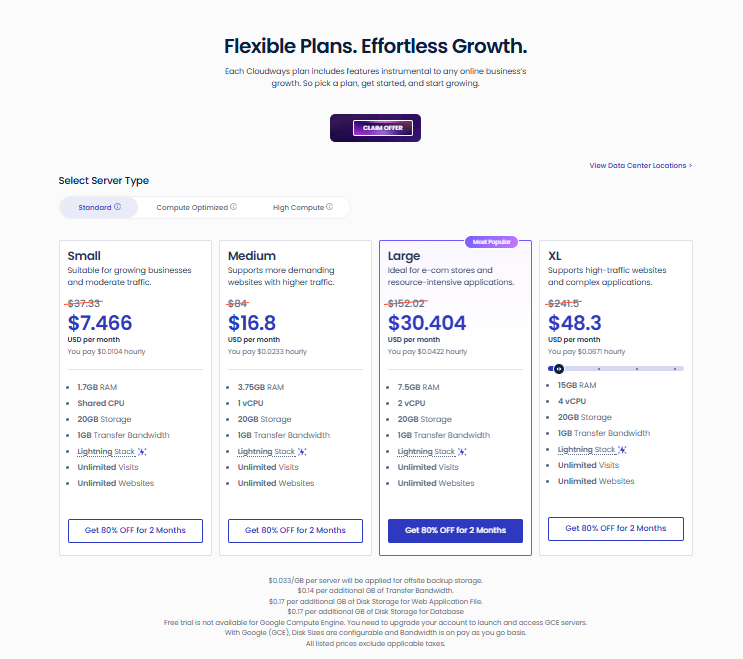
Screenshot: Google Cloud Standard plans, with the extra-fee notes under the cards.
Google Cloud Compute Optimized
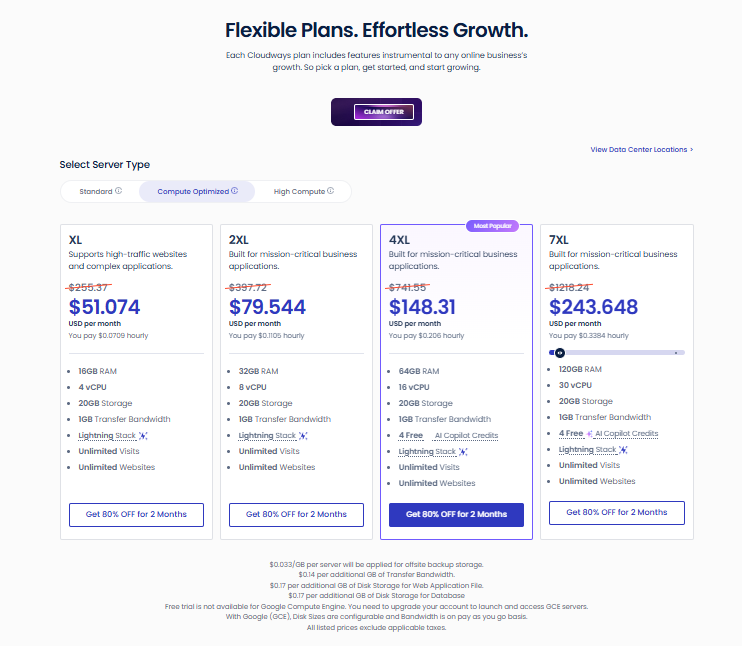
Screenshot: Google Cloud Compute Optimized plans.
Google Cloud High Compute
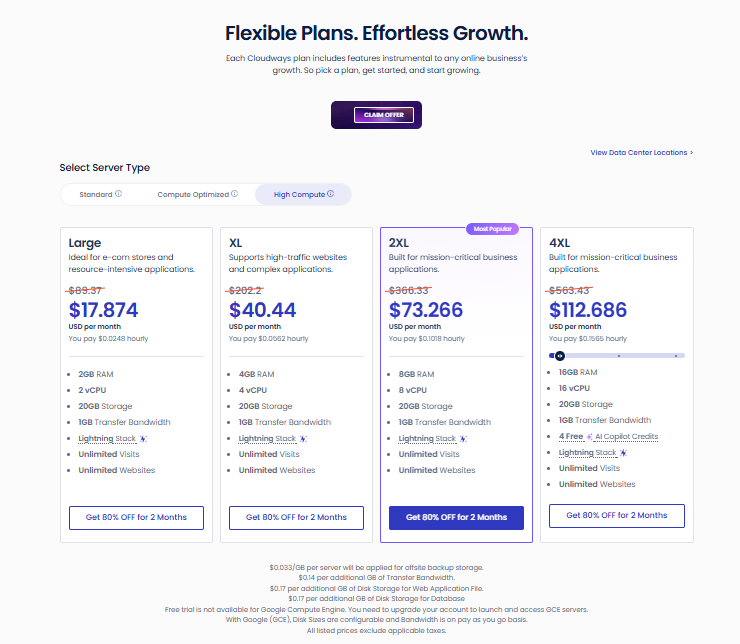
Screenshot: Google Cloud High Compute plans.
What to notice. Standard Small has a shared vCPU, which makes it the lightest option. High Compute gives you as many vCPUs as GB of RAM.
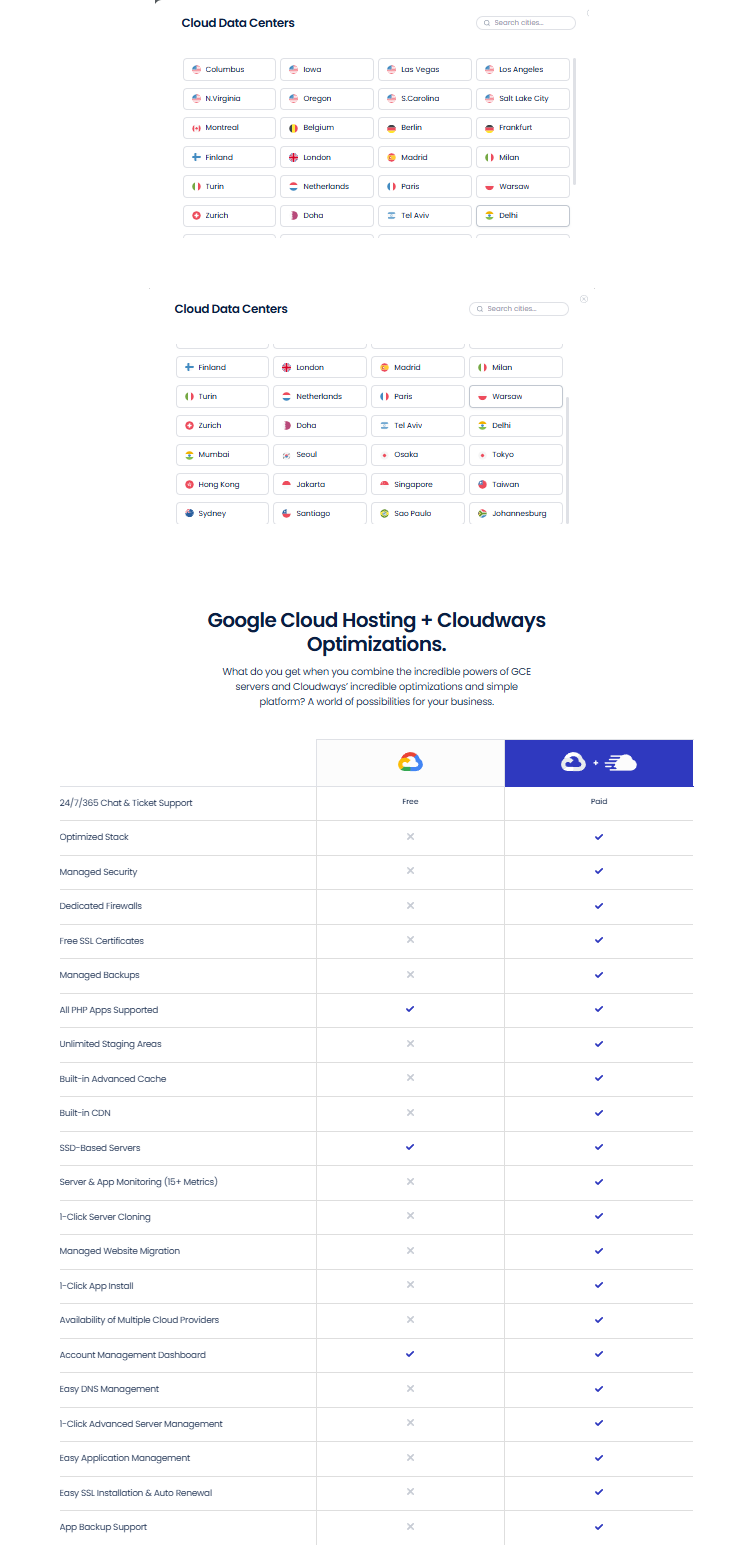
Screenshot: Google Cloud locations in the Cloudways picker, and Cloudways’ own comparison table. In that table, the support row looks swapped, so ignore it.
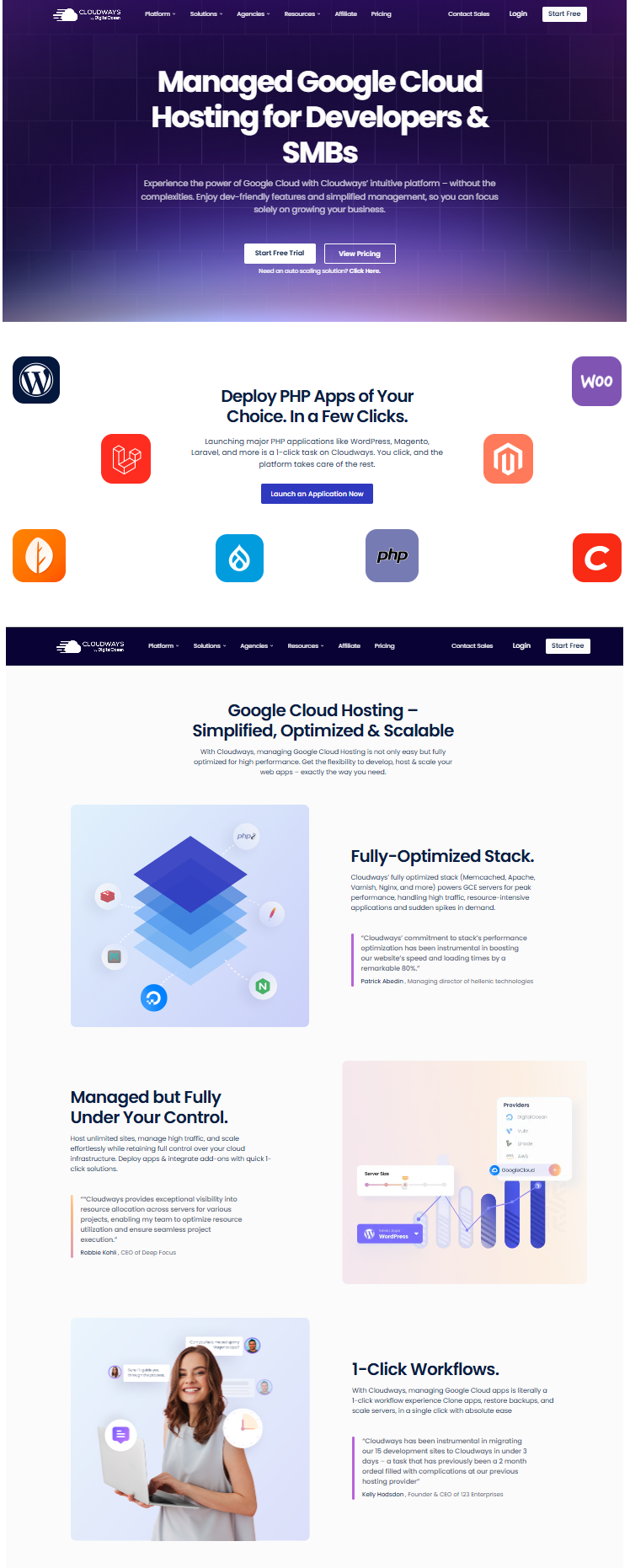
Screenshot: Cloudways’ Google Cloud page.
Provider Comparison at a Glance
DigitalOcean, Vultr and Linode sit close together. The gap at the 4GB size is only $2.60 a month during the sale ($9.20 to $11.80), or $13 at regular prices ($46 to $59). AWS and Google Cloud cost far more for the same RAM.
The fees matter even more than the sticker price. AWS and Google Cloud include a small allowance of storage and traffic, then charge for the rest. Say your site uses 200GB of extra transfer in a month. That adds about $24 on AWS and $22 to $34 on Google Cloud. The other three providers list plans with 1TB to 9TB of transfer built in.
Location count is less important than location choice. Pick the data center closest to your visitors. Cloudways says this lowers delay and gives faster page loads. A provider with 36 cities does not help if none is near your audience.
Which Provider Fits Your Site
These are starting points, not rules. For a blog or small site, begin one size below what you think you need. Online stores need headroom, so start at Large. Resize when actual traffic tells you to.
Cloudways vs Going Direct to the Provider
Each Cloudways provider page has a table that compares Cloudways with the same cloud used on its own. In those tables, Cloudways gets a check mark for managed backups, staging, monitoring, a firewall and 24/7 support. The cloud alone gets far fewer. These tables are Cloudways’ own claims, so read them as marketing.
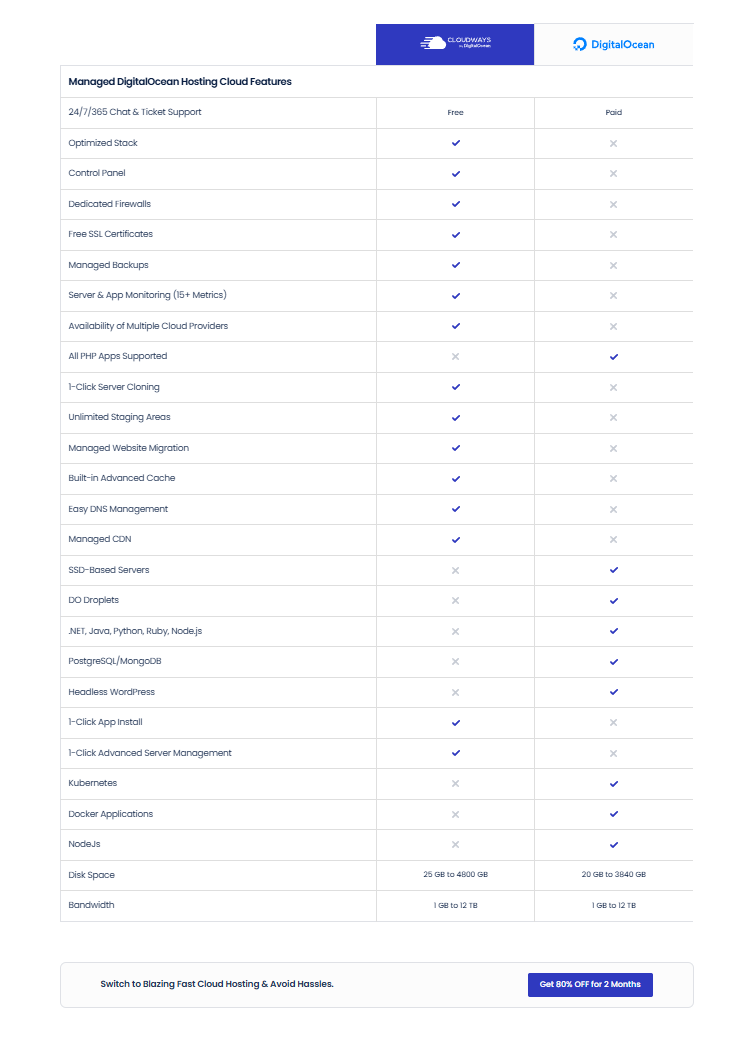
Screenshot: Cloudways’ own comparison of managed and direct DigitalOcean.
The real trade-off is the type of app you run. Flexible is built for PHP apps: WordPress, WooCommerce, Magento, Laravel and custom PHP. Cloudways’ own DigitalOcean table shows that DigitalOcean on its own also runs .NET, Java, Python, Ruby, Node.js, Docker and Kubernetes. Flexible does not. If you build with Node.js, look at Cloudways Velocity instead.
You also cannot bring an existing cloud account. Cloudways creates the servers itself. On AWS and Google Cloud, this is also why you get one Cloudways invoice and no separate cloud bill. If your site already lives on one of these clouds, you move the site to a new Cloudways server. You do not link the old one.
What Every Flexible Plan Includes
Lightning Stack. An NGINX-based setup. You can pick Hybrid instead if your app needs Apache.
Unlimited websites and visits. Your server’s CPU, RAM, and storage set the practical limit.
Security basics. A built-in firewall with IP blocking, free SSL, and a WordPress vulnerability scanner.
Speed tools. Free Redis and free Object Cache Pro on servers with 4GB of RAM or more. Cloudways values them at $95 and $100 a month.
Staging and cloning. Copy a site to test changes, then push them live.
Vertical scaling. Resize CPU and RAM from the dashboard.
Cloudways Copilot. An AI assistant that watches your servers and offers a one-click fix for some problems. Plan cards list 4 free credits, and Cloudways’ support article states that Starter credits are free for accounts with a monthly invoice over $100.
Cloudflare Enterprise CDN is a paid add-on, not part of the base plan.
Migration is free for WordPress and WooCommerce sites. Other PHP apps get one free migration, and during the Black Friday offer, additional PHP app migrations are free too if you request them by December 31, 2026. Outside the offer, each extra app costs $99.
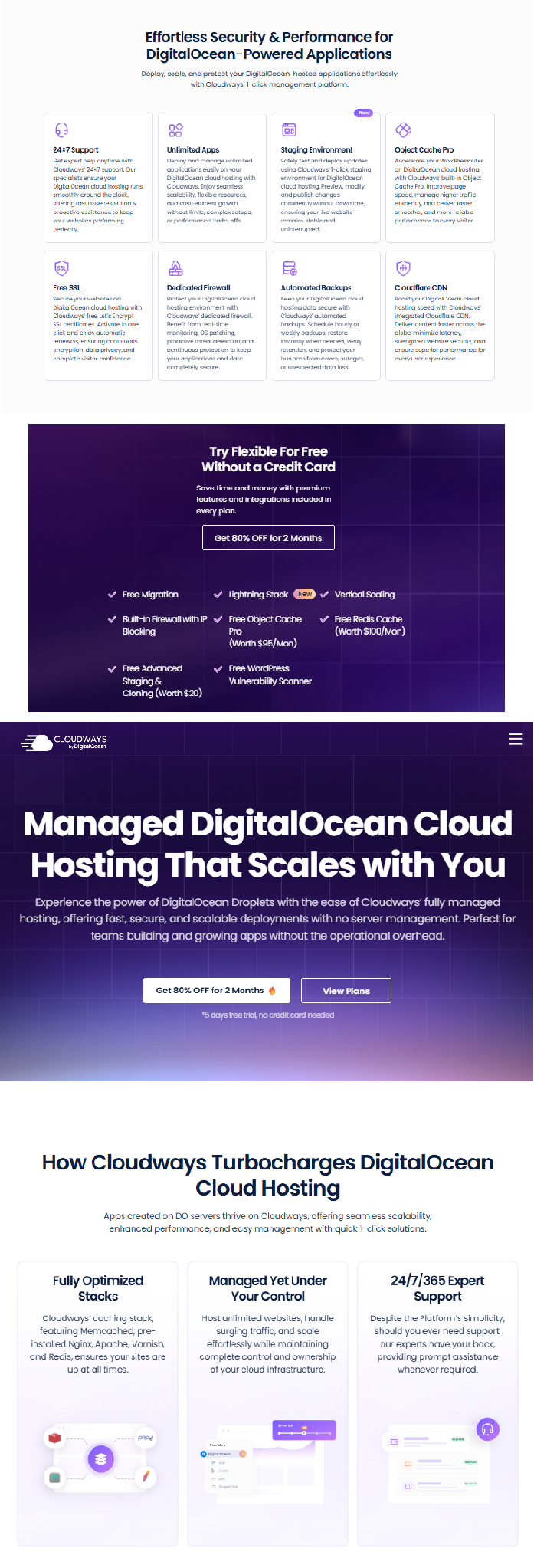
Screenshot: features and free extras listed on Cloudways’ DigitalOcean page.
Cloudways Support Levels
Cloudways claims an average response time of 90 seconds and a 95% customer satisfaction score. Those are its own numbers. Another Cloudways page lists Advanced support at $25 a month, so confirm the price before you add it.
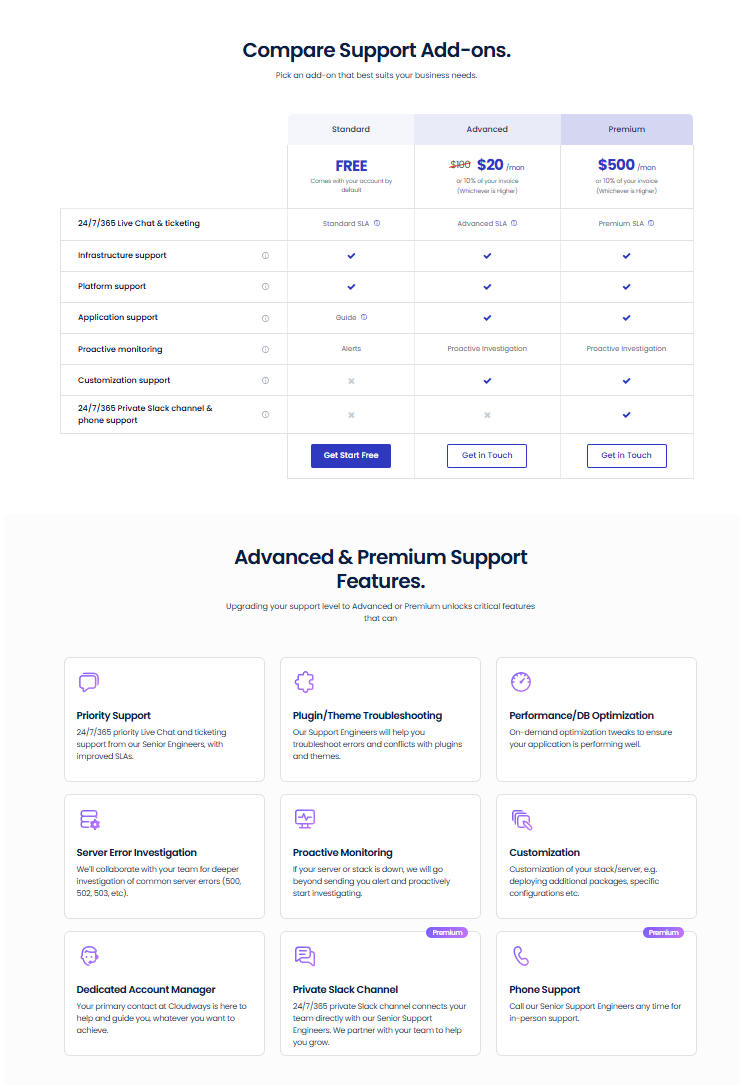
Screenshot: Cloudways support add-on comparison and the Advanced and Premium feature list.
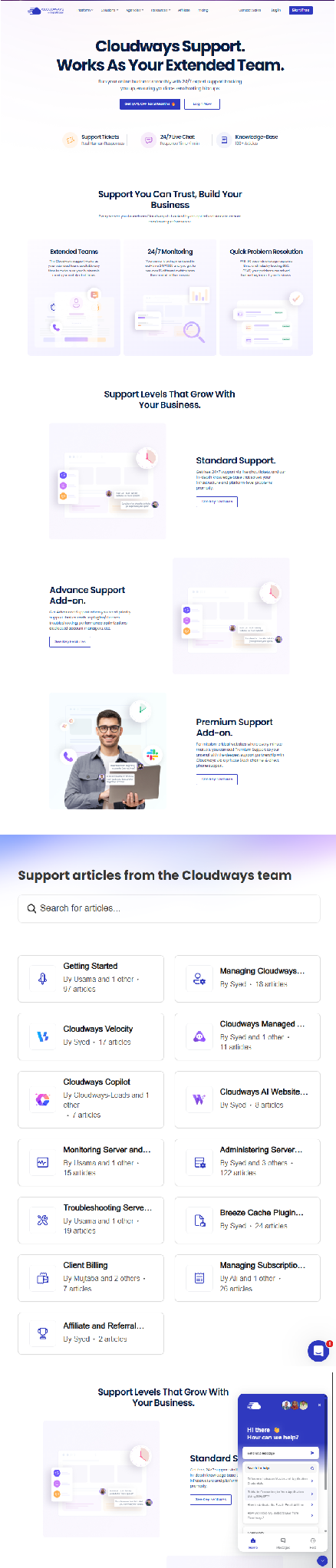
Screenshot: Cloudways support page, help center articles and chat widget.
The Other Cloudways Products
Autonomous is managed hosting for WordPress and WooCommerce. It adjusts its resources automatically as traffic rises and falls. Growth costs $19.80 a month during the sale, Scale costs $39.80 and Plus costs $199 because of the $200 monthly limit. The regular prices are $99, $199 and $399 respectively. Extra disk, bandwidth and autoscaled servers cost more. A 3-day free trial is listed.
Velocity hosts Node.js apps with Git-based deployment and no cold starts. It has seven plans. Starter costs $4 a month during the sale and has 2GB of RAM, 2 vCPUs and room for 5 apps. Business costs $200 a month during the sale because of the $200 monthly limit, and it has 64GB of RAM, 16 vCPUs and room for 150 apps. The regular prices run from $20 to $400.
Managed AI Agents runs OpenClaw or Hermes on a managed server. During the sale, Scout costs $2 a month, Operator $4, Squad $8 and Swarm $16. The regular prices are $9.99, $19.99, $39.99 and $79.99.
Copilot and the AI Website Builder sit in the same AI Suite menu, which Cloudways marks as 80% off. The AI Website Builder is listed as generally available.
[image: Cloudways Autonomous, Velocity and Managed AI Agents pricing]
Screenshot: Cloudways Autonomous, Velocity and Managed AI Agents pricing cards.
The Black Friday Offer
The offer takes 80% off the first 2 months. It covers hosting plans, AI Agents, the AI Website Builder and add-ons. A few details decide whether you get it.
[image: Cloudways Black Friday 2026 banner: 80% off for 2 months]
Screenshot: Cloudways’ Black Friday banner and navigation bar.
Coupon code: BFCM802. Cloudways’ sale buttons already include it.
Who can use it: new accounts. Cloudways’ FAQ tells you to create a new account with the code.
Deadline: the FAQ says December 4. The countdown timer shows December 6. Treat December 4 as the safe date.
The $200 limit: the banner says “up to $200 off per month.” At 80%, that limit is reached on plans with a regular price of $250. On bigger plans, the discount is capped at $200 off per month, so the deal price is the regular price minus $200. The limit applies to your whole invoice, so several servers share it. Check the cart total before you pay.
After 2 months: the regular price starts. On plans with a regular price under $250, that is five times the deal price. A DigitalOcean Premium Medium plan goes from $10.80 to $54.
Black Friday falls on November 27, and Cyber Monday on November 30. Older articles may show 50% off for 3 months. That was the 2025 sale. Trust the live page.
How to Get Started
Open Cloudways through a sale button and create a new account.
Start a new server and pick your app, such as WordPress or Laravel. Cloudways says a launch takes about 5 to 7 minutes.
Choose the cloud provider.
Choose the server type and size.
Choose the data center closest to your visitors.
Check that the cart shows 80% off before you pay.
Move your old site over.
Cloudways advertises a free trial for Flexible with no credit card. Some pages say 3 days and others say 5, so check the signup page. AWS and Google Cloud servers are not part of the trial.
Mistakes to Avoid
Starting too big. You can resize later. A server that is too large costs you every month.
Judging only by the deal price. Look at the regular price in each table before you commit.
Skipping the fine print on AWS and Google Cloud. Extra transfer and disk fees add up fast.
Paying more for CPU Optimized without a reason. Cloudways builds it for compute-heavy work, so most blogs and small stores can start with Standard or General Purpose.
Forgetting backups. Offsite backup storage costs $0.033 per GB on top of your plan.
Choosing a far-away data center. A closer city helps visitors more than a bigger plan does.
Pros and Cons
Pros
Five clouds in one dashboard and one invoice.
Entry plans from $2.20 a month during the sale.
Free 24/7 chat and ticket support.
Resize a server without moving your site.
Unlimited websites on every Flexible plan.
Cons
On plans under $250, the regular price is five times the deal price.
AWS and Google Cloud cost more and bill for extra use.
Flexible is built for PHP apps, not for every language.
You cannot link an existing cloud account.
Some figures, such as the deadline and the trial length, differ between Cloudways pages.
Frequently Asked Questions
How many cloud providers does Cloudways offer?
Five: DigitalOcean, Vultr, Linode, AWS and Google Cloud. You choose one when you launch a Flexible server.
Which cloud provider is best on Cloudways?
For most beginners, DigitalOcean or Vultr. Their entry plans cost the least, and their prices are close. Pick AWS or Google Cloud only if you need that cloud.
What is the cheapest Cloudways hosting plan?
DigitalOcean Standard Micro. It costs $2.20 a month during the sale and $11 at the regular price. It has 1GB of RAM, 1 vCPU and 25GB of SSD storage.
Is DigitalOcean or Vultr better on Cloudways?
They cost about the same. DigitalOcean has a cheaper Standard tier and 10 locations. Vultr has 32 locations and a High Frequency option.
Can I use my own AWS or Google Cloud account?
No. Cloudways creates the servers for you. To move a site from your own account, migrate it to a new Cloudways server.
Can I resize my server later?
Yes. Cloudways supports vertical scaling, so you can raise or lower CPU and RAM. A short interruption can happen, so resize when traffic is low.
Does Cloudways scale automatically?
Not on Flexible. You resize by hand. Cloudways Autonomous scales by itself and is built for WordPress and WooCommerce.
Is there a Cloudways free trial?
Cloudways advertises a free trial for Flexible with no credit card. AWS and Google Cloud servers are not covered, and the trial length is listed as 5 days.
Is migration to Cloudways free?
Yes, for WordPress and WooCommerce sites. Other PHP apps get one free migration, and during the Black Friday offer, extra PHP app migrations are free if you request them by December 31, 2026.
What is the Cloudways Black Friday coupon code?
The code is BFCM802, and it gives 80% off the first 2 months for new accounts. Cloudways’ FAQ says to use it by December 4.
What apps can I run on Cloudways Flexible?
WordPress, WooCommerce, Magento, Laravel, and custom PHP apps. For Node.js, use Cloudways Velocity.
Can I host more than one website on a server?
Yes. Flexible plans include unlimited websites. How many a server can handle depends on its CPU, RAM, storage, and traffic.
Do Cloudways plans bill by the hour?
The pricing pages show an hourly rate under each monthly price, and Cloudways describes its billing as pay as you go.
Final Thoughts
The five-provider choice looks harder than it is. For a first site, pick DigitalOcean or Vultr and start at Micro, Small or Medium. Choose a data center near your visitors. Resize when your traffic grows.
The Black Friday offer makes the first two months cheap. Plan for the regular price after that, and buy by December


Leave a Comment